
DMARC · Email Authentication · Email Security · Email Deliverability
How to Read DMARC Aggregate Reports: Diagnosis Guide
· InboxPlacement.io Team
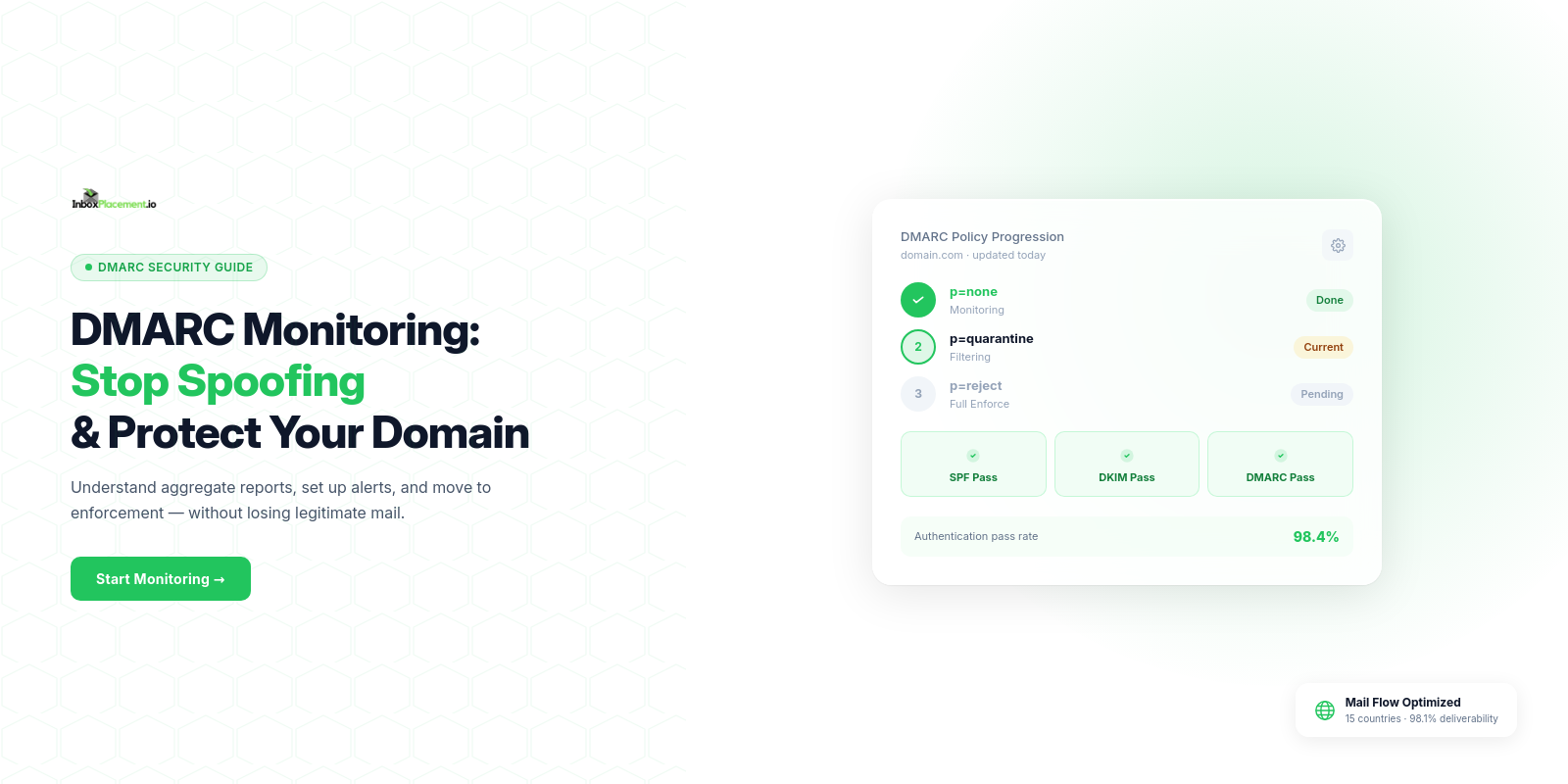
DMARC aggregate reports, also called RUA reports, are one of the best ways to understand which systems send mail for your domain and whether receivers see aligned SPF or DKIM authentication. They are summary evidence, not a complete delivery verdict.
This guide shows how to read the important fields, translate them into likely causes, and follow a safe remediation and retest plan. DNS and aggregate-report analysis can validate authentication signals and sender configuration, but it does not prove inbox placement or final deliverability.
The report structure and terminology in this guide follow RFC 9989. Examples are illustrative unless explicitly labelled as first-party platform evidence.
What DMARC aggregate reports can validate
An aggregate report groups receiver observations by reporting organization, date range, source IP, and authentication outcome. Depending on the receiver and parser, you may see:
- source_ip — the sending IP observed by the receiver.
- count — the number of messages represented by the row.
- policy_evaluated — the receiver’s evaluated disposition plus SPF, DKIM, and any recorded reason.
- identifiers.header_from — the visible From domain that DMARC evaluates.
- auth_results — SPF and DKIM results, including the domain or selector involved.
- policy_published — the DMARC policy and alignment settings published for the domain.
The same sender can appear in multiple rows because receivers may group by IP, result, or policy context. Treat the report as a set of observations to investigate, not as a single score.
Read the report in three passes
1. Start with the source
Group rows by source IP and provider. Compare known sending services such as your ESP, CRM, helpdesk, billing system, website, and transactional email provider with sources you do not recognize.
The source IP identifies where the receiver saw the message originate. It does not, by itself, identify the business or prove that the sender was authorized. Use the IP, envelope-from domain, DKIM signing domain, and provider inventory together.
2. Check the authentication results
Read the SPF and DKIM result for each source. A result of pass means that particular authentication check succeeded. It does not automatically mean that DMARC passed, because DMARC also evaluates alignment with the visible From domain.
3. Check alignment and disposition
Read identifiers.header_from alongside the SPF envelope domain and DKIM d= domain. Then check the evaluated disposition:
- If DKIM passes and its signing domain aligns with the From domain, DMARC can pass even when SPF fails.
- If SPF passes and its authenticated envelope domain aligns with the From domain, DMARC can pass even when DKIM fails.
- If both checks fail or neither passing identifier aligns, DMARC fails.
none,quarantine, andrejectdescribe policy instructions and receiver handling; they are not guarantees that every provider behaves identically.

Conceptual signal flow. The fields and checks are explained in the surrounding text; the illustration is not a live report or a receiver-specific schema.
How to interpret the important fields
source_ip and count
Use source_ip to identify the sending infrastructure represented by the row. Use count to understand volume and prioritize investigation. A high-volume unknown source deserves attention, but a low-volume source can still be a forgotten vendor or an important transactional stream.
policy_evaluated
This object commonly includes:
- disposition — the receiver’s applied or requested treatment.
- dkim — whether DKIM passed for the evaluated message group.
- spf — whether SPF passed for the evaluated message group.
- reason — an optional explanation for an unusual receiver action.
Do not interpret a failed SPF result as an automatic DMARC failure. Forwarding often changes the envelope path and breaks SPF while leaving an aligned DKIM signature intact.
identifiers.header_from
This is the domain a recipient sees in the From header. Compare it with the domain authenticated by SPF and the DKIM d= value. A cryptographically valid DKIM signature can still fail DMARC when its signing domain is not aligned with the visible From domain.
policy_published
This section describes the DMARC record the receiver used, including p=, sp=, rua=, pct=, adkim=, and aspf= when available. Confirm that the record reflects the policy you intended and that the report’s date range is current enough to inform a change.
What authentication results mean in plain English
Read each row as: “From this sending IP, this many messages were observed; SPF and DKIM produced these results; the visible From domain aligned or did not align; the receiver applied or recorded this disposition.”
For example:
- SPF pass, DKIM fail, aligned SPF — DMARC may pass through SPF. Investigate DKIM for redundancy, but do not call the row a DMARC failure without checking the evaluated result.
- SPF fail, DKIM pass, aligned DKIM — DMARC may still pass. Forwarding or an incorrect envelope-from configuration is a likely SPF investigation path.
- SPF pass, DKIM pass, DMARC fail — alignment or policy context may be the issue. Compare the authenticated domains with
header_from. - SPF fail, DKIM fail — DMARC will normally fail. Identify whether the source is legitimate, unauthorized, forwarded, or misconfigured before changing policy.
First-party platform evidence: authentication pass rates
The following InboxPlacement.io platform screenshot is illustrative first-party evidence from an authentication review. It separates SPF authentication, SPF alignment, DKIM authentication, DKIM alignment, and the resulting DMARC pass rate. That separation matters: a strong authentication rate can still leave an alignment gap.
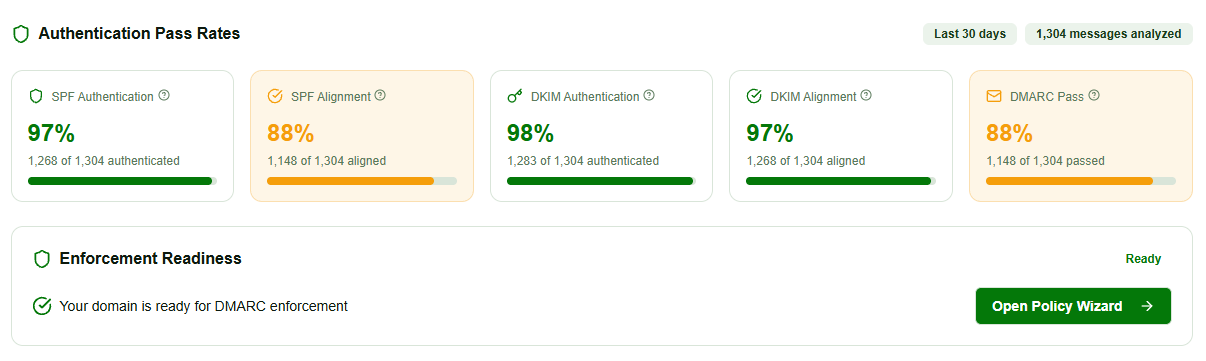
Illustrative InboxPlacement.io platform evidence. The values and message count shown are examples from one platform view, not a promise of performance for another domain or provider.
Common failure patterns
Pattern A — SPF fails after forwarding
Symptom: policy_evaluated.spf = fail appears for messages from multiple recipient-side forwarding paths.
Likely cause: Forwarding changed the envelope path, or a legitimate sending service is missing from the SPF authorization path.
Safe fix: Inventory the sending services, confirm documented SPF includes, and make sure important outbound streams use aligned DKIM so DMARC has a path that survives forwarding.
Retest criteria: Aggregate rows show SPF passing where expected, or aligned DKIM passes with DMARC passing. Verify a real forwarded message separately.
Pattern B — DKIM signature missing or selector mismatch
Symptom: DKIM fails or is absent for one provider or a specific set of source IPs.
Likely cause: A provider changed selectors, stopped signing, or has a missing or expired selector record.
Safe fix: Confirm the provider’s current selector, publish the documented TXT record under selector._domainkey.example.com, and rotate keys carefully rather than deleting the old selector first.
Retest criteria: New messages show a valid DKIM result, the signing domain aligns with the visible From domain, and the aggregate rows show DMARC passing.
Pattern C — Alignment mismatch
Symptom: SPF or DKIM passes, but DMARC still fails.
Likely cause: The authenticated domain differs from the visible From domain, or strict alignment is being applied to a third-party sender that uses a related subdomain.
Safe fix: Correct the provider’s envelope-from or DKIM signing domain. Use relaxed alignment only when the domain relationship is intentional and understood.
Retest criteria: The passing SPF or DKIM identifier aligns with header_from under the selected aspf or adkim mode.
For record-level investigation, use the SPF sender authorization guide and DKIM tester guide. For a broader DNS and domain review, see Domain Forensic Analysis.
Illustrative DNS record examples
These records are examples only. Replace the domains, reporting destinations, selectors, and policy values with settings confirmed for your own sending program.
_dmarc.example.com TXT "v=DMARC1; p=quarantine; rua=mailto:dmarc-reports@example.com; adkim=r; aspf=r;"
selector1._domainkey.example.com TXT "v=DKIM1; k=rsa; p=MIIBIjANBgkq..."
example.com TXT "v=spf1 include:mail.example.net -all"
Never paste a private DKIM key into live DNS. Use the public key supplied by your mail provider and keep private signing material in the provider’s managed system.
A safe remediation workflow
Use a staged process when multiple tools or providers send mail for the same domain:
- Inventory: list every sending IP, provider, envelope-from domain, visible From domain, and DKIM signing domain.
- Monitor: start with a valid
p=nonepolicy while you collect reports and discover forgotten sources. - Group: separate legitimate vendors, unknown sources, forwarding paths, and transient anomalies.
- Fix: correct SPF authorization, DKIM signing, selectors, and alignment one provider at a time.
- Verify: review new aggregate reports and send representative real messages.
- Enforce gradually: move from
nonetoquarantineand thenrejectonly when the evidence supports the change.

A staged workflow reduces the chance that a forgotten vendor or subdomain is disrupted by a policy change.
The DMARC monitoring guide covers the ongoing review loop, while When to Change Your DMARC Policy explains the decision from monitoring to enforcement.
For a product overview related to this reporting workflow, see DMARC Monitoring.
Threat intelligence is a separate investigation signal
Aggregate reports show authentication observations from reporting receivers. Threat-intelligence views can add context about source reputation, geography, and suspicious infrastructure, but they are not a substitute for the report’s authentication and alignment fields.
This illustrative InboxPlacement.io platform view shows how trusted and risky sources may be separated for investigation. Treat those labels as triage signals: confirm ownership and message context before blocking or changing DNS.
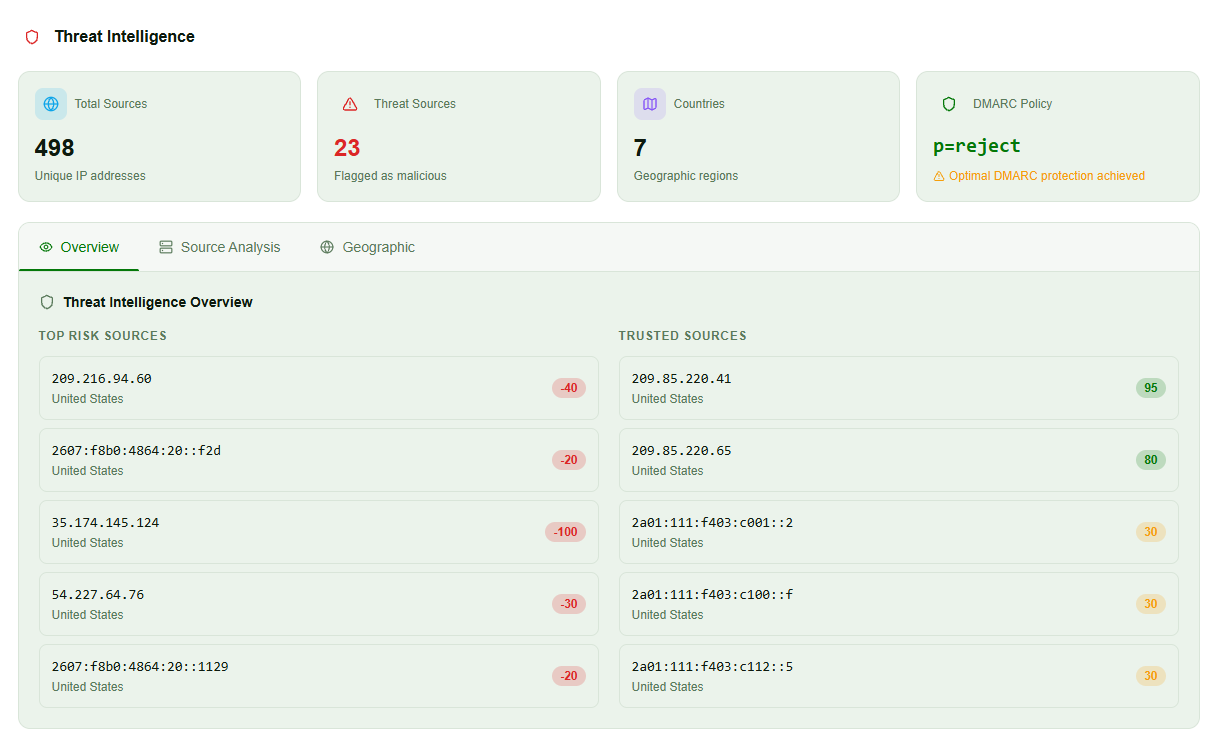
Illustrative InboxPlacement.io platform evidence. Source classifications and policy readiness require domain-specific verification.
Why aggregate reports do not prove inbox placement
DMARC aggregate reports document authentication outcomes and receiver-applied disposition decisions in summary form. They do not contain the full message headers, body, recipient engagement, spam-folder placement, or final inbox location for each message.
Use aggregate reports to answer:
- Which systems are sending for the domain?
- Are SPF and DKIM passing?
- Does a passing identifier align with the visible From domain?
- Which sources need configuration or ownership review?
Use real-message tests to answer:
- What headers did a mailbox provider receive?
- Did the message land in the inbox, spam, or another folder?
- Did forwarding preserve the authentication path?
- How do representative providers handle the actual message?
Verify a real message after the change
After DNS or provider fixes:
- Send representative messages from each legitimate sending stream to mailboxes you control or an InboxPlacement seed.
- Capture full headers and redact personal data before sharing them.
- Inspect
Authentication-Results,Return-Path,Received-SPF, andDKIM-Signature. - Confirm that SPF or DKIM passed and that the passing identifier aligns with the visible From domain.
- Run an inbox-placement test across the providers that matter to your audience.
- Continue reviewing aggregate reports after every new sender, provider, forwarding path, or DNS change.
The email-header troubleshooting guide helps distinguish public DNS configuration from what actually happened on delivery. A valid DMARC record, p=reject, or a high authentication rate does not guarantee inbox placement.
Frequently Asked Questions
Do DMARC aggregate reports show full message headers?
No. Aggregate reports are summaries of counts, source data, policy evaluation, and authentication results. They do not include the full headers or body content of every message.
Can I rely on aggregate reports alone to set p=reject?
No. Use reports to confirm consistent authentication across all legitimate sending sources, then verify representative real messages and inbox placement before tightening policy.
How long should I run p=none before enforcing?
Run p=none until you see stable, repeatable DMARC passes from all legitimate sending sources and have investigated unknown traffic. The right period varies by organization, sending volume, and provider behavior.
What should I do when SPF fails but DKIM passes?
Check whether DKIM is aligned with the visible From domain. If it is, DMARC may still pass. Investigate forwarding and envelope-from configuration, then verify with a real message rather than changing SPF blindly.
Do aggregate reports show whether mail landed in the inbox?
No. They show authentication and receiver policy observations, not final mailbox placement. Send a real message and use an inbox-placement test to measure where it lands.
Run an InboxPlacement test after investigating your aggregate reports to verify authentication results and mailbox placement.
Sources
- RFC 9989: DMARC Aggregate Reports
- RFC 7489: Domain-based Message Authentication, Reporting, and Conformance
- RFC 6376: DomainKeys Identified Mail (DKIM) Signatures
- RFC 7208: Sender Policy Framework (SPF)
- DMARC.org