
DMARC · Email Security · DMARC Policy · Email Authentication · Email Deliverability
When to Change Your DMARC Policy: The Safe Path from p=none to p=reject
· InboxPlacement.io Team
Updated
Introduction
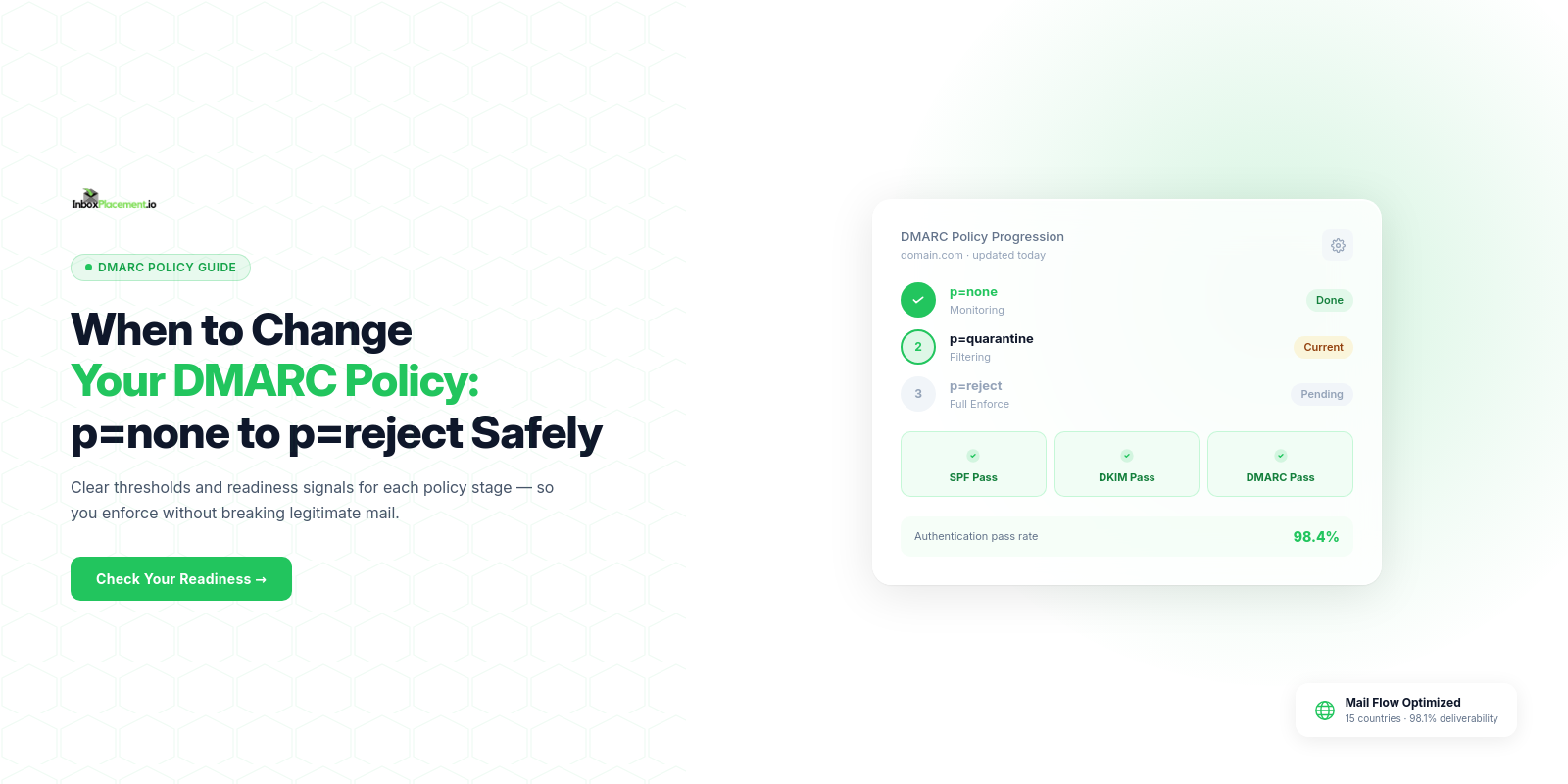
One of the most common and costly DMARC mistakes is changing your policy too fast. Every week, businesses jump straight from p=none to p=reject—and immediately start blocking their own legitimate emails. Marketing campaigns stop delivering. Customer receipts disappear. Support tickets flood in.
The rule is simple but frequently ignored: DMARC policy changes must be earned, not assumed.
This guide explains exactly when to change your DMARC policy at each stage, what metrics signal readiness, and how InboxPlacement.io's Enforcement Readiness feature takes the guesswork out of the decision entirely.
Understanding the Three DMARC Policies
Before diving into timing, it helps to be clear on what each policy actually does when an email fails authentication checks.
| Policy | DNS Value | Action on Failure | Risk Level | Use When |
|---|---|---|---|---|
| Monitor Only | p=none | Email delivered normally | Low | Starting out — collecting data without impacting delivery |
| Quarantine | p=quarantine | Email sent to spam/junk | Medium | You have identified all legitimate senders and fixed auth issues |
| Reject | p=reject | Email blocked entirely | High | You have sustained 95%+ pass rates across all sources for 30+ days |
The critical point: each policy change is permanent for your email delivery until you reverse it. Moving to p=reject when your third-party senders aren't properly authenticated means those emails simply vanish — no bounce, no notification, just silence.
The Hidden Danger of Jumping to p=reject
Here's what actually happens when organizations move to p=reject too early:
Forgotten senders get blocked. Most businesses use more email-sending services than they realize — CRM tools, helpdesk platforms, billing systems, marketing automation, transactional email providers. If any of those aren't properly authenticated with SPF and DKIM, their emails get rejected the moment you set p=reject.
Misalignment kills legitimate mail. Even if a sender IS in your SPF record, DMARC also requires alignment — meaning the domain in the From: header must match the domain used for SPF or DKIM. A misconfigured forwarding rule or a vendor using a shared IP pool can cause silent rejections.
Third-party forwarding breaks. Email forwarding — common in enterprises — often breaks DMARC authentication. If users forward emails from your domain through a personal inbox, those messages can fail DMARC at the final destination.
The real cost is invisible. Unlike bounces, DMARC rejections at p=reject are silent from the sender's side. You won't see error messages. Your email platform reports a "sent" status. But the email never arrived.
✓ This is why the staged approach exists — it protects you while you discover and fix every single source of email from your domain.
The Three-Stage Enforcement Journey
Think of DMARC enforcement like earning trust. Each stage has specific requirements you must meet before advancing.
Stage 1: Monitor Only (p=none) — 2 to 4 Weeks Minimum
v=DMARC1; p=none; fo=1; rua=mailto:dmarcfr@inboxplacementio.me; ruf=mailto:dmarcfr@inboxplacementio.me;
This is where everyone starts. With p=none, receiving servers deliver all emails normally but send you daily aggregate reports showing exactly who is sending email from your domain and whether they pass authentication.
What to do at this stage:
✓ Set up SPF records for every service that sends email from your domain
✓ Enable DKIM signing on all your sending platforms
✓ Configure DMARC reporting addresses to collect aggregate (RUA) and forensic (RUF) reports
✓ Use a DMARC report analyzer to identify all sending sources — authorized and unauthorized
✓ Document every third-party service and verify its authentication status
Do NOT move to p=quarantine until:
- You have collected at least 2–4 weeks of report data
- You have identified every legitimate sending source
- You have fixed authentication issues for all legitimate senders
- Your SPF and DKIM pass rates are consistently above 95%
Stage 2: Quarantine Failed Emails (p=quarantine) — 2 to 4 Weeks
v=DMARC1; p=quarantine; fo=1; rua=mailto:dmarcfr@inboxplacementio.me; ruf=mailto:dmarcfr@inboxplacementio.me;
At p=quarantine, emails that fail DMARC authentication are moved to the recipient's spam or junk folder rather than the inbox. This is your first real enforcement step — you are now actively protecting recipients from spoofed mail, while still allowing you to catch false positives before they become silent rejections.
What to do at this stage:
✓ Monitor your quarantine folder for legitimate emails that were incorrectly filtered
✓ Check DMARC reports daily for any new sources appearing unexpectedly
✓ Fix any remaining SPF/DKIM configuration issues immediately
✓ Ensure all authorized senders maintain consistently high authentication rates
✓ Watch your inbox placement metrics — they should hold steady or improve
Do NOT move to p=reject until:
- You have run
p=quarantinefor at least 2–4 weeks with no false positives - SPF, DKIM, and DMARC pass rates are all above 95% consistently
- No legitimate email sources are failing or partially failing authentication
- You have confirmed alignment is correct across all sending services
Stage 3: Reject Failed Emails (p=reject) — Ongoing
v=DMARC1; p=reject; fo=1; rua=mailto:dmarcfr@inboxplacementio.me; ruf=mailto:dmarcfr@inboxplacementio.me;
p=reject is the gold standard — emails that fail DMARC are blocked entirely at the receiving server. Phishers and spoofers cannot deliver email claiming to be from your domain.
At this stage, monitoring never stops. New email services get added to your stack all the time. A vendor changes their sending infrastructure. A forwarding rule gets created. Ongoing DMARC monitoring ensures you catch new authentication issues before they silently break email delivery.
See the DMARC Monitoring product page for a product overview.
Key Metrics Before Changing Policy
These are the specific thresholds you need to hit before advancing to the next stage:
| Metric | Move to p=quarantine | Move to p=reject |
|---|---|---|
| SPF Authentication Rate | ≥ 95% | ≥ 98% |
| SPF Alignment Rate | ≥ 90% | ≥ 95% |
| DKIM Authentication Rate | ≥ 95% | ≥ 98% |
| DKIM Alignment Rate | ≥ 90% | ≥ 95% |
| DMARC Overall Pass Rate | ≥ 90% | ≥ 95% |
| Monitoring Period | 2–4 weeks at p=none | 2–4 weeks at p=quarantine |
| Unauthorized Sources | All identified | All blocked or zero |
| False Positives at Current Stage | Zero for 14+ days | Zero for 14+ days |
These thresholds are not arbitrary. They account for the natural variance in email routing, forwarding, and third-party sending infrastructure. Even well-configured domains rarely hit 100% across all metrics — and that's fine.
Enforcement Readiness: What "Ready" Actually Means
Manually tracking all these metrics across dozens of daily DMARC reports is impractical. This is exactly why InboxPlacement.io built the Enforcement Readiness indicator directly into the DMARC Report dashboard.
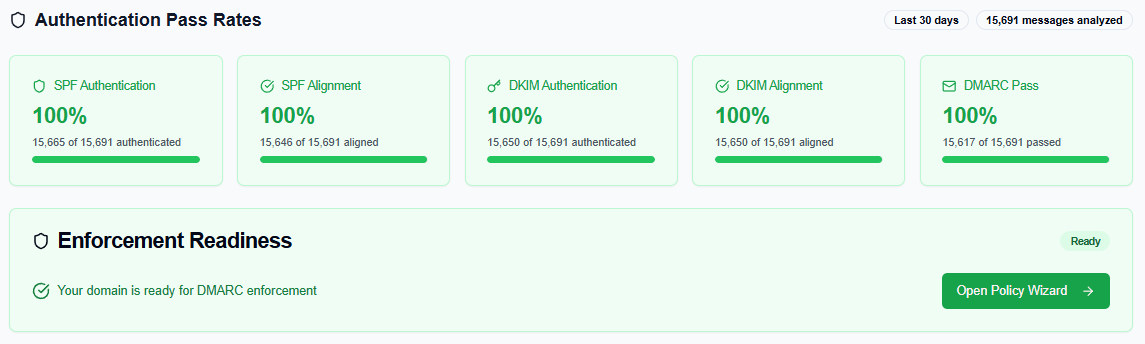
The Enforcement Readiness panel in InboxPlacement.io: When your domain meets all readiness thresholds, the status shows "Ready" and the Policy Wizard becomes available.
The Enforcement Readiness panel analyzes your last 30 days of DMARC report data and evaluates:
- SPF Authentication — Are your sending IPs passing SPF checks?
- SPF Alignment — Does the SPF-authenticated domain align with the From header?
- DKIM Authentication — Are your emails properly signed with DKIM?
- DKIM Alignment — Does the DKIM signing domain align with the From header?
- DMARC Pass Rate — What percentage of your total email volume passes DMARC end-to-end?
When all five signals cross the required thresholds, the panel displays a green "Ready" status — meaning you can safely advance to the next enforcement level without risking legitimate email delivery.
If any metric is below threshold, the panel highlights exactly which check is failing and why, so you know precisely what to fix before moving forward.
The Policy Wizard: Your Step-by-Step Guide
When Enforcement Readiness shows "Ready," clicking the Open Policy Wizard button walks you through the exact DNS record change needed for each stage — with the precise DMARC syntax pre-filled for your domain.
Each step in the wizard includes:
✓ Risk Level — Low, Medium, or High — so you know what you're committing to
✓ Recommended Timeline — How long to stay at each stage (2–4 weeks minimum per step)
✓ Requirements Checklist — Specific conditions that should be met before advancing
✓ Pre-filled DNS Record — The exact DMARC TXT record to publish at _dmarc.yourdomain.com
✓ Recommended Next Step — A clear indication of when and how to progress
The wizard removes the ambiguity from DMARC enforcement. Instead of manually calculating whether your pass rates are high enough, the platform tells you — based on your actual data — when you're ready to move.
Stage-by-Stage Readiness Checklist
Use this checklist before every policy change:
Before Moving from p=none to p=quarantine
✓ Collected at least 2–4 weeks of DMARC aggregate reports
✓ All legitimate email-sending sources identified and documented
✓ SPF records updated to include every authorized sender
✓ DKIM enabled and verified on all sending platforms
✓ SPF and DKIM pass rates both above 95% for the past 14 days
✓ No unauthorized senders present in reports (or actively being blocked)
✓ DMARC alignment confirmed correct across all sources
✓ Enforcement Readiness shows "Ready" status in InboxPlacement.io dashboard
Before Moving from p=quarantine to p=reject
✓ Run p=quarantine for at least 2–4 weeks
✓ Zero legitimate emails found in quarantine folder during monitoring period
✓ All sources maintain 95%+ authentication pass rates
✓ SPF, DKIM, and DMARC alignment all confirmed correct
✓ No new unauthorized sources appearing in DMARC reports
✓ Monitoring alerts configured for any authentication failures
✓ Team is aware of the change and its impact on any misconfigured senders
✓ Enforcement Readiness shows "Ready" status for the next stage
Common Mistakes to Avoid
❌ Skipping p=quarantine — Going directly from p=none to p=reject is the most dangerous shortcut. Quarantine gives you a safety net while you confirm there are zero false positives.
❌ Changing policy before fixing all senders — If any legitimate source still fails authentication, fix it first. A single forgotten integration can cause thousands of missing emails.
❌ Not monitoring after moving to p=reject — DMARC enforcement is not a "set and forget" task. New tools get added. Infrastructure changes. Ongoing monitoring is essential.
❌ Ignoring alignment errors — An IP can pass SPF but still fail DMARC if the domains don't align. Always check alignment rates, not just authentication rates.
❌ Setting pct=100 too early — The pct tag lets you apply your policy to a percentage of failing emails. Starting with pct=10 on quarantine, then gradually increasing to 100, gives you additional safety margin during the transition.
Frequently Asked Questions
Q: How long should I stay at p=none before moving to p=quarantine?
A: A minimum of 2–4 weeks. More importantly, stay at p=none until you have identified every legitimate sending source and fixed all authentication issues. For complex organizations with many third-party tools, this can take 60–90 days.
Q: What happens if I move to p=reject and some emails stop delivering?
A: Immediately downgrade back to p=quarantine by updating your DMARC DNS record. Review your DMARC reports to identify which sources are failing authentication, fix them, then advance again once Enforcement Readiness confirms you're ready.
Q: Do I need 100% pass rates before changing policy?
A: No. A 95–98% pass rate accounts for normal variance in email routing and forwarding. The key is ensuring that the emails below that threshold are not legitimate emails from your own services — only spoofed or unauthorized traffic.
Q: Will changing to p=reject affect email forwarding?
A: Yes, this is one of the most common sources of false positives. Email forwarding (where a recipient's inbox forwards your email to another address) can cause the message to fail DMARC at the final destination. Monitor forensic reports (RUF) carefully during the quarantine stage to detect forwarding-related failures.
Q: Can I use p=quarantine with pct less than 100?
A: Yes, and it's recommended for a cautious approach. Start with pct=10 and monitor for a week, then increase to 25, 50, and finally 100 over the course of a few weeks. This limits the blast radius if any legitimate emails are being incorrectly caught.
Conclusion: Let Your Data Drive the Decision
The question of when to change your DMARC policy should never be answered by a calendar date or a gut feeling. It should be answered by your authentication data.
When your SPF, DKIM, and DMARC pass rates consistently hit the required thresholds — and when your monitoring platform confirms your domain is ready — that's when you advance. Not before.
InboxPlacement.io's Enforcement Readiness feature was built specifically to make this decision data-driven and safe. Instead of guessing whether your 94% DMARC pass rate is "good enough," the platform evaluates all five authentication signals against the exact thresholds required for each transition and tells you clearly: Ready or Not Ready.
Start your DMARC journey the right way.
Get started with InboxPlacement.io DMARC Monitoring →