
Email Headers · Email Authentication · Email Deliverability · SPF · DKIM · DMARC · DNS Diagnostics
How To Read Email Headers For Deliverability: Diagnosis, Common Failure Patterns, and Next Steps
· InboxPlacement.io Team
Short answer: reading email headers for deliverability means using the message's SMTP and authentication headers—such as Received, Return-Path, Authentication-Results, and DKIM-Signature—alongside the DNS records they reference. This helps you diagnose whether SPF, DKIM, and DMARC authentication can succeed. It does not prove that a message reached the inbox.
The useful distinction is between authentication evidence and mailbox behavior. Headers can show what a receiving system observed about one message. DNS queries can show what your domain currently publishes. Neither one, by itself, explains every reputation, engagement, content, or user-level decision that affects inbox placement.
This guide gives you a concise diagnostic path, explains the limits of header-only checks, covers common failure patterns with safe fixes, and shows how to verify a real message after you change DNS or signing settings.
What email headers can validate for deliverability
The goal is to determine whether the DNS records and signatures referenced in a message header are correct and aligned well enough for receiving mail transfer agents to authenticate the message.
With a raw message and access to DNS, you can investigate:
- SPF: Did the receiving system evaluate the sending IP against the SPF record for the envelope-from or Return-Path domain?
- DKIM: Does the signature validate against the public key published for the selector and signing domain?
- DMARC: Did SPF or DKIM pass with alignment to the visible From domain, and what policy did the domain publish?
- Message path: What SMTP hops and sending IPs appear in the Received chain?
- Receiver observations: What did the receiving system report in Authentication-Results, and were ARC headers added during forwarding?
For a deeper selector and signature review, see the DKIM tester guide. For DNS record syntax and sender authorization, use the SPF checker guide.
What header and DNS checks cannot prove
A header or DNS check is a diagnostic, not an inbox-placement guarantee. It cannot prove:
- Whether the message reached a recipient's inbox.
- Whether a mailbox rule, user action, or forwarding destination moved the message later.
- The exact reason a provider classified the message as spam when several signals contributed.
- Whether a future message will perform the same way as the one you inspected.
Sender reputation, recipient engagement, complaint rates, message content, list quality, volume, and provider-specific filtering all affect mailbox placement. An authentication pass removes one class of risk; it does not guarantee a positive delivery decision.
Run the check: collect the right inputs
Start with one complete message that represents the problem. Avoid relying on a screenshot of a simplified header view if the mail client can provide the full raw source.
Inputs you must collect
- Full message headers or the raw MIME message from the received message.
- The sending IP from the outermost Received header you can access.
- The MAIL FROM or Return-Path domain, also called the envelope-from domain.
- The visible From header and its domain.
- Every DKIM-Signature header, including its d= signing domain and s= selector.
- Authentication-Results headers, if the receiver or an intermediate gateway added them.
- DNS access for SPF TXT, DKIM selector TXT, and the DMARC TXT record.
Read the Received chain carefully
Received headers are added as a message travels through SMTP systems. The newest hop is generally at the top, but trust boundaries matter: a sender can write earlier headers before a receiving system adds its own observation. Use the receiving mailbox's trusted boundary and document which hop supplied the IP you are checking.
The chain helps you identify the path and likely sending system. It does not independently prove that the visible From address is authorized. That is why the Received chain must be read together with Return-Path, DKIM-Signature, Authentication-Results, and DNS.
Read Return-Path and From together
The Return-Path identifies the envelope-from address used for the SMTP transaction. The visible From address is what the recipient sees. They can be different, especially when a sending platform uses a bounce or tracking domain.
That difference is important for DMARC alignment. SPF is evaluated against the envelope-from domain, while DMARC compares the authenticated domain with the visible From domain. A message can have SPF pass and still fail DMARC if the domains do not align.
Expected authentication signals
Look for these signals in Authentication-Results or in the result of a controlled analysis:
- SPF: spf=pass, spf=fail, spf=softfail, spf=neutral, or an error result. Confirm which domain and IP were evaluated.
- DKIM: dkim=pass, dkim=fail, dkim=neutral, dkim=temperror, or dkim=permerror. Compare the d= domain and s= selector with DNS.
- DMARC: dmarc=pass or dmarc=fail, along with the visible From domain and the policy retrieved from _dmarc.
- ARC: ARC-Authentication-Results, ARC-Seal, and ARC-Message-Signature may preserve authentication context through forwarding, but ARC does not automatically make an original DMARC failure disappear.
For the protocol references, see RFC 7208 for SPF, RFC 6376 for DKIM, RFC 9989 for DMARC, and RFC 5321 for SMTP.
How to interpret the result in plain English
SPF pass, DKIM pass, and DMARC pass
Your DNS and signing configuration allowed the receiving system to authenticate this message, and at least one authenticated identifier aligned with the visible From domain. This reduces one category of delivery risk. It still does not guarantee inbox placement.
SPF fail, DKIM pass, and DMARC pass
SPF failed, but DKIM passed and aligned with the visible From domain, so DMARC can still pass. A likely cause is that the sending IP was not included in SPF, or the message crossed a forwarding path. If the IP is legitimate, update SPF carefully or preserve the envelope sender through the sending path.
DKIM permerror or invalid signature
The selector may point to a missing or malformed public key, the signing system may be using the wrong private key, or a system may have changed signed content after signing. Inspect the selector TXT record and the signing configuration, then send a new controlled message.
DMARC fail
Neither SPF nor DKIM passed with alignment to the visible From domain. Align the envelope-from domain or DKIM d= domain with From, using a deliberate subdomain strategy when appropriate. A DMARC record checker can help review the published policy, but a syntactically valid record is not proof that every sender is aligned.
The diagram below summarizes the boundary between what a header-and-DNS review can establish and what requires real-message placement testing.
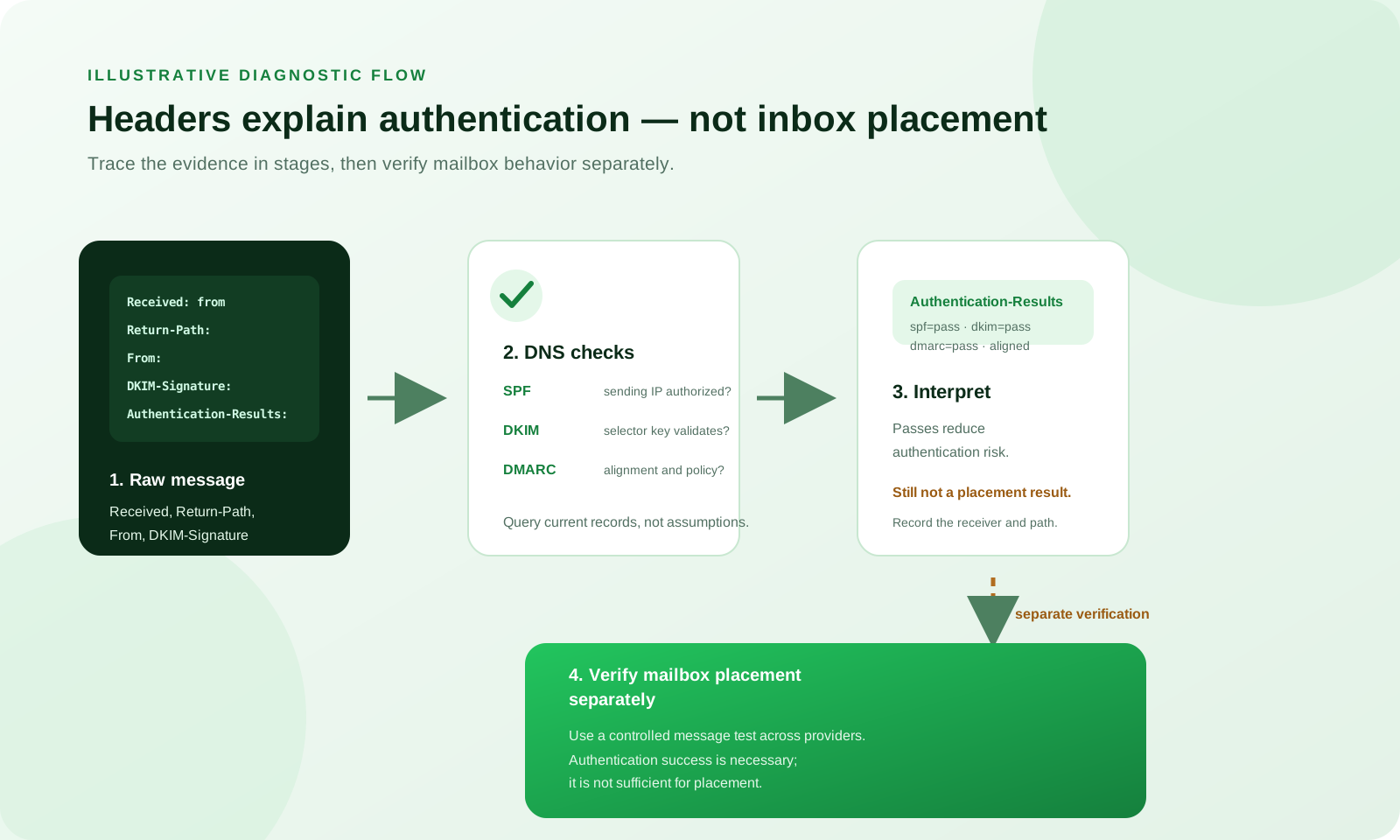
Illustrative diagnostic flow. It uses example domains and does not represent a customer message, a typical score, or a guarantee of inbox placement.
Common failure patterns and safe fixes
Each example below is illustrative. Treat the symptom as a starting point, confirm it against the actual message and DNS, make one meaningful change, and retest.
1. SPF fails because the sending IP is not authorized
Symptom: Authentication-Results shows spf=fail, and the connecting IP is not covered by the SPF record for the envelope-from domain.
Likely cause: A new provider or IP pool was added without updating DNS, or the sender moved to a third-party platform and kept an old SPF record.
Safe fix: Add the provider's documented include or authorized IP to the SPF record while staying within DNS lookup limits. Publish the change and wait for normal propagation.
Retest: Query the domain's TXT records, confirm the intended authorization is present, resend through the same provider, and check for spf=pass.
An illustrative record might look like this: v=spf1 include:spf.partner.example -all. Do not copy an example include into production without confirming the provider's actual hostname.
2. DKIM is invalid or missing
Symptom: dkim=fail, dkim=permerror, or no DKIM-Signature header appears.
Likely cause: The selector points to a missing or incorrect public key, the signing service is not enabled for the domain, or a gateway or mailing list altered signed content.
Safe fix: Check selector._domainkey.example.com, compare the published public key with the signing service, and make sure the final outbound hop signs the message. If an intermediary rewrites content, investigate ARC or a signing design that survives the final hop.
Retest: Confirm the selector TXT record exists, send through the same path, and inspect the new Authentication-Results header for dkim=pass.
3. DMARC fails because identifiers do not align
Symptom: dmarc=fail appears, or a receiving system applies the published quarantine or reject policy.
Likely cause: The From domain differs from the domain that passed SPF or DKIM, and the published alignment mode does not permit that relationship.
Safe fix: Configure DKIM to sign with an aligned d= domain, or make the envelope-from domain align with From. Use p=none only as a deliberate monitoring stage while you fix known senders; do not use a weaker policy to hide unresolved alignment failures.
Retest: Send a controlled message from each legitimate provider and confirm that DMARC passes for the visible From domain.
4. Forwarding or mailing lists break authentication
Symptom: SPF fails after forwarding, and DKIM also fails because a list or gateway rewrote signed headers or body content.
Likely cause: A forwarder uses its own SMTP IP, while a mailing list changes content that was signed earlier.
Safe fix: Work with the list operator, use ARC where supported, or sign at the final outbound hop. Do not add every forwarder's IP to your SPF record as a substitute for understanding the forwarding path.
Retest: Send through the same forwarding route and record which authentication and ARC results survive at the destination.
5. Multiple providers use different signing domains
Symptom: One provider's DKIM passes for its own d= domain, but DMARC fails for the visible From domain.
Likely cause: The provider signs with a domain that is not aligned to From, or the domain strategy was not applied consistently across providers.
Safe fix: Configure each provider with the intended aligned signing domain and publish the required selectors. Keep an inventory of providers, selectors, envelope-from domains, and visible From domains.
Retest: Send from each provider and confirm that the correct d= value and aligned DMARC result appear in the receiving mailbox.
A safe remediation workflow
When several sending tools are involved, use a staged workflow:
- Gather evidence. Save a redacted raw message and record the provider, sending date, visible From, Return-Path, selector, and trusted receiving hop.
- Build a DNS checklist. Confirm SPF coverage for every legitimate provider, DKIM selectors for every signing service, and the DMARC policy at _dmarc.example.com.
- Isolate the signing hop. Identify whether your MTA, gateway, or ESP signs the message. Choose the authoritative signer and confirm its d= domain is aligned.
- Apply one safe change. Add a missing authorization, publish a selector, or correct the signing configuration. Avoid changing SPF, DKIM, and DMARC all at once.
- Test controlled messages. Send to multiple mailbox providers and capture the complete headers from each result.
- Compare results. Record symptom, likely cause, fix applied, and retest result. Note which observations came from a receiver rather than from your own DNS query.
- Enforce DMARC gradually. Start with p=none while monitoring legitimate senders, then move to quarantine or reject only after sustained evidence.
- Document and repeat. Keep a change log and test again after the relevant DNS TTL expires.
The domain forensic analysis guide can help organize a broader DNS review, while the inbox placement testing guide explains why authentication checks should be paired with provider-level placement evidence.
Authentication is necessary, but not the same as inbox placement
SPF, DKIM, and DMARC are important signals that help mailbox providers evaluate sender identity and policy. Authentication success reduces one dimension of filtering risk. It does not tell you whether the message will appear in Inbox, Promotions, a focused folder, spam, or nowhere visible to the recipient.
Mailbox placement also reflects:
- Sender and domain reputation.
- Recipient engagement and complaint rates.
- Message content, links, and HTML quality.
- List hygiene and sending volume.
- Provider-specific filtering, user rules, and historical signals.
Use a header review to diagnose authentication. Use a real-message inbox placement test to observe provider-level placement for a controlled message. Keep those conclusions separate.
Verify a real message after the change
DNS-only checks can tell you what is published. A real message tells you what a receiving system observed on one delivery path.
Capture the raw message
- In Gmail, open the message menu, choose Show original, and copy the full headers and body.
- In other clients, choose View raw message, View source, or the equivalent message-source option.
- Redact addresses, message IDs, personal names, tracking tokens, and other user-identifying data before sharing logs.
Compare the evidence
Look for:
- The outermost trusted Received line and its connecting IP.
- Return-Path and envelope-from domain.
- Authentication-Results from the receiving MTA.
- DKIM-Signature d= and s= tags.
- ARC-Authentication-Results or ARC-Seal when forwarding is involved.
- The visible From domain and the DMARC alignment result.
Compare the observed Authentication-Results with the DNS checks you predicted. If they differ, investigate the exact sending route, resolver view, signing hop, or receiver boundary before changing records again.
Do not publish a customer's raw headers or imply that an illustrative result is typical. Use a redacted controlled message when you need evidence for a team or a post-change review.
Frequently Asked Questions
Can a DNS or header check prove that a message reached the inbox?
No. DNS and headers validate authentication signals and receiver observations for a message. They cannot prove final mailbox placement, which requires a controlled placement test or direct mailbox observation.
How long should I wait after changing a DNS record?
Wait at least one TTL cycle for the record you changed. Allow 24–48 hours when practical because cached answers, multiple resolvers, and provider configuration can make the visible result change gradually.
What if a mailing list or forwarder breaks DKIM?
Work with the list operator to preserve signing or use ARC where supported. You may also need to sign at the final outbound hop. Do not assume that adding a forwarder's IP to SPF will solve a DKIM or alignment failure.
Should I switch DMARC to reject when the checks pass?
Move gradually. Start with p=none while monitoring all legitimate senders, then use quarantine or reject after authentication and delivery are stable across controlled and real traffic.
What to do next
Capture one redacted raw message that illustrates the issue, query SPF, the DKIM selector, and DMARC, and compare those results with Authentication-Results. Then run an InboxPlacement test to observe authentication alongside provider-level mailbox placement.
Ready to test a real message? Run an InboxPlacement test after reviewing the headers so you can separate authentication fixes from placement evidence.