
SPF · Email Authentication · Email Deliverability · DNS Records
SPF Checker: Validate Your Sender Authorization and Fix Common Errors
· InboxPlacement.io Team
Updated
An SPF checker validates the DNS record that authorizes senders for your domain. It can find a missing v=spf1 record, malformed IP range, unauthorized sender, overly broad qualifier, or DNS lookup problem that could cause SPF evaluation to fail.
For example, if you send email from inboxplacement.io, the checker reads the TXT record published at inboxplacement.io. It does not, by itself, prove that a real message will reach the inbox. That requires a test send, message-header inspection, and mailbox placement testing.
This guide explains what an SPF checker can validate, how to read each mechanism, how to fix common SPF errors safely, and how SPF contributes to DMARC alignment.
What Does an SPF Checker Validate?
SPF is a DNS-based authorization system for the envelope sender, also called the MAIL FROM or return-path. A receiving server uses the connecting IP address and the sender's SPF record to decide whether that IP is authorized.
What an SPF checker can check
- Confirm that an SPF TXT record exists for
inboxplacement.io. - Confirm that the record begins with
v=spf1. - Parse mechanisms such as
ip4,ip6,a,mx,include,exists, andredirect. - Validate IP addresses, CIDR ranges, qualifiers, and common syntax rules.
- Expand
includeandredirectchains to identify DNS lookup usage. - Flag likely lookup-limit problems, duplicate SPF records, and risky allow-all settings.
- Show which declared senders are authorized and which parts of the record need attention.
What an SPF checker cannot prove
- That every real sending service is covered if your sender inventory is incomplete.
- That a message will pass SPF when its actual MAIL FROM or connecting IP differs from the record you checked.
- That SPF will align with the visible
From:domain for DMARC. - That a receiver will accept the message or place it in the inbox.
- That forwarding will preserve SPF authentication.
- That a third-party provider's recommended include will remain unchanged forever.
A clean DNS result means the published record is valid to inspect. It is not a delivery guarantee.
How to Check the SPF Record for inboxplacement.io
Before changing DNS, make a list of every system that sends mail using inboxplacement.io:
- Your corporate mail server
- Marketing and newsletter platforms
- CRM and customer-support systems
- Transactional email providers
- Website forms and application notifications
- Services that send on your behalf with a custom return path
Then run an SPF check:
- Enter
inboxplacement.iointo an SPF checker. - Confirm there is exactly one SPF TXT record and that it starts with
v=spf1. - Compare every
include, IP address,a, andmxmechanism with your sender inventory. - Review the number of DNS lookups required by the full include chain.
- Fix syntax and coverage issues before changing the final qualifier.
- Send a real test message after DNS changes and inspect its authentication headers.
You can also make a basic DNS lookup from a terminal:
dig TXT inboxplacement.io
The supplied InboxPlacement.io checker screenshot shows a sample SPF result with Google, Microsoft, and Mailgun includes. It reports that the record starts correctly, uses 3 of 10 available DNS lookups, and flags the hard -all qualifier and lack of direct IP addresses for review.
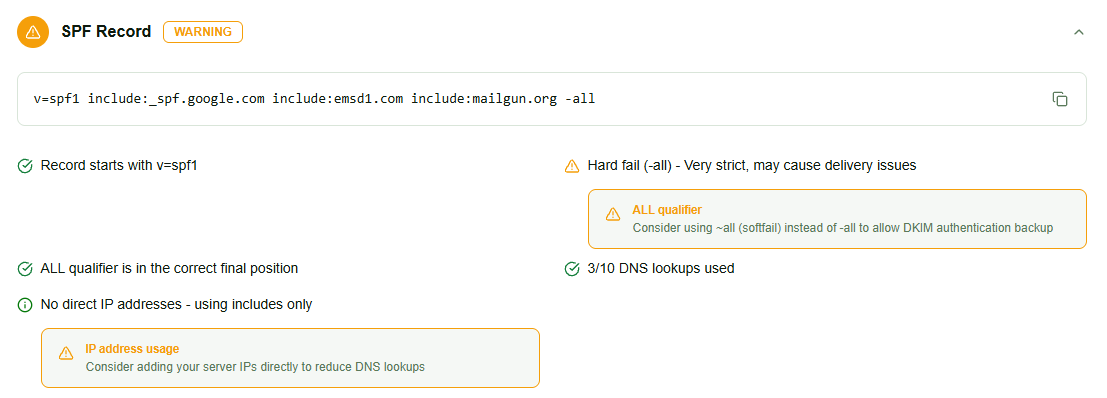
Example SPF checker result. The record and warnings illustrate how to prioritize review; they are not a claim about the current SPF configuration of every InboxPlacement.io environment.
How to Read an SPF Record
An SPF record is a single TXT record made up of a version marker, mechanisms, modifiers, and a final qualifier. The following examples use inboxplacement.io as the domain being configured; provider hostnames are illustrative.
v=spf1: the SPF version
Every SPF record must begin with v=spf1. A record without this marker is not an SPF record and will not authorize mail.
ip4 and ip6: authorize specific addresses
These mechanisms authorize a known IPv4 or IPv6 address:
v=spf1 ip4:198.51.100.12 ip6:2001:db8::12 -all
The addresses above are documentation ranges used for illustration. Replace them with the real sending addresses for inboxplacement.io only after confirming that those addresses belong to a system you control.
include: authorize a provider's SPF record
An include delegates authorization to another domain:
v=spf1 include:mail.vendor.example -all
This means that a sender is authorized when it matches the SPF record published by mail.vendor.example. An include also consumes DNS lookup budget, including lookups required by nested includes.
Use the exact include recommended by your provider. Do not copy a provider's include into inboxplacement.io until that provider actually sends mail for you.
a and mx: authorize addresses from DNS
aauthorizes IP addresses returned by the domain's A or AAAA records.mxauthorizes IP addresses returned by the domain's MX records.
These mechanisms can be convenient, but they may authorize more infrastructure than intended and can consume DNS lookups. Prefer the narrowest mechanism that accurately represents your senders.
redirect=: use another domain's SPF policy
A redirect tells SPF evaluation to use another domain's SPF record when no mechanism in the current record matches:
v=spf1 redirect=spf.inboxplacement.io
Use this only when you intentionally manage the redirected record and understand how its changes affect inboxplacement.io.
Qualifiers and the final all mechanism
Qualifiers describe what happens when a mechanism matches:
| Qualifier | Result | Typical meaning |
|---|---|---|
+ | Pass | Explicitly authorize the sender |
- | Fail | The sender is not authorized |
~ | SoftFail | The sender is probably unauthorized, but receivers may accept it |
? | Neutral | The record makes no statement |
The final mechanism is commonly -all or ~all:
-allsays that senders not matched earlier should fail SPF.~allsays that unmatched senders should soft-fail.+allauthorizes every sender and removes most of SPF's protection.
The screenshot's -all warning is not automatically an error. It is a strict setting that is appropriate when all legitimate senders for inboxplacement.io are covered. Change it only after checking your complete sender inventory.
SPF's 10-DNS-Lookup Limit
SPF evaluation allows up to 10 DNS lookups for mechanisms and modifiers that require DNS queries. Includes can contain more includes, so a short-looking record can exceed the limit after expansion.
Mechanisms that can consume DNS lookups include:
includeamxexistsredirect
If evaluation exceeds the limit, the receiver can return a permerror, and SPF may fail even when the sender appears in one of the nested records.
The right fix is not simply deleting random includes. Map each include to a real sending service, remove services that no longer send for inboxplacement.io, and consolidate or redesign the record when the lookup tree is too deep. RFC 7208 is the authoritative reference for SPF evaluation limits.
Common SPF Errors and Safe Fixes
1. A legitimate sender is missing
Problem: Your mail server at the documented address 198.51.100.12 sends with inboxplacement.io, but the SPF record only includes your marketing platform.
Before:
v=spf1 include:mail.vendor.example -all
Fix:
v=spf1 ip4:198.51.100.12 include:mail.vendor.example -all
Add a sender only after confirming the IP or provider is authorized to send on behalf of inboxplacement.io.
2. The record contains an invalid CIDR range
Problem:
v=spf1 ip4:198.51.100.0/33 -all
IPv4 networks cannot use a prefix longer than /32. The checker should report this as a syntax or address error.
Fix:
v=spf1 ip4:198.51.100.0/24 -all
The corrected range is still illustrative. Use the narrowest real network that covers your sender.
3. The record is overly permissive
Problem:
v=spf1 +all
+all authorizes every IP address and defeats SPF's purpose.
Fix:
v=spf1 include:mail.vendor.example -all
Add every legitimate provider for inboxplacement.io, then use a final qualifier that matches your tested policy.
4. Nested includes exceed the lookup limit
Problem:
v=spf1 include:a.example include:b.example include:c.example -all
Each include can expand into more DNS queries. The total can exceed 10 even when the top-level record has only a few mechanisms.
Fix: Remove obsolete providers, use the provider's recommended consolidated include, or authorize stable infrastructure with explicit ip4 or ip6 mechanisms where appropriate. Recheck the fully expanded record afterward.
5. There are multiple SPF records
Problem: A domain has two separate TXT records beginning with v=spf1. Receivers may treat this as an SPF permerror.
Fix: Combine the necessary mechanisms into one SPF TXT record. Do not publish a second SPF record to add a new provider.
6. SPF is confused with DMARC
SPF authenticates the envelope sender, not the visible From: header. A message can pass SPF and still fail DMARC if the MAIL FROM domain does not align with the header From domain and DKIM does not provide an aligned pass.
How SPF Alignment Affects DMARC
Suppose a real message has:
From: alerts@inboxplacement.io
Return-Path: bounce@mail.vendor.example
The vendor's IP may pass SPF for mail.vendor.example, but that result may not align with inboxplacement.io under the DMARC policy. With relaxed alignment, related subdomains can align; with strict alignment, the authenticated domain must match the visible From domain exactly.
DKIM can provide the aligned DMARC pass when the signature's d= domain matches or aligns with inboxplacement.io. This is especially important for forwarded mail, where SPF can fail because the forwarding server connects from a different IP.
For a complete explanation of the next authentication layer, read DMARC Checker: Validate Your Record and Fix Common Errors.
A Safe SPF Remediation Workflow
Step 1: Build a sender inventory
List every application, provider, server, and subdomain that uses inboxplacement.io in the MAIL FROM. Record the provider's documented include, IP range, or return-path configuration.
Step 2: Check the current record before editing
Save the current record and run an SPF checker. Note existing senders, lookup usage, warnings, and the current final qualifier. This gives you a rollback reference if a change causes unexpected failures.
Step 3: Add or remove one sender at a time
Add the exact mechanism needed for a confirmed sender. Remove an include only after verifying that no current campaign, transactional stream, form, or application depends on it.
Step 4: Recheck syntax and expanded lookups
Run the checker again after each meaningful change. Confirm that the record still has one v=spf1 record, valid mechanisms, and fewer than 10 DNS lookups after expansion.
Step 5: Wait for DNS caching and send a real test
DNS visibility depends on TTL and resolver caching. After the record is visible, send representative messages from each stream and inspect the receiving provider's headers:
Authentication-Resultsforspf=pass,fail,softfail, orpermerrorReceived-SPFfor the evaluated MAIL FROM and connecting IPDKIM-Signatureand DKIM verification resultsdmarc=passorfailand the alignment context
If SPF fails even though the checker shows a valid record, compare the actual MAIL FROM and connecting IP in the headers with the record you checked.
Step 6: Use -all only when coverage is complete
-all can be the right final setting for inboxplacement.io, but only when all legitimate senders are authorized and real messages show the expected results. If you are still discovering senders, use a cautious rollout and monitor closely rather than switching qualifiers blindly.
What to Do After an SPF Check
An SPF checker answers whether the published authorization record is valid and whether its declared senders are likely to evaluate correctly. It does not answer where your campaign will land.
After fixing SPF:
- Test a real message from each sending service.
- Inspect SPF, DKIM, and DMARC results in the full headers.
- Run inbox placement testing across Gmail, Outlook, Yahoo, and other target providers.
- Compare inbox, spam, and missing-delivery results by provider.
- Recheck SPF after adding a provider or changing your return path.
For a wider authentication and DNS review, see Domain Forensic Analysis: What Your Domain Reveals About Email Risk. To connect authentication with actual mailbox outcomes, read Email Deliverability Checker: What Each Test Reveals.
Frequently Asked Questions
Will an SPF checker tell me if my emails will land in the inbox?
No. It validates the published SPF record, sender mechanisms, syntax, and lookup risks. Inbox placement depends on real message headers, receiver policies, sender reputation, content, engagement, and other signals. Use test sends and inbox placement testing to measure it.
Does SPF stop spoofing of the From header?
Not directly. SPF validates the envelope MAIL FROM or return-path. DMARC connects SPF or DKIM authentication to the visible From domain and lets receivers apply a policy to messages that fail alignment.
How many includes can I use in an SPF record?
There is no safe fixed number of includes. The limit applies to the total DNS lookups required after mechanisms and nested includes are expanded. Keep the expanded evaluation within SPF's limit and remove unused or redundant senders.
Is -all better than ~all?
Neither is universally better. -all is stricter and can reject unauthorized mail at receivers that enforce SPF, while ~all signals a soft failure. Use -all for inboxplacement.io only after every legitimate sender is covered and real-message tests are passing.
My emails are forwarded. Will SPF still pass?
Forwarding can cause SPF to fail because the forwarding server may connect from an IP that the original domain did not authorize. DKIM, ARC where supported, and receiver-specific forwarding behavior can preserve or explain authentication in these cases.
What should I do if an SPF checker reports too many DNS lookups?
Expand the record and map each lookup to a current sender. Remove obsolete services, avoid unnecessary a and mx mechanisms, consolidate provider includes when supported, and authorize stable IPs directly where appropriate. Recheck after every change.
How long do SPF changes take to appear?
Many DNS changes become visible within minutes or hours, depending on TTL and resolver caching. Allow up to 48 hours for broad propagation and verify from more than one resolver if results differ.
Check SPF for inboxplacement.io and Verify Delivery
Use an SPF checker to validate sender authorization before your next campaign, then verify real messages with header and inbox placement testing. InboxPlacement.io helps connect DNS findings with authentication and mailbox results so you can fix the issue most likely to affect delivery.
Check your SPF setup at InboxPlacement.io →
Related: DMARC Checker: Validate Your Record and Fix Common Errors · IP Blacklist Monitoring: Detect and Delist Fast · Inbox Placement Rate: Benchmarks and Improvement Guide
Sources
- SPF specification (RFC 7208)
- DMARC specification (RFC 7489)
- Google Workspace email authentication guidance
- Microsoft email authentication guidance