
DMARC · Email Authentication · Email Security · Email Deliverability
DMARC Checker Results: Validate and Fix Common Errors
· InboxPlacement.io Team
A DMARC checker is a DNS-focused diagnostic. It reads the TXT record published at _dmarc.yourdomain.com, checks the policy and reporting tags, and explains syntax or configuration warnings.
That makes a checker useful for finding a missing record, duplicate TXT records, malformed reporting addresses, or an unsafe policy change. It does not prove that a real message passed DMARC, reached the inbox, or will be accepted by every mailbox provider. Those questions require full message headers and live inbox-placement testing.
This guide explains what a DMARC checker can validate, how to interpret its most common results, how to fix the underlying record safely, and how to verify authentication on real messages before moving from monitoring to enforcement.
What a DMARC checker can validate
A checker queries the public TXT record at _dmarc.yourdomain.com. Depending on the tool, it can report:
- Whether a parsable DMARC record exists.
- Whether the record begins with
v=DMARC1. - The domain policy in
p=:none,quarantine, orreject. - The subdomain policy in
sp=. - Aggregate and forensic reporting destinations in
rua=andruf=. - The rollout percentage in
pct=. - SPF and DKIM alignment modes in
aspf=andadkim=. - Duplicate records, malformed tags, unsupported values, and other formatting problems.
It can also surface related SPF or DKIM findings that may affect DMARC alignment. A clean result means the public DNS configuration is valid to inspect at that moment. It does not prove that every legitimate sender is authorized, that outbound messages are signed, or that a receiver will place them in the inbox.
Run a focused DMARC check
Start with the domain shown in the visible From: header, not necessarily the domain used by your website or login system.
- Enter the domain, such as
example.com. - Look up the TXT record at
_dmarc.example.com. - Confirm that the record begins with
v=DMARC1. - Record the
p=,sp=,rua=,ruf=,pct=,adkim=, andaspf=values. - Check for duplicate records or a value that the checker cannot parse.
- Compare the result with the sending services that use the domain.
You can also query a record from a terminal:
dig TXT _dmarc.example.com
For a guided result, use the InboxPlacement.io DMARC checker workflow. Use its findings to choose the next investigation step, but do not treat a valid record or platform score as an inbox-placement guarantee.
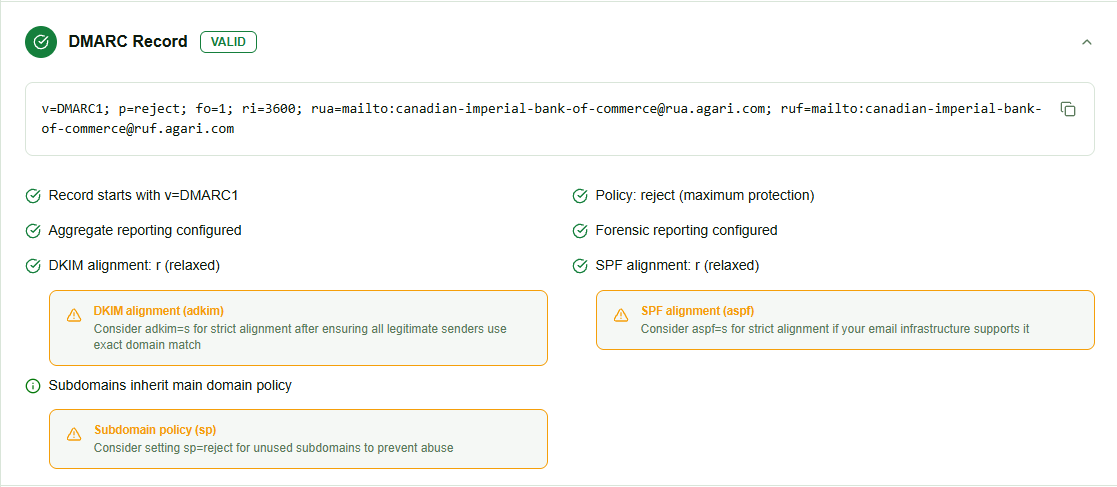
Illustrative InboxPlacement.io platform result. The record values and report destinations shown are example evidence from one scan; do not copy them without confirming your own senders, reporting setup, and policy readiness.
Interpret DMARC checker results in plain English
No record found
The checker cannot find a usable record at _dmarc.example.com. Receiving systems cannot evaluate a DMARC policy for that domain until a valid record is published. Confirm the hostname, DNS zone, and delegation before adding a record.
p=none
The record is present and asks receivers to monitor DMARC failures without requesting quarantine or rejection. This is useful for discovery and aggregate reporting, but it is monitoring rather than enforcement. A checker may label this as “policy not enabled” even when the record is syntactically valid.
p=quarantine
The domain asks receivers to treat failing messages as suspicious, commonly by placing them in spam. This is an enforcement stage, not a guarantee that every failing message will be handled identically by every provider. Review reports and real-message results before increasing coverage.
p=reject
The domain asks receivers to reject messages that fail DMARC. This can protect against spoofing, but it can also affect legitimate mail from a forgotten CRM, helpdesk, marketing platform, or transactional service. Use it only after legitimate sources are inventoried and aligned.
Reporting warnings
Malformed rua= or ruf= values can prevent reports from reaching the intended destination. Reporting addresses normally use a mailto: URI, such as rua=mailto:dmarc-reports@example.com. A record can still look valid at a glance while reporting is misconfigured.
Alignment warnings
The adkim= and aspf= tags control strictness:
rmeans relaxed alignment. Related domains under the same organizational domain can align.smeans strict alignment. The authenticated domain must match the visibleFrom:domain exactly.
Strict alignment can be appropriate for a controlled sending program, but it can expose third-party configuration gaps. Confirm every legitimate sender before tightening it.
How to read the important DMARC tags
v=DMARC1: the version
This required tag must appear at the beginning of the record. A missing or misspelled version prevents receivers from processing the record as DMARC.
p=: the organizational-domain policy
The policy tells receivers what to do when a message fails DMARC:
| Policy | Meaning | Typical use |
|---|---|---|
p=none | Monitor failures without asking for quarantine or rejection | Discovery and reporting |
p=quarantine | Ask receivers to treat failures as suspicious | Gradual enforcement |
p=reject | Ask receivers to reject failures | Mature enforcement |
These are receiver instructions, not a promise that every provider will apply the same action.
sp=: the subdomain policy
sp= sets a policy for subdomains. Without it, subdomains generally inherit the organizational domain's policy. Use it when a subdomain has a different sending program or readiness level, and test that program separately.
rua=: aggregate reports
rua= identifies where receivers can send aggregate DMARC reports, often as XML attachments. Use a mailbox or report processor that someone will review. If the destination is outside the reporting domain, follow the receiving service's authorization requirements.
ruf=: forensic reports
ruf= requests detailed failure reports, but many providers do not send them. Forensic reports can contain message or personal data, so use them only when the privacy and operational tradeoffs are understood. Aggregate reporting through rua= is usually the safer starting point.
pct=: rollout coverage
pct=10 asks receivers to apply the policy to approximately 10% of failing messages, while pct=100 applies it to the full policy scope. A percentage rollout can reduce change risk, but it does not replace report review or real-message testing.
adkim= and aspf=: alignment strictness
DMARC passes when at least one of SPF or DKIM passes and the authenticated domain aligns with the visible From: domain. Relaxed alignment is often more forgiving for third-party senders. Strict alignment requires exact domain matching and should follow an inventory of every authorized sender.
Common DMARC errors and safe fixes
Multiple DMARC TXT records
Problem: Two TXT records exist at _dmarc.example.com, often because a second record was added instead of editing the first. Multiple DMARC records make policy processing unreliable; the base DMARC specification says receivers should not apply a policy when multiple records are returned.
Fix: Keep one canonical record and combine only the tags you need:
v=DMARC1; p=none; rua=mailto:dmarc-reports@example.com
Missing or misspelled v=
Problem: A record such as p=none; rua=mailto:dmarc-reports@example.com is not a valid DMARC record because the required version tag is missing.
Fix: Put v=DMARC1 first:
v=DMARC1; p=none; rua=mailto:dmarc-reports@example.com
A reporting address without mailto:
Problem:
v=DMARC1; p=none; rua=dmarc-reports@example.com
Fix:
v=DMARC1; p=none; rua=mailto:dmarc-reports@example.com
Apply the same URI format to ruf=. If an external reporting service is used, follow its authorization instructions.
Enforcing before senders are ready
Problem: Moving directly to p=reject can affect legitimate messages from a service that has not been added to SPF or configured for DKIM.
Fix: Start or return to p=none, inventory every sending source, authenticate each one, and review aggregate reports before moving to quarantine or reject.
SPF warnings mistaken for DMARC failures
DMARC relies on SPF or DKIM alignment, so a checker may show SPF findings beside the DMARC record. An SPF warning is not automatically a DMARC failure, and a valid -all can be appropriate once every authorized sender is covered. Use the SPF sender authorization guide to investigate the sender list without changing SPF blindly.
For selector and signature problems, use the DKIM tester guide. A checker can identify a likely DNS issue, but only a real message can confirm what a provider received.
A safe path from p=none to enforcement
1. Inventory every legitimate sender
List your ESP, CRM, marketing platform, invoicing system, helpdesk, website, transactional service, and forgotten subdomains. Record the visible From domain, envelope-from domain, sending IP, SPF path, and DKIM signing domain for each stream.
2. Publish one monitoring record
If you do not know every source yet, start with a valid monitoring record:
v=DMARC1; p=none; rua=mailto:dmarc-reports@example.com
The immediate goal is to discover what sends on behalf of the domain, not to block traffic.
3. Review reports and source data
Group report sources by IP, provider, SPF result, DKIM result, and alignment. Investigate unknown sources separately from legitimate vendors that need configuration changes. DMARC monitoring can help organize this ongoing review.
4. Fix SPF and DKIM for legitimate sources
- Add authorized services through their documented SPF include or delegation method.
- Stay within SPF's 10-DNS-lookup limit.
- Enable DKIM signing in each sending service.
- Publish the required DKIM selectors.
- Confirm the DKIM
d=domain aligns with the visible From domain under the chosenadkimmode.
5. Test real messages
Send representative messages from every stream. Inspect Authentication-Results, Return-Path, and DKIM-Signature headers. A header-reading workflow helps separate DNS configuration from what actually happened on delivery.
6. Move to quarantine gradually
After legitimate sources are aligned, consider a controlled policy such as:
v=DMARC1; p=quarantine; pct=10; rua=mailto:dmarc-reports@example.com
Review reports, bounces, and mailbox results before increasing pct=. Do not advance only because a calendar date has passed.
7. Move to reject when evidence supports it
When legitimate traffic is consistently aligned and quarantine has not produced unexpected failures, consider:
v=DMARC1; p=reject; pct=100; rua=mailto:dmarc-reports@example.com
Keep monitoring after enforcement. A new vendor, DNS change, forwarding path, or subdomain can introduce new failures.
How SPF and DKIM alignment affect DMARC
SPF authenticates the envelope-from or return-path domain. With relaxed alignment, a related subdomain can align; with strict alignment, the domains must match exactly. Forwarding can change the envelope path and break SPF even when the original sender was configured correctly.
DKIM uses the signing domain in the d= value. A message can pass DKIM cryptographically but still fail DMARC if that signing domain is not aligned with the visible From domain. DKIM alignment is often useful for forwarded mail because forwarding may break SPF while leaving the DKIM signature intact.
For a broader DNS review, see Domain Forensic Analysis. For the enforcement decision itself, read When to Change Your DMARC Policy.
Verify a real message after the change
A DMARC checker answers, “Is the public DNS configuration valid and what should I fix?” A real-message test answers, “What happened to my email on the delivery path?”
- Send authenticated test messages from each sending stream to representative Gmail, Outlook, Yahoo, and corporate mailboxes.
- Capture full headers and redact personal data before sharing them.
- Inspect
Authentication-Results,Return-Path,Received-SPF, andDKIM-Signature. - Confirm that SPF or DKIM passed and that the passing identifier aligns with the visible From domain.
- Run an inbox-placement test across the providers that matter to your audience.
- Continue reviewing aggregate reports after each new sender or DNS change.
A valid DNS record, p=reject, or a high checker score does not guarantee inbox placement. Content, reputation, recipient engagement, forwarding, and provider policy still influence delivery.
Frequently Asked Questions
What does a DMARC checker check?
A DMARC checker reads the public TXT record at _dmarc.yourdomain.com, validates version and policy tags, checks reporting and alignment syntax, detects duplicates, and may surface related SPF and DKIM findings. It cannot prove inbox placement from DNS alone.
How do I find my DMARC record?
Look up the TXT record at _dmarc.yourdomain.com, either with dig TXT _dmarc.example.com or a DMARC checker. The result should contain v=DMARC1 and a valid p= value.
Is p=none a DMARC failure?
No. p=none is a valid monitoring policy, but it does not ask receivers to quarantine or reject failing mail. A warning that the policy is “not enabled” usually means enforcement is not active, not that the record is syntactically broken.
Do I need a rua= tag?
DMARC can be published without rua=, but aggregate reports are the main way to discover legitimate and unauthorized senders during rollout. Add a destination that someone can monitor or process.
Do I need a ruf= tag?
No. Forensic reporting is optional, many providers do not send it, and reports may contain sensitive message data. Aggregate reporting through rua= is the usual starting point.
Can a DMARC checker confirm that my email will land in the inbox?
No. It can validate DNS configuration and identify likely problems. To measure inbox placement, send a real message and check where it lands across representative mailbox providers.
How long do DMARC DNS changes take to appear?
Visibility depends on TTL and resolver caching. Many changes appear within minutes or hours, but recheck from more than one resolver when a result is inconsistent. Do not move to enforcement until the record is visible and your real sending paths are ready.
Check your DMARC record and verify delivery
Use a DMARC checker to validate the record first, then use real-message and inbox-placement testing to confirm that authentication works in practice. InboxPlacement.io connects DNS findings, authentication results, and mailbox placement so you can address the highest-impact issue first.
Check your DMARC setup at InboxPlacement.io →
For a broader pre-send workflow, read the email deliverability testing guide.
Sources
- DMARC specification (RFC 7489)
- DKIM specification (RFC 6376)
- SPF specification (RFC 7208)
- DMARC.org
- Google Workspace email authentication requirements
- Yahoo sender best practices