
Email Deliverability · Domain Reputation · Blacklist Removal · Email Security
How to Remove a Domain From an Email Blacklist: Diagnosis
· InboxPlacement.io Team
If email delivery suddenly deteriorates, you may hear that your domain has been “blacklisted.” That phrase can describe several different signals: a domain reputation list, a sending IP listed on an RBL, a provider-specific block, or a broader authentication and reputation problem.
The first step is to identify exactly what was checked. A DNS or RBL result can show that an IP or domain appears on a queried list, but it cannot prove that Gmail, Outlook, Yahoo, or another mailbox provider will reject every message. Use the result to investigate, fix the cause, and then verify recovery with real headers and inbox-placement tests.
This guide explains how to identify the relevant domain and sending IP, interpret blacklist results in plain English, remediate the underlying problem, coordinate with an email service provider, and confirm that delivery has recovered.
What this guide can and cannot validate
An IP-based blocklist, also called a DNSBL or RBL, publishes addresses associated with a particular abuse or reputation signal. Some services also check domain indicators, but many “domain blacklist” checks ultimately report on the IP infrastructure sending mail for that domain.
A focused blacklist check can help you:
- Find whether a tested IP or domain appears on the queried lists.
- Record the list name, status, date, and any reason code returned by the list operator.
- Compare the result with sending activity, complaints, bounces, security events, and provider feedback.
- Decide which remediation path deserves investigation first.
It cannot, by itself:
- Prove an inbox, spam, rejection, or deferral outcome at a particular mailbox provider.
- Show whether a provider consulted the specific list that returned the result.
- Explain the effect of domain reputation, DKIM, content, engagement, or local receiver policy.
- Guarantee that delisting will restore delivery.
Treat a blacklist result as evidence to investigate, not as a complete diagnosis.
Collect the right inputs before checking
Gather the data for the sending stream that is actually having trouble:
- The sending IP address or addresses.
- The envelope-from or return-path domain.
- The visible header-from domain.
- A recent message's full headers, including
Receivedand authentication results. - The public PTR or reverse-DNS name for the sending IP.
- The ESP, relay, or mail server responsible for that stream.
Different systems can send from different IPs. A marketing platform, transactional provider, and corporate mail server may each need a separate check. If the stream uses a shared IP, ask the ESP which infrastructure applies to your account before requesting any removal.
Run the blacklist check
Run the confirmed IP and, where supported, the relevant domain through active, reputable lists. Record:
- The exact input that was checked.
- Each list that returned a result.
- The status and reason supplied by the list operator.
- The time of the lookup.
- The affected sending stream and provider.
You can run this investigation in the InboxPlacement.io blacklist monitoring workflow. Enter the sending IP or domain, review the provider-by-provider result, and use the finding to decide what evidence to collect next. A platform result is diagnostic evidence for that scan; it is not a guarantee about every recipient's delivery decision.
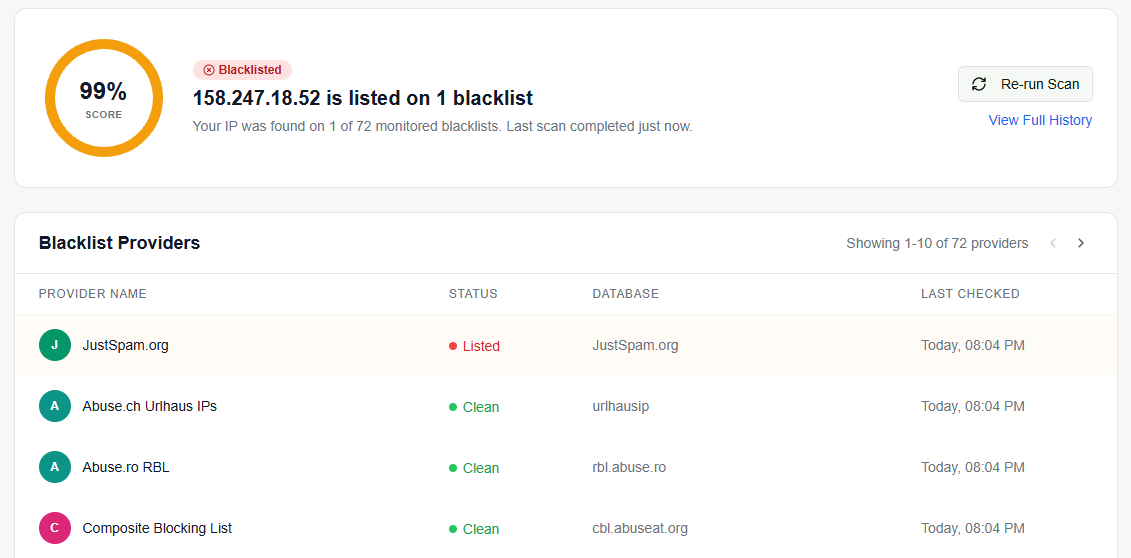
Illustrative InboxPlacement.io platform result. The sample IP, 99% score, listed provider, provider count, and timestamps belong to this example scan; test your own sending source and confirm remediation with the relevant list operator and real-message evidence.
Interpret the result in plain English
Unlisted
The tested IP or domain did not appear on the queried lists at the time of the lookup. Continue with authentication and mailbox testing. An unlisted result makes those specific lists less likely to explain a delivery problem, but it does not prove inbox placement.
Listed on one lower-impact or unfamiliar list
A single result may reflect a list-specific detection, a temporary complaint signal, a shared-IP issue, or a list that the receiving provider does not use. Read the operator's reason and compare it with the affected stream before taking action.
Listed on several relevant lists
Multiple listings increase the priority of the investigation, especially when they line up with SMTP rejections, deferrals, a compromised account, or a sudden change in complaints and bounces. Pause or throttle the affected stream if necessary while you contain the cause.
Domain unlisted but sending IP listed
This combination is common and important. The domain may not appear on a domain-focused list while the shared or dedicated IP sending its mail is listed. Work with the ESP or infrastructure owner to determine whether the IP is yours to remediate.
IP unlisted but mail still goes to spam
An unlisted IP does not rule out authentication failures, domain reputation problems, content filtering, recipient engagement, or provider-specific policy. Move to header inspection and live inbox-placement testing instead of repeatedly checking the same lists.
Common failure patterns and safe fixes
These examples are illustrative patterns, not diagnoses for every sender.
Several listings after a marketing campaign
Likely cause: Low-quality list acquisition, purchased addresses, or a new segment generating complaints and spam-trap hits.
Safe fix: Pause the campaign, audit how recipients were acquired, remove recent risky additions, suppress hard bounces, and review rate limits before resuming.
Retest: Confirm that no new listings appear during an observation window appropriate to the incident, then send authenticated test messages to representative mailboxes.
One IP listed while the domain is unlisted
Likely cause: Shared-IP abuse in an ESP pool, a compromised account, or infrastructure that is not fully under your control.
Safe fix: Ask the ESP to investigate the pool, isolate your sending, or move the stream to a healthier configuration. Rotate credentials and close any compromise vector before requesting removal.
Retest: Confirm the list operator's status and inspect fresh SPF and DKIM headers from the repaired stream.
A listing alongside failed authentication
Likely cause: Missing or incorrect SPF, DKIM, or DMARC alignment combined with poor list quality, compromised sending, or spam-like content.
Safe fix: Correct authentication, review the sending source, and use DMARC monitoring before moving to a stronger enforcement policy. Authentication reduces risk but is not a substitute for fixing abuse or recipient complaints.
Retest: Confirm that DNS records resolve as intended, DKIM signs messages, SPF reflects the real sending path, and DMARC alignment is visible in full headers.
A safe remediation workflow
- Stop or throttle the affected stream. Do this when sending appears compromised or the listing is causing active rejections.
- Gather evidence. Save the list names, lookup results, listing dates, bounce messages, full headers, and relevant abuse reports.
- Fix the root cause. Investigate compromise, content, list quality, volume changes, authentication, and infrastructure ownership.
- Coordinate with your ESP. Share evidence and ask whether the provider needs to isolate the stream or submit the removal request.
- Follow each operator's process. Request removal only after the cause is fixed and you can describe the remediation accurately.
- Verify the real message path. After the list status changes, run controlled sends and inbox-placement tests across the providers that matter to your audience.
Do not chase delisting before fixing the underlying issue. Repeated listings can continue when the source of unwanted mail, complaints, or compromised credentials remains active.
How authentication connects to the investigation
Authentication helps a mailbox provider evaluate whether a message is authorized and aligned, but it does not erase a reputation or abuse signal:
- SPF sender authorization confirms which systems can send for the envelope-from domain.
- DKIM testing confirms that messages carry a valid signature and helps preserve identity through forwarding.
- DMARC checking tests alignment between authenticated identifiers and the visible From domain.
- DMARC monitoring helps identify legitimate and unauthorized sources before enforcement changes.
SPF can fail after forwarding because the forwarding server may not be authorized in the original domain's SPF record. Fixing authentication is necessary for a healthy sending program, but it is not sufficient to guarantee inbox placement.
Verify a real message after the change
Removal from a list is not the finish line. Test the repaired sending path:
- Send controlled messages from the affected source to Gmail, Outlook, Yahoo, and a representative corporate mailbox you control.
- Collect full headers and delivery observations. Redact personal data before sharing them.
- Inspect
Authentication-Results,Received-SPF, DKIM results, and DMARC alignment. - Run an inbox-placement test across the providers that matter to your audience.
- Monitor bounces, deferrals, complaints, and placement trends after the change.
Useful pass criteria include successful authentication, aligned DMARC where expected, no continuing SMTP rejection from the affected path, and inbox placement for representative test messages. No single result should be generalized into a guarantee for every future send.
Frequently Asked Questions
Will removing my domain from an RBL guarantee inbox delivery?
No. Delisting removes one possible blocking or reputation signal. Providers still evaluate authentication, domain and IP reputation, content, engagement, recipient history, and local policy. Authenticate the stream and run live mailbox tests after the change.
Should I check my domain, my IP, or both?
Check both when the tools support both inputs, but always identify which one produced the result. Many RBLs are IP-focused, and a shared-IP listing may be owned by your ESP rather than your organization.
Should I request delisting immediately?
No. Gather evidence and fix the underlying cause first. Requesting removal while compromised sending, poor list quality, or authentication failures continue can lead to a repeat listing.
Does a shared-IP listing always affect my email?
Not necessarily. The effect depends on the receiving system, the specific list, your ESP's remediation, and other message signals. Ask the provider which infrastructure serves your account and whether it can isolate the stream.
How do I know whether delivery has recovered?
Confirm the list status with the operator, then send controlled messages and inspect their headers and mailbox placement. A fresh DNS result alone cannot show whether a message reached the inbox or spam folder.
Next step
Run a focused blacklist check as part of a broader deliverability investigation. If you find a relevant listing, identify the affected stream, fix the root cause, follow the operator's process, and verify recovery with real messages.
Run blacklist monitoring in InboxPlacement.io →
For a broader pre-send workflow, read the email deliverability testing guide.