
IP Blacklist · IP Reputation · Email Deliverability · Blocklist Monitoring
IP Blacklist Check: Find, Verify, and Fix Listings
· InboxPlacement.io Team
Updated
An IP blacklist check tells you whether a sending IP appears on a blocklist. It is a useful diagnostic, but it does not prove that every mailbox provider is rejecting your email or that a message will miss the inbox. Use the result to investigate a real sending problem, then verify the outcome with message headers and inbox-placement testing.
This guide explains how to identify the correct sending IP, confirm whether a listing is relevant, fix the underlying cause, and validate recovery without relying on assumptions or invented deliverability percentages.
What an IP blacklist check can and cannot tell you
An IP-based blocklist, also called a DNSBL or RBL, publishes IP addresses associated with a particular abuse or reputation signal. A listing can matter when a receiving system uses that list in its filtering policy.
An IP blacklist check can help you:
- Find a listed IP and the list that returned it.
- Review the listing reason and the list operator's published removal process.
- Compare the result with your recent sending activity, complaints, bounces, or security incidents.
It cannot, by itself:
- Prove a Gmail, Outlook, or Yahoo inbox-placement outcome.
- Show whether a mailbox provider consulted that specific list.
- Tell you whether a domain, DKIM signature, content, engagement, or other reputation signal caused filtering.
Treat a listing as a lead to investigate—not a complete diagnosis. A clean result is also only evidence about the lists and IP tested at that moment.
Step 1: identify the actual sending IP
Start with a recent message from the same sending stream that is having a problem. For example, do not test a transactional IP when the issue affects a marketing platform.
- Send a test message to a mailbox you control.
- Open the full message headers or original source.
- Review the
Receivedlines and the authentication results to identify the server that delivered the message to the recipient. - Confirm the IP with your ESP or mail-server documentation before taking any remediation action.
If you use a shared IP, ask the ESP which sending infrastructure applies to your account. A shared-IP listing may not have the same impact at every recipient, and the provider may be the party able to investigate or request remediation.
Do not check an IP just because it appears in a generic account setting. Match the address to the affected sending stream and to a real message whenever possible.
Step 2: run a focused IP blacklist check
Check the confirmed IP against active, reputable blocklists. Record:
- The exact IP address tested.
- The name of each list returning a result.
- The list operator's stated reason or category.
- The date and time of the check.
- Which sending stream and provider use that IP.
If you want to run blacklist monitoring in one place, use the blacklist-monitoring workflow in InboxPlacement.io. Enter the sending IP or domain, run the scan, and use the returned list status as the starting point for your investigation. The platform result is diagnostic evidence for that scan—not a guarantee that every provider will make the same delivery decision.
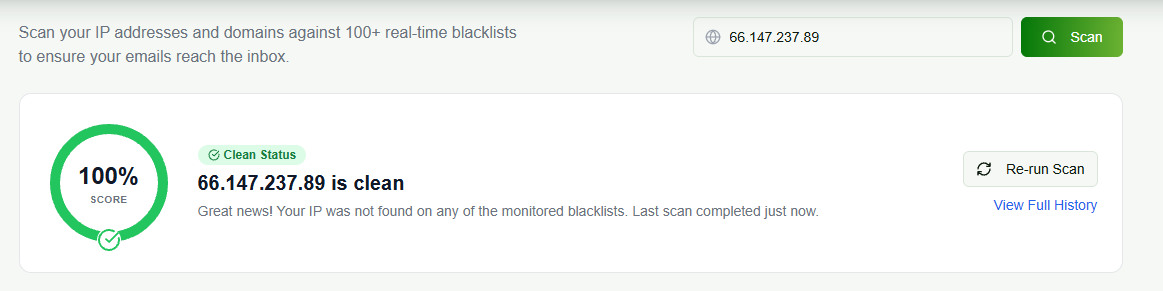
Illustrative InboxPlacement.io blacklist monitoring result. The IP address and clean status shown are sample scan data; test your own sending source and confirm any listing with the relevant list operator and delivery evidence.
Do not treat every legacy result as equally important. For example, SORBS was decommissioned in June 2024 and no longer publishes active reputation data, so it should not be presented as a current remediation target. CSO Online reported the shutdown.
Step 3: confirm that the listing relates to your delivery problem
Before requesting delisting, collect evidence that connects the result to a real issue:
- Recipient-side SMTP rejection or deferral messages.
- A sharp change in accepted, bounced, or deferred mail for the affected stream.
- Full headers from messages that reached spam or were rejected.
- An alert or explanation from the ESP, hosting provider, or list operator.
If you cannot connect the listing to an affected sending stream, do not assume it is the cause of an inbox problem. Mailbox placement depends on many signals beyond IP reputation, including authentication, domain reputation, recipient engagement, content, and local receiver policy.
Step 4: fix the cause before requesting removal
The correct remedy depends on the listing reason. Common investigation paths include:
Unexpected mail or a compromised account
- Pause the affected sending path if it is sending without authorization.
- Rotate credentials and review account access.
- Review mail logs, automation rules, and outbound volume changes.
- Remove any unauthorized application or integration.
List-quality or complaint problems
- Stop sending to purchased, scraped, or unverified contacts.
- Suppress hard bounces and repeated delivery failures.
- Review complaint feedback and recent acquisition sources.
- Reduce volume until the cause is understood; do not simply move the same traffic to another IP.
For Gmail bulk senders, Google's current guidance is to keep Postmaster Tools spam rates below 0.1% and avoid reaching 0.3% or higher. It also requires authentication and other sender practices for qualifying senders. Read Google's sender-guidelines FAQ.
Authentication or infrastructure gaps
- Confirm SPF and DKIM pass for the stream you are testing. Use the SPF sender authorization guide and DKIM tester guide for record-level troubleshooting.
- Confirm DMARC alignment for the visible From domain with the DMARC checker guide.
- Check that the sending host has valid forward and reverse DNS where applicable.
- Verify that the actual sending IP matches the provider configuration you expect.
Do not use a blocklist check as a substitute for message-level authentication testing.
Step 5: follow the list operator's process
After the cause is fixed, use the applicable list operator's own lookup and removal instructions. Provide accurate, minimal information about the remediation you completed. Do not promise a universal delisting time: each list, listing type, and case can have a different process.
For a shared IP, work through the ESP or hosting provider first. They may control the IP, have more context, or need to make the request.
Step 6: verify recovery with real messages
Removal from a list is not the finish line. Validate that your sending path has actually recovered:
- Send controlled test messages from the affected source.
- Inspect
Authentication-Resultsand delivery headers. - Run an inbox-placement test across the mailbox providers that matter to your audience.
- Monitor bounces, deferrals, complaints, and placement trends after the change.
An inbox-placement test shows what happened to actual messages on the providers and test path you selected. It complements the blacklist result; neither check alone explains every filtering decision.
Prevention checklist for blocklist monitoring
- Maintain a current inventory of every ESP, transactional service, CRM, and mail server that sends for your domains.
- Monitor sending volume, complaints, bounces, authentication results, and provider alerts by sending stream.
- Keep SPF, DKIM, and DMARC records current as you add or remove senders.
- Use confirmed incidents and message headers to guide remediation.
- Keep a change log so your team can connect a reputation event to a deployment, campaign, or provider change.
- Run blacklist monitoring on a schedule that matches your sending risk, then investigate new results before your next major campaign.
For domain-level authentication signals and aggregate reporting, see the DMARC monitoring guide. For a broader pre-send workflow, use the email deliverability testing checklist.
FAQ
Does an IP blacklist check prove my emails are going to spam?
No. It reports whether an IP appears on a particular blocklist. Inbox placement requires testing actual messages and evaluating multiple authentication, reputation, and recipient-side signals.
How do I know which IP to check?
Use full headers from a recent message sent through the affected system, then confirm the result with the relevant ESP or mail administrator. Different sending streams can use different IPs.
Should I request delisting immediately?
Fix and document the underlying cause first. Requesting removal before resolving the source of the issue can lead to a repeat listing and does not solve the delivery problem.
Does a shared IP listing always affect my mail?
Not necessarily. The practical effect depends on the receiving system, the specific list, your ESP's remediation, and other message signals. Ask the provider for the affected infrastructure and current guidance.
What should I do after a clean blacklist result?
Keep the result with the date, IP, and sending stream that were tested, then verify the real message path with headers and inbox-placement testing. A clean blacklist scan removes one possible signal; it does not prove that authentication, content, reputation, or recipient-side filtering is healthy.
Next step
Run an IP blacklist check as part of a broader deliverability investigation. If you find a relevant listing, confirm the sending source, fix the root cause, and then use InboxPlacement.io to verify authentication and mailbox placement with real test messages.
Run blacklist monitoring in InboxPlacement.io →