
Email Deliverability · IP Reputation · IP Blocklist Removal · Email Authentication
How to Remove an Email IP From a Blocklist: Practical Guide
· InboxPlacement.io Team
Begin here: If a sending IP may be listed, first confirm the address, the specific list, and whether the result matches a real delivery problem. Pause traffic from that IP when you have evidence of compromised or abusive sending; do not switch IPs blindly, especially if you use a shared sending pool. Collect the SMTP response and relevant headers, fix the verified cause, follow that list operator's current removal process (or work through your ESP), and test the repaired sending path.
When this topic matters
- You have persistent bounce or rejection errors mentioning a blocklist or an IP-based rejection.
- Major mailbox providers or recipients report delivery failures referencing an IP.
- High complaint, abuse, or security incidents suggest a sending IP may be blocked.
(If mail only lands in Spam and there is no explicit IP-listing signal, do not assume that a blocklist is the cause or request removal on that basis. Start with message headers, the actual sending path, and mailbox-placement evidence.)
Core concepts in plain language
- Receiving systems may consult third-party IP blocklists as one input to filtering. Each receiver chooses whether and how to use a particular list, so a listing alone does not show that a recipient provider rejected a message because of it.
- Authentication standards—
SPF,DKIM, andDMARC—and theAuthentication-Resultsheader help diagnose sender identity and policy, but do not confirm a blocklist result or inbox placement. Microsoft documents that authentication failures in Microsoft 365 can lead to quarantine, rejection, or Junk routing. - Provider sender requirements are separate from blocklist-operator removal procedures. Google and Yahoo publish different baseline and bulk-sender requirements; use their current guidance to check your sending setup, and follow the specific list operator's instructions for a removal request.
Important: a removal from a blocklist is a step toward restoring delivery but does not guarantee inbox placement. Treat delisting as one corrective action among several (authentication, complaint rate, content, sending behavior).
A practical step-by-step workflow
Each numbered step below separates observed evidence, likely causes, recommended safe actions, and clear retest criteria you can use after applying the change.
- Confirm the affected sending IP and collect evidence
- Observed evidence: the exact SMTP response text, the sending IP used by the affected stream, and any explicit list name or listing record.
- Likely causes: a receiver or gateway may be applying an IP-based policy, but a generic rejection does not prove a blocklist caused it.
- Recommended actions: save the complete bounce and SMTP log, relevant original headers (including
Authentication-ResultsandReceived), timestamps,Message-ID, sender domain, and a representative recipient. Ask the ESP or mail administrator to confirm the actual egress IP for that stream. - Retest criteria: the failing message, sending path, and IP are identified well enough to check the same address and compare the result with the receiving system's diagnostic.
- Check the relevant list and record its result
- Observed evidence: a named list in the receiver's response, ESP notice, or relevant operator lookup.
- Likely causes: operators maintain different datasets and policies; a result from one list does not establish that another receiver uses it.
- Recommended actions: use the operator's own lookup or documentation where available. Record the exact IP, list name, result, reason, and check time. Avoid entering a shared IP into unrelated third-party lookup services without confirming that it is the right address and permitted data to share.
- Retest criteria: you can reproduce the specific operator's result for the confirmed IP and retain the response or record for comparison.
- Check authentication and domain-level signals separately
- Observed evidence:
Authentication-ResultsforSPF,DKIM, andDMARC; publishedDNSrecords; and the sending domain and IP associated with the affected stream. - Likely causes: missing or misconfigured authentication can contribute to provider handling, but it does not by itself explain an IP-list result.
- Recommended actions:
- Check that the actual sending service is included in the authorized
SPFconfiguration and that the stream signs with the expectedDKIMdomain. - Confirm that the domain owner's
DMARCpolicy and alignment are understood; do not weaken an enforced policy without explicit owner approval. - Use the cited Microsoft troubleshooting guidance for Microsoft 365 authentication failures; do not apply provider-specific requirements universally.
- Check that the actual sending service is included in the authorized
- Retest criteria: the message's authentication results match the domain owner's intended setup. Passing authentication does not prove the listing was removed or guarantee inbox placement.
- Investigate abuse, compromise, and content
- Observed evidence: sudden volume spikes, new templates, user complaints, or phishing-like content.
- Likely causes: account compromise, malware, poor list hygiene, or risky links.
- Recommended actions:
- Pause traffic from the affected IP if there is evidence of compromised or unauthorized sending; coordinate first when the IP is shared or managed by an ESP.
- Reset compromised credentials, remove abusive flows, and remove or suppress addresses with high complaint rates.
- Review links and payloads for suspicious redirects.
- Retest criteria: no ongoing abuse detected; complaint rates and outgoing traffic return to baseline for a representative period.
- Prepare and submit delisting requests
- Observed evidence: blocklist operator’s delisting form or email address, and their required supporting data.
- Likely causes: removal requirements differ by operator and listing type.
- Recommended actions:
- Read the specific operator's current removal instructions. Provide only the requested, accurate details, such as the IP, listing record, or remediation summary.
- Avoid vague statements—give precise, factual steps taken and dates.
- If an ESP or host controls the IP, ask them to confirm the listing and handle any removal or routing change they are responsible for.
- Retest criteria: the operator confirms removal or its own lookup no longer shows the IP listed. Keep the result and time checked; this is not proof of mailbox acceptance.
- Resume sending carefully and monitor
- Observed evidence: delivery behavior after resuming (bounces, Authentication-Results, inbox vs spam indications).
- Likely causes: residual receiver reputation or enforcement windows can delay full recovery.
- Recommended actions:
- Resume low-volume, authenticated sends to engaged recipients only.
- Monitor complaint rates, bounces, and mailbox-provider feedback tools (e.g., Postmaster Tools for Gmail).
- Keep sending rates conservative and escalate only after stable signals.
- Retest criteria: no new listings, Authentication-Results shows expected passes for your traffic, and provider feedback tools show stabilized signals.
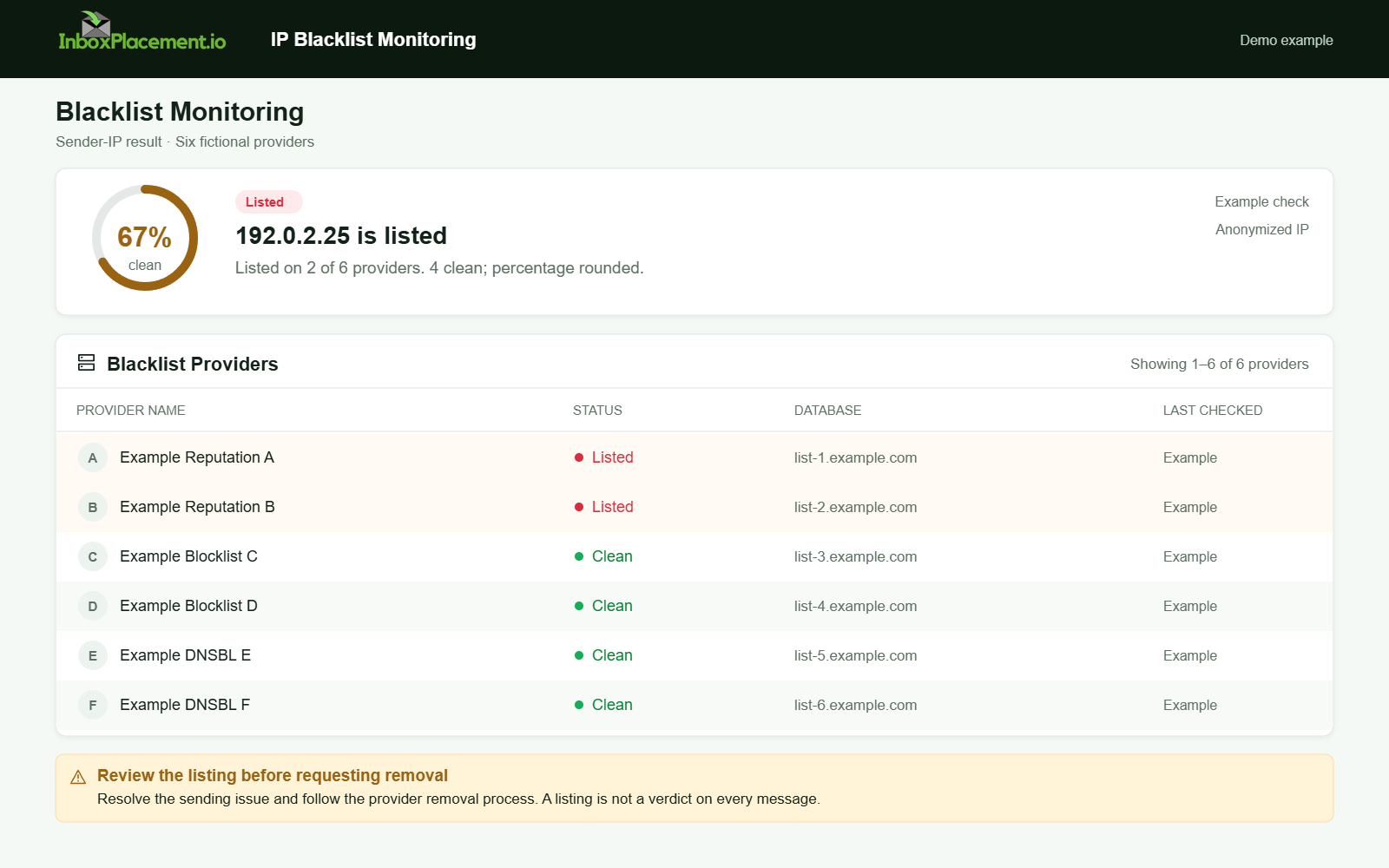
Demo example. Listed IP and provider details. Synthetic results for feature explanation; not a live test or customer outcome.
Decision checklist: fix first vs request delisting now
Use this checklist to decide whether to ask for delisting immediately or fix problems first.
- Is the IP actively sending abusive or compromised traffic? → Fix security and stop sending before requesting delist.
- Are
SPF/DKIM/DMARCfailing? → Fix relevant authentication issues, but check the specific operator's rules rather than assuming authentication is a universal delisting prerequisite. - Does the blocklist operator accept delist requests while you remediate? → If yes and you can show concrete fixes, submit a request with evidence.
- Is the sending path controlled by your ESP or hosting provider? → Coordinate with them; they may be the authorized requester.
Examples (illustrative)
- Illustrative example A: A sender receives a response whose text explicitly says its sending IP is listed. The sender confirms the egress IP and list, corrects a verified
SPFomission, and follows that operator's published removal process. After the operator's status changes, the sender verifies authentication and tests the same sending path; neither result alone guarantees inbox placement. - Illustrative example B: An account compromise sends spam from multiple IPs. The team disables the compromised account, removes malware, and works with their hosting provider to rotate the sending IPs. They request delisting after confirming no further abuse.
(These scenarios are illustrative; they are not evidence of outcome and do not represent guaranteed results.)
Common mistakes and limitations
- Treating a single-delivery failure as conclusive proof of a blocklist: a bounce can reflect many upstream decisions; collect the full header and error text before acting.
- Requesting removal before fixing the verified cause: the same sending behavior may lead to another listing.
- Assuming authentication equals placement: pass/fail for SPF, DKIM, or DMARC is a signal, not a guarantee of inbox placement. Authentication-Results is an important diagnostic header but cannot prove a message landed in the inbox.
- Weakening DMARC enforcement to evade rejections: do not advise lowering DMARC policy as a routine remedy. Any emergency change must be authorized by the domain owner, narrowly scoped, time-limited, and paired with rollback criteria.
How this connects to inbox placement
- Blocklist removal can stop outright rejections and enable mail to reach recipient mail servers, but it does not control how a mailbox provider classifies a message (inbox vs spam).
- Authentication (
SPF,DKIM, andDMARC) and sending reputation can affect provider handling. Microsoft's guidance describes authentication-failure outcomes in Microsoft 365; Google's and Yahoo's sender guidance describe their own requirements and tools. None of these documents substitutes for the affected list operator's removal rules. - Use delisting as one corrective action in a broader recovery that includes authentication, content quality, engagement, and complaint-rate controls.
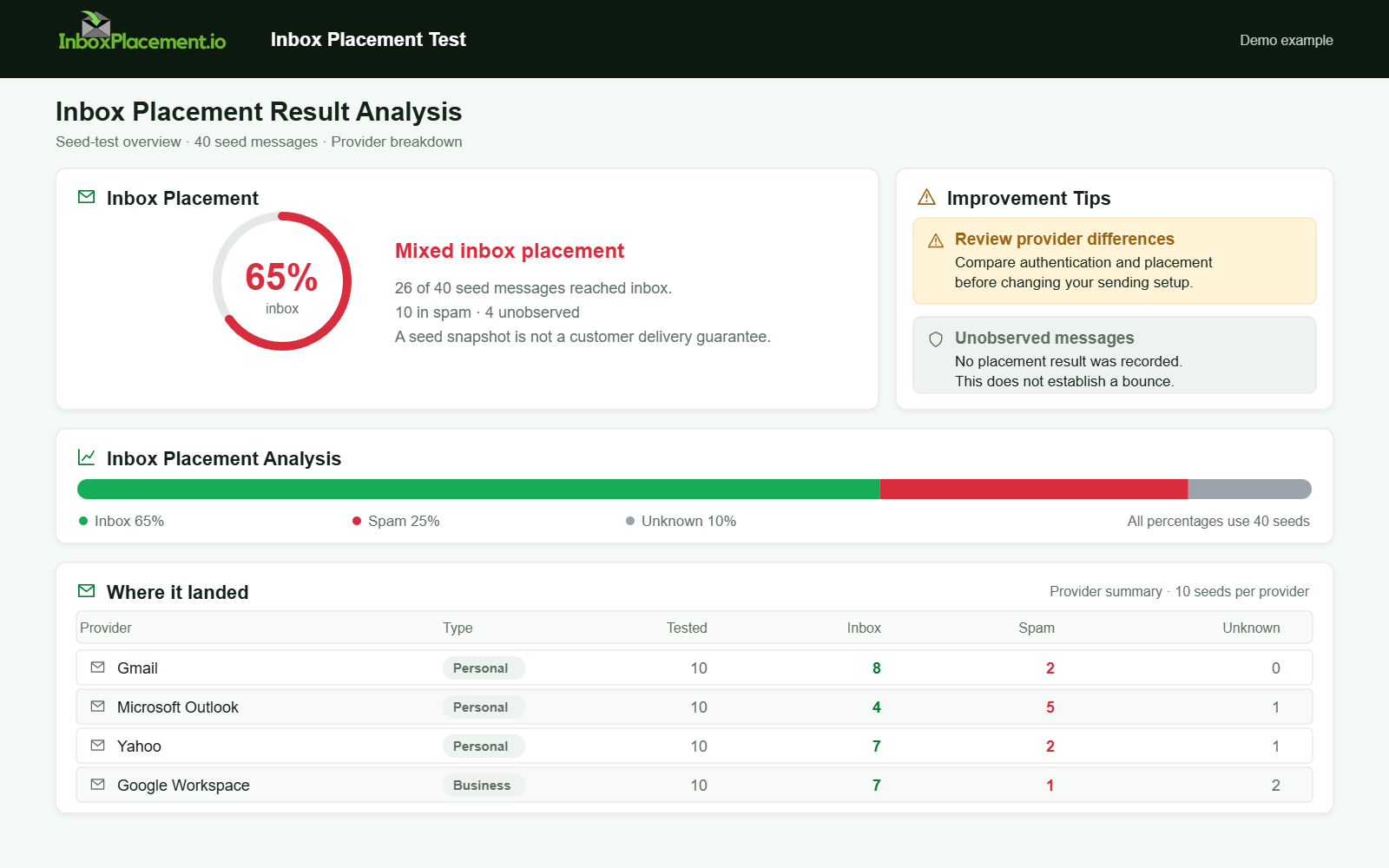
Demo example. Mixed placement across providers. Synthetic results for feature explanation; not a live test or customer outcome.
Verification and next steps (what to collect and what tests can/cannot prove)
- Collect these items before and after remediation:
- Full SMTP bounce text and timestamps.
- Full original message headers including Authentication-Results and Received lines.
- Message-ID(s), sample recipient addresses, and volume patterns during the incident.
- DNS records for SPF, DKIM, and DMARC and DMARC aggregate reports (if available).
- What tests or reports cannot prove:
- Authentication-Results headers cannot prove inbox placement. They only show how a receiver evaluated SPF/DKIM/DMARC for that message.
- A "not listed" result on a single lookup cannot prove full downstream acceptance across all receivers; treat it as one signal.
- After obtaining removal confirmation, verify by:
- Sending authenticated, low-volume mail to engaged recipients.
- Inspecting Authentication-Results for expected passes.
- Monitoring feedback tools, complaint rates, and mailbox-provider tools such as Gmail Postmaster Tools, if available for your sending domain.
FAQ
How fast will a removal request be processed?
There is no universal timeline. Check the specific operator's current instructions and status tools; avoid relying on a general estimate as a guarantee.
Should I change my sending IP immediately after a listing?
If you can route mail through another healthy, authenticated IP that you control (and that isn’t listed), that can reduce immediate impact. Coordinate with your ESP or host and follow the workflow above—do not simply swap IPs if the root cause (compromise or bad content) remains.
Can I rely on Authentication-Results to show everything I need?
Authentication-Results is a critical diagnostic header showing how a receiver evaluated your message’s SPF/DKIM/DMARC. It does not show inbox placement or the receiver’s eventual user-facing classification; use it together with provider feedback tools and placement testing.
Run an InboxPlacement inbox-placement test to compare actual test-message placement after applying the recommended changes. This tests the selected message path; it does not establish whether every recipient uses the same blocklist.
Sources
- RFC 5737: IPv4 address blocks reserved for documentation — Identifies
192.0.2.0/24as a documentation-only address range; the first supplied image uses192.0.2.25. - Email sender guidelines — Distinguishes Gmail's requirements for all senders from the additional requirements for senders above its bulk threshold.
- Email sender guidelines FAQ — Provides Google's current FAQ and bulk-sender classification details.
- Troubleshoot email authentication in Microsoft 365 — Describes Microsoft 365 authentication failures and troubleshooting outcomes, including quarantine, rejection, or Junk routing.
- Yahoo Sender Requirements and Recommendations — Separates Yahoo's all-sender and bulk-sender requirements, including authentication and complaint-rate guidance.
Related Reading
- IP Blacklist Check: Find, Verify, and Fix Listings
- How to Remove a Domain From an Email Blacklist: Diagnosis
- Email Bounce Troubleshooting: A Practical Guide & Checklist
- Holiday Spam Complaint Rate Troubleshooting Playbook
- Spam Mail Filtering: Diagnosis, Common Failure Patterns, and Next Steps
- Cyber Monday Email Spam Test Workflow for Deliverability