
Email Authentication · ARC · Email Deliverability · DNS Diagnostics
ARC Email Authentication Explained: What the Results Mean
· InboxPlacement.io Team
Short answer: ARC preserves prior SPF, DKIM, and DMARC results so receivers can decide whether a modified or forwarded message should still be trusted. Read the
Authentication-Resultsheader and theARC-*fields —ARC-Seal,ARC-Message-Signature, andARC-Authentication-Results— as distinct signals. An ARC chain can explain why a message that would otherwise fail DMARC is being accepted, but it does not by itself prove inbox placement or recipient trust.
Treat each field as evidence to investigate. Map observed facts to plausible causes, take conservative remediation steps, and then retest.
Fields and signals that matter most
Collect these items from a sample message for analysis. Each is an observed fact that you should separate from causes and actions.
Authentication-Resultsheader (exact header name): shows the receiver's SPF, DKIM, and DMARC checks and any pass/fail outcomes.ARC-Authentication-Results: the authentication results recorded by an intermediate system that modified or forwarded the message.ARC-Message-SignatureandARC-Seal: signatures that attest the intermediate service's identity and the integrity of the recorded ARC chain.Receivedheaders and the sending IP: confirm the sending path and verify SPF inclusions.- Published DNS records you control: SPF TXT, DKIM public-key records, and DMARC TXT, including policy and
ruatags. - Receiver disposition or delivery path (delivered, quarantined, rejected) reported by the destination system. Treat this as a separate signal from authentication outcomes.
- Per-provider signals from Gmail, Outlook, or Yahoo tools such as Postmaster or receiver mail logs.
Compile these fields from representative messages. Do not infer mailbox placement from authentication alone. For a header-first companion, see How to Read Email Headers for Deliverability.
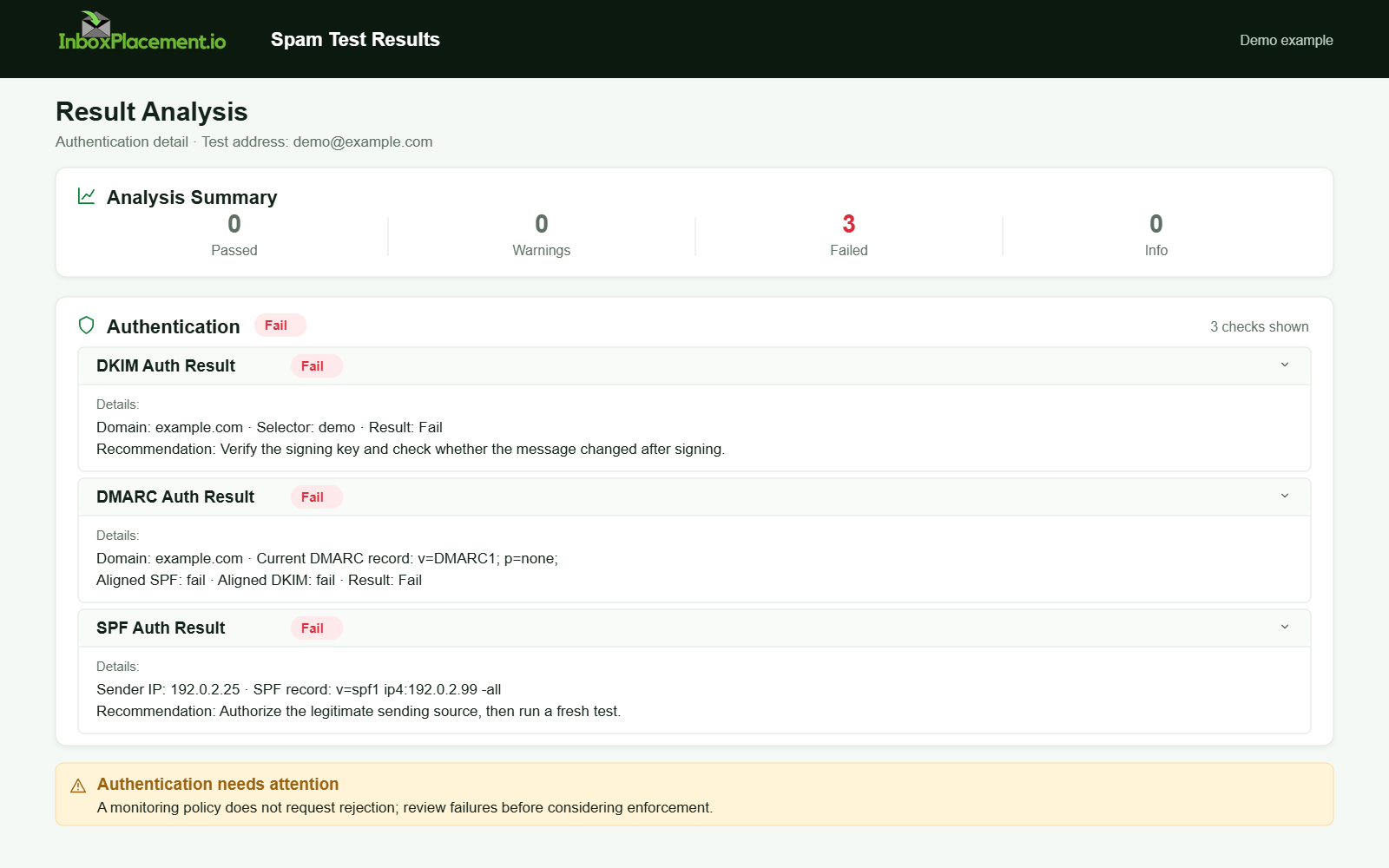
Demo example. Authentication failure diagnosis. Synthetic results for feature explanation; not a live test or customer outcome.
Step-by-step interpretation workflow
-
Gather a reproducible sample
- Collect the full raw message (RFC-822) so you can see
Authentication-Results,ARC-*,Receivedheaders, and the envelope/from addresses. Record the sending IP and domain.
- Collect the full raw message (RFC-822) so you can see
-
Observe and record raw signals before interpreting them
- List the SPF, DKIM, and DMARC results, the published DMARC policy (
p=none,p=quarantine, orp=reject),ARC-Authentication-Results, ARC signatures present or missing, and receiver disposition.
- List the SPF, DKIM, and DMARC results, the published DMARC policy (
-
Separate observed facts from possible causes
- Keep a two-column log: observed fact (what the headers show) and potential causes. Label all causes as illustrative unless you have additional evidence.
-
Map to safe next steps
- Prefer actions that add, fix, or verify data — such as publishing missing DNS records, fixing DNS lookups, or requesting DKIM rotation only if a key is compromised — rather than sweeping policy changes.
-
Retest consistently
- After each change, send the same sample message and re-collect the same raw fields. Do not change multiple variables simultaneously.
-
Escalate when an intermediate system shows ARC but the receiver still rejects
- Verify that the intermediate service's ARC signatures are valid and that its
ARC-Authentication-Resultsare trustworthy. If the forwarder is not known or authorized, contact the intermediate operator before changing policy.
- Verify that the intermediate service's ARC signatures are valid and that its
Common result patterns and what each may indicate
All scenarios below are illustrative unless you have your own collected evidence.
-
Pattern A:
Authentication-ResultsshowsSPF=pass,DKIM=pass, andDMARC=pass; ARC is not present.- Observed fact: The sender authenticated at the receiver using SPF and DKIM, and DMARC aligned and passed.
- Possible cause: Proper DNS records and correct signing or SPF inclusion.
- Safe action: No authentication change is required; continue monitoring with provider tools.
-
Pattern B:
Authentication-ResultsshowsSPF=fail,DKIM=pass, andDMARC=passwith relaxed alignment.- Observed fact: DKIM signed and aligned sufficiently to satisfy DMARC despite SPF failing.
- Possible cause: The sending IP is not in SPF, but an aligned-domain DKIM signature is present.
- Safe action: Verify that SPF includes all legitimate senders. If using third-party senders, ensure they are included in SPF or use DKIM signing.
-
Pattern C:
Authentication-ResultsshowsSPF=fail,DKIM=fail, andDMARC=fail, while ARC is present withARC-Authentication-Resultsshowing pass.- Observed fact: Origin authentication failed at the final receiver, but an intermediate added ARC asserting earlier passes.
- Possible cause: A legitimate forwarding or modifying service rewrote headers and applied ARC to preserve earlier authentication results.
- Safe action: Verify that the intermediate service is authorized and its ARC signatures are valid. If it is an expected forwarder, such as a mailing list or gateway, document that behavior and consider aligning DKIM and SPF for that path.
- Retest: Send a message that bypasses the intermediate path to confirm origin-domain authentication.
-
Pattern D:
Authentication-Resultsshowspermerrorfor SPF ortemperrorfor a temporary DNS problem.- Observed fact: SPF failed with a permanent or temporary evaluation error.
- Possible causes: Missing SPF TXT record, SPF exceeding DNS lookup limits, or an unreachable authoritative DNS server.
- Safe action: Use the domain's DNS control to ensure one SPF TXT record exists, keep lookups under provider limits, and resolve DNS issues. Microsoft's authentication troubleshooting guidance documents these failure modes.
- Retest: After the DNS fix, re-query the SPF TXT record and resend the message.
-
Pattern E:
DMARC=failwhile the published policy isp=none.- Observed fact: DMARC failures are being reported, but no enforcement action is requested.
- Possible causes: Misalignment between the
From:domain and signing domains, or missing DKIM or SPF alignment. - Safe action: Continue collecting DMARC reports through
ruaand use them to diagnose alignment issues. Do not changep=noneto a more aggressive policy without owner authorization, verification, and rollback criteria. - Retest: Fix alignment issues and confirm that DMARC passes in
Authentication-Results.
Action matrix: signal, likely cause, safe next step, retest
| Signal (observed fact) | Likely cause (illustrative) | Safe next step (do first) | How to retest |
|---|---|---|---|
Authentication-Results: SPF=none | No SPF TXT record published for the sending domain | Publish one SPF TXT record listing authorized senders | Wait for DNS TTL, query TXT, and resend the same sample |
Authentication-Results: SPF=permerror | Multiple SPF records or more than 10 DNS lookups | Collapse into one SPF record and reduce includes/lookups | Query SPF from authoritative DNS and resend |
Authentication-Results: DKIM=fail | Selector missing, key mismatch, or header modifications | Verify the DKIM selector DNS record and signing domain; fix the signing process | Send a message and verify DKIM=pass in Authentication-Results |
Authentication-Results: DMARC=fail, policy p=none | Misalignment between From: and SPF/DKIM domains | Inspect signing-domain alignment and enable DMARC reports through rua | Fix alignment, resubmit, and check Authentication-Results |
ARC-* present but Authentication-Results shows DMARC fail | Message modified after origin signing; an intermediate provided ARC | Confirm the intermediate is a known, authorized forwarder and ARC signatures validate | Bypass the intermediate if possible and verify origin authentication |
Authentication-Results: temperror | Temporary DNS resolution failure | Check the authoritative DNS resolver and retry after propagation | Retry after the DNS fix and record the changed result |
Use this table as a triage checklist: observe → hypothesize → act conservatively → retest.
Limitations and conclusions the data cannot support
- Authentication headers and ARC attestations are evidence about how a receiver evaluated a specific message and what intermediaries recorded. They do not prove inbox placement or user engagement.
- A pass in
Authentication-Resultsor a valid ARC chain does not guarantee that Gmail, Outlook, or Yahoo will place a message in the inbox. Mailbox placement depends on provider heuristics, user preferences, sender reputation, and content signals. - DMARC pass/fail is separate from the published DMARC policy (
p=none,p=quarantine, orp=reject). A published enforcement policy requests a disposition but does not itself confirm delivery behavior. - ARC can preserve original authentication so a receiver can accept a forwarded message that would otherwise fail DMARC, but ARC only helps when the receiver trusts the ARC signer. Verify the trustworthiness of intermediaries.
- Do not assume changes to DNS or policy will immediately change provider behavior. Providers may use aggregated telemetry and may take time to reflect changes in placement decisions.
For a separate check of mailbox placement, use an inbox placement test. Authentication results are useful signals, not proof that a message reached the primary inbox.
Illustrative example — fields to collect
Illustrative example only: Collect the same fields from your own messages; do not treat this example as proof.
For each sample message, gather:
- The full raw message (RFC-822) with all headers.
- The value of the final receiver's
Authentication-Resultsheader. ARC-Authentication-Results,ARC-Message-Signature, andARC-Seal, if present.- Envelope from/rcpt-to and the visible
From:header. - Sending IPs from
Receivedheaders and their PTR records. - Published DNS records for SPF, DKIM selectors, and DMARC TXT for the sending domain.
- Receiver disposition (delivered, quarantined, or rejected) reported by the destination system.
Label every scenario derived from these fields as illustrative unless you can corroborate it with provider logs or DMARC aggregate reports.
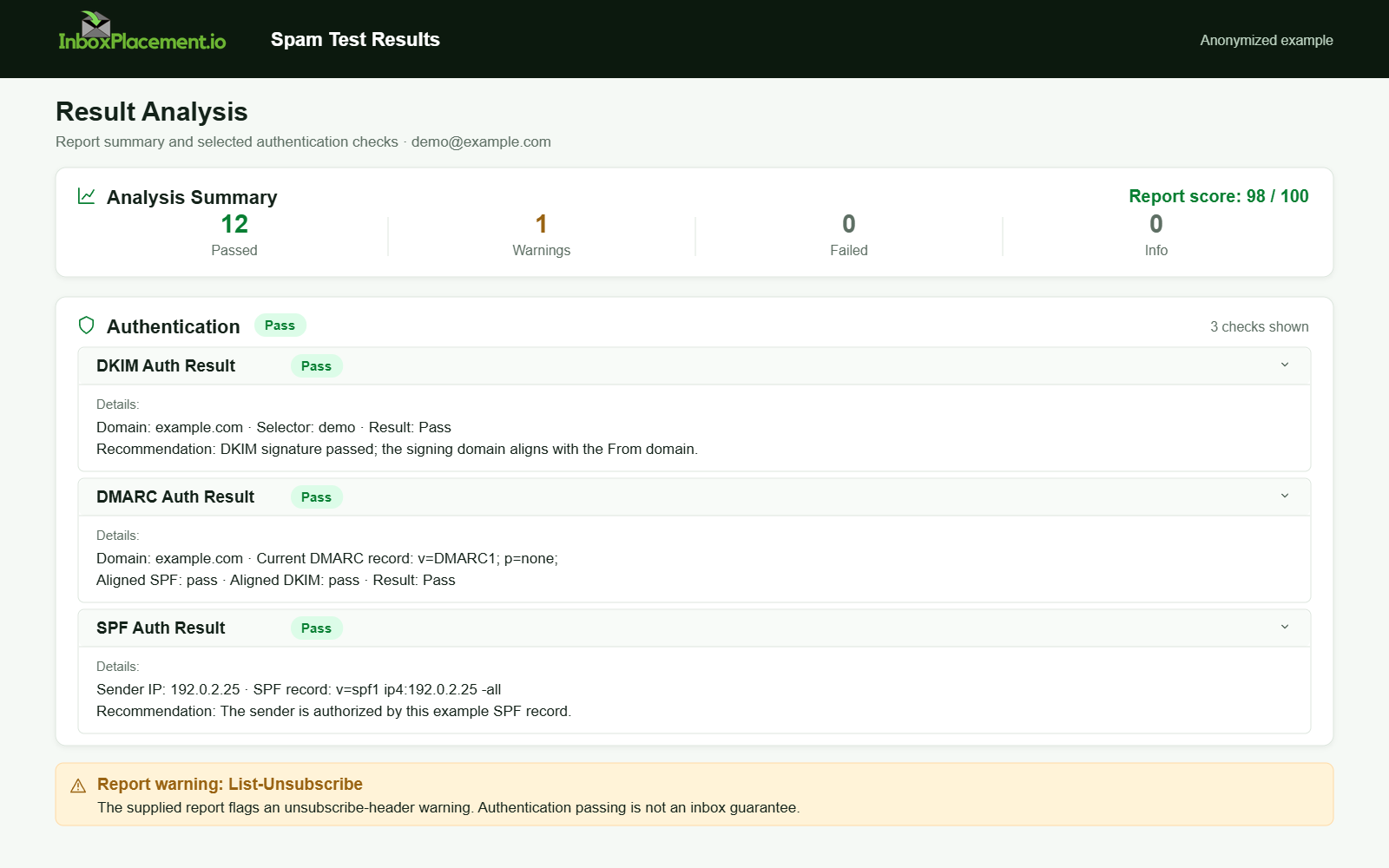
Anonymized example adapted from a supplied product report. Selected figures retained; identifiers and layout reconstructed. Not a new live test.
Troubleshooting reminders and policy-safe constraints
- Do not weaken an existing DMARC enforcement policy. Any emergency change to DMARC must be authorized by the domain owner, limited in scope and time, and include clear rollback criteria.
- Prioritize fixes that add or restore correct signals: publish the DKIM key, ensure SPF contains legitimate senders, and enable DMARC reporting.
- Use provider tooling such as Gmail Postmaster, Microsoft/Outlook reports, and Yahoo Sender Hub to monitor trends after fixes. Follow each provider's current guidance and enforcement timelines.
- For ongoing report interpretation, see DMARC monitoring and authentication reporting.
Sources
This article uses official guidance from major mailbox providers for definitions and troubleshooting approaches:
- Microsoft email authentication overview — SPF, DKIM, DMARC, and ARC roles and why all methods matter.
- Microsoft authentication troubleshooting guide — common SPF errors and how SPF, DKIM, and DMARC work together.
- Google Gmail sender guidelines FAQ — sender requirements and enforcement guidance for personal Gmail accounts.
- Yahoo Sender Best Practices — authentication requirements, DMARC recommendations, and sender expectations.
FAQ
How does ARC interact with DMARC?
ARC preserves prior authentication results recorded by intermediaries so a receiver can evaluate forwarded or modified messages. It does not override receiver policy; receivers decide whether to trust ARC attestations.
If Authentication-Results shows DMARC=fail but the DMARC policy is p=none, should I change the policy?
No. Do not change DMARC enforcement without owner authorization and a controlled plan. Use p=none to collect reports and diagnose failures before considering a move to quarantine or reject.
Which providers enforce stricter sender authentication?
Major providers publish guidance and enforcement timelines. Use provider tools such as Postmaster and Sender Hub to confirm requirements for sending to their users.
Run an InboxPlacement test to verify authentication signals and mailbox placement after applying the recommended changes.