
authentication · email-deliverability · dmarc
SPF DKIM DMARC Alignment Explained: Field Guide
· InboxPlacement.io Team
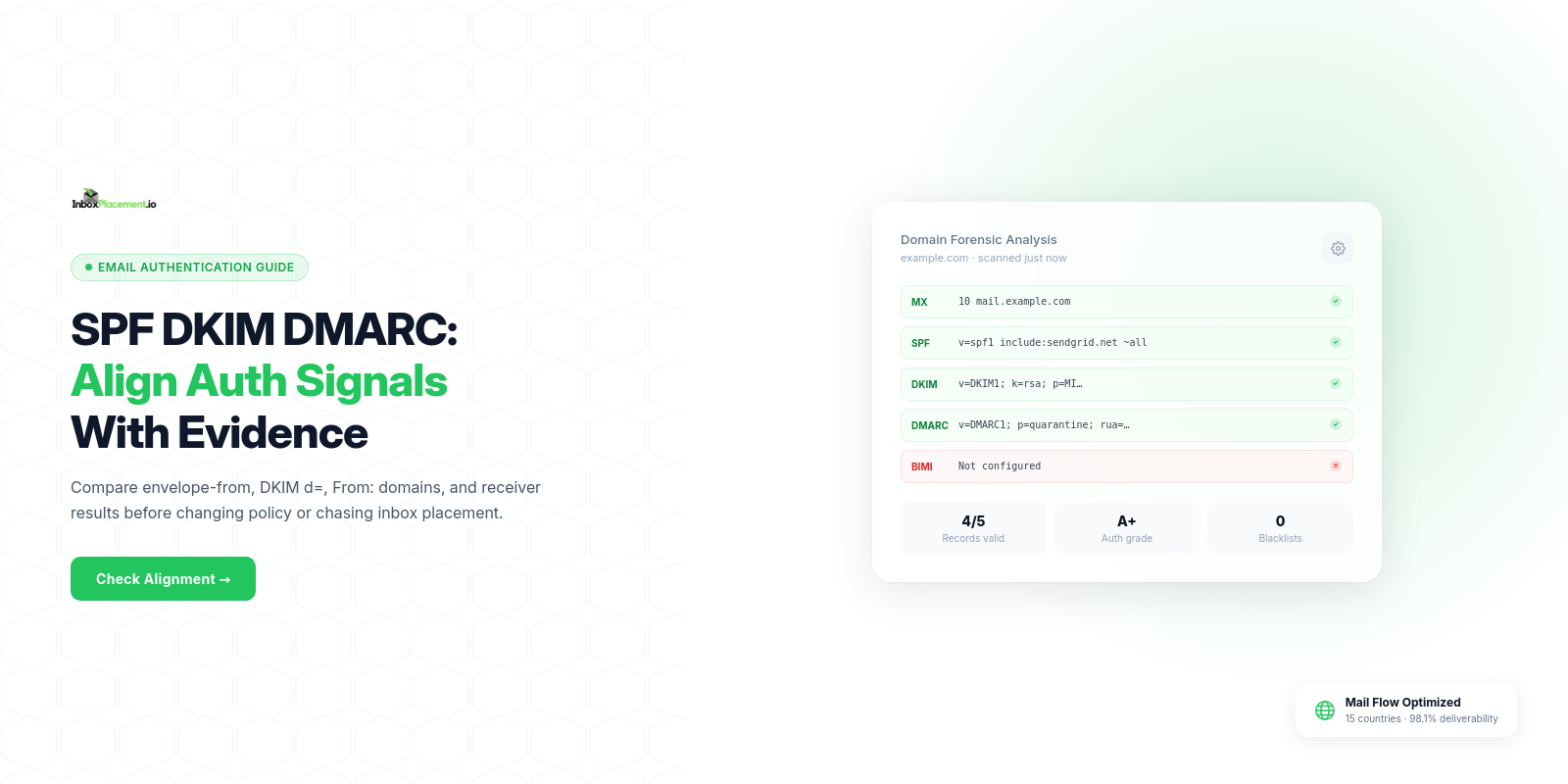
A concise answer: SPF, DKIM, and DMARC alignment means checking whether the domain used by SPF (envelope/MAIL FROM) or DKIM (d= signing domain) matches the domain in the message From: header so DMARC can consider the message authenticated. An Authentication-Results header documents the receiver’s checks for that message. Authentication results alone do not prove inbox placement; treat them as facts to interpret with other signals before changing policy or infrastructure.
What the report or signal actually tells you
Observed authentication fields (SPF result, DKIM result, DMARC result and alignment tag, Authentication-Results headers) are factual outputs from the receiver’s checks. They tell you:
- Whether SPF or DKIM verifications passed or failed for the specific message the receiver evaluated.
- Which identity the receiver used for SPF (envelope
MAIL FROM/Return-Path) and whichd=domain DKIM used. - Whether the receiver reported DMARC alignment and the DMARC check result for that message.
- What the receiver recorded in
Authentication-Resultsfor that message (for example: "Authentication-Results: mail.example.net; spf=pass smtp.mailfrom=...; dkim=pass header.d=...; dmarc=pass").
Use official guidance when mapping these signals to action. Microsoft documents the roles of SPF, DKIM, DMARC, and ARC; Google’s sender guidance notes that, for direct email, the From: domain must align with SPF or DKIM to pass DMARC alignment and that enforcement is increasing. (See Sources.)
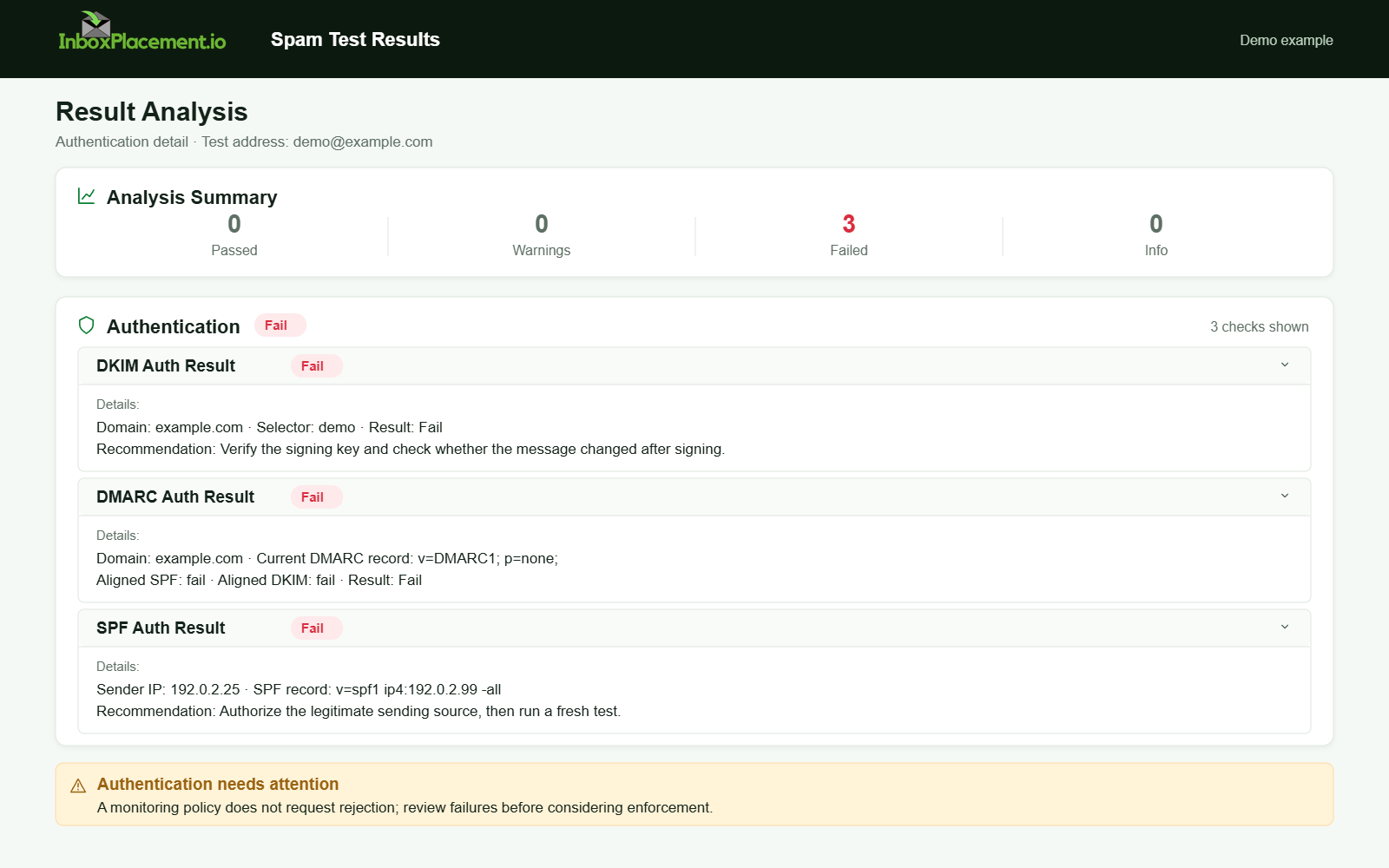
Demo example. Authentication failure diagnosis. Synthetic results for feature explanation; not a live test or customer outcome.
Separate items to record (keep these distinct)
When you capture evidence for troubleshooting, keep these items separate and labeled:
- DMARC authentication result (the DMARC outcome shown in
Authentication-Resultsfor that message) - Published DMARC policy (the TXT record at
_dmarc.example.comas fetched from DNS) - Receiver disposition (what the receiving service reports it did to the message: none/quarantine/reject in their logs or quarantine folder)
- Delivery outcome (where the message was delivered on the receiver: inbox, spam/junk, quarantine, or rejected)
- Inbox placement (whether the message appeared in the recipient’s inbox; this is a delivery outcome and must be verified by an end-user or controlled inbox test)
Do not conflate an Authentication-Results DMARC=pass with inbox placement — they are separate observations.
Fields and signals to collect
Collect these fields from the message and from DNS before you interpret results:
Authentication-Resultsheader (receiver’s pass/fail for SPF, DKIM, DMARC, ARC)- SPF result and the identity used (envelope
MAIL FROM/Return-Path) - DKIM result, the
d=domain, and the selector used - DMARC result and any alignment mode reported (relaxed vs strict if the receiver includes it)
From:header (header.From domain)Return-Path(envelope-from domain)- Received chain and sending IP
- ARC headers (if present) and their results
- DNS records: TXT SPF record, DKIM public key (
selector._domainkey), DMARC record (TXT at_dmarc)
Treat the above as observed facts. Do not infer broader deliverability outcomes from a single field without additional evidence.
Step-by-step interpretation workflow
-
Collect the facts
- Save the full raw message headers for the sample message and note the sending IP and timestamps.
- Pull the published DNS records for SPF, DKIM (selector), and DMARC for all domains involved.
-
Record observed results (verbatim)
- Copy the
Authentication-Resultsheader and the envelopeReturn-PathandFrom:domains.
- Copy the
-
Determine alignment status
- If DKIM passed: check the
d=domain for an exact or organizational match withFrom:(relaxed vs strict alignment as supported by the receiving service). - If SPF passed: check the identity used for SPF (
envelope-from). Compare that domain withFrom:.
- If DKIM passed: check the
-
Classify the situation
- Aligned/pass, partially aligned (one method aligned), or not aligned.
- Note any errors (
permerror,temperror,none,fail,softfail) exactly as reported.
-
Map to illustrative likely causes (see below)
- Match observed facts to plausible causes; these are illustrative and must be verified in your environment.
-
Choose safe next steps and retest
- Prefer low-risk fixes first (correct DNS records, validate DKIM keys/selectors, ensure sending IPs are included in SPF where appropriate).
- If you need to authorize an exception to policy (see the DMARC enforcement section below), require scoped emergency authorization, a time limit, a documented rollback plan, and immediate retesting and monitoring.
- Re-run the same tests (send the same message type, collect new headers, compare
Authentication-Results).
Common result patterns and what each may indicate
Each pattern below separates observed evidence (what you see), illustrative likely causes (unverified), safe actions, and retest criteria.
Pattern A — SPF and DKIM both pass and at least one aligns with From::
- Observed evidence:
Authentication-ResultsshowsSPF=passand/orDKIM=pass; DKIMd=domainor SPF envelope-from matchesFrom:domain. - Illustrative — likely causes: Proper DNS records and signing; sending infrastructure configured to use matching domains.
- Safe next steps: Document the configuration, ensure key rotation and SPF maintenance procedures are in place, and monitor DMARC aggregate reports if enabled.
- Retest: Send staged messages and verify
Authentication-Resultsstill show pass/aligned; review DMARC aggregate reports for anomalies.
Pattern B — DKIM passes and aligns, SPF fails or is not aligned:
- Observed evidence:
DKIM=pass(d=brand.examplematchesFrom:),SPF=failorsoftfail;Authentication-ResultsshowsDMARC=pass(due to DKIM alignment). - Illustrative — likely causes: Envelope-from uses a different domain not included in SPF; mail flow uses a relay not listed in SPF.
- Safe next steps: Update SPF to include authorized sending IPs or services for the envelope-from domain where appropriate; verify DKIM selector and key TTLs.
- Retest: Send messages through the same path and confirm SPF now shows pass and DMARC remains pass.
Pattern C — SPF passes but is not aligned; DKIM missing or fails
- Observed evidence:
SPF=passfor anenvelope-fromdomain that does not matchFrom:,DKIM=none/permerror/fail,DMARC=failor quarantine for that message. - Illustrative — likely causes: A third-party service is setting envelope-from to its domain while the
From:shows the brand; DKIM not configured for the brand domain. - Safe next steps: Configure DKIM signing for the brand’s
From:domain where possible, or change sending configuration so the envelope-from aligns with the brand domain. If you are coordinating changes that may affect enforcement, use documented, scoped emergency authorization only if absolutely necessary (see DMARC enforcement guidance). - Retest: After DKIM configuration or envelope change, send a test and confirm DMARC alignment.
Pattern D — SPF returns permerror, temperror, or none
- Observed evidence: SPF check returns
permerror/temperror/noneinAuthentication-Results. - Illustrative — likely causes: No SPF record, multiple SPF records, SPF exceeding DNS lookup limits, or DNS resolution issues.
- Safe next steps: Inspect the domain’s DNS: ensure exactly one SPF TXT record exists and that the record stays within lookup limits; for DNS timeouts, check authoritative DNS health.
- Retest: Query the SPF TXT record from multiple resolvers and re-evaluate SPF on a new message. Microsoft’s troubleshooting guidance covers these scenarios (see Sources).
Pattern E — Forwarding breaks SPF but ARC present
- Observed evidence: Original mail shows
SPF=pass; forwarded copy showsSPF=fail; ARC headers exist (ARC=pass). - Illustrative — likely causes: Forwarding server’s IP is not in the original sender’s SPF; ARC may preserve original authentication and allow the final receiver to accept the message.
- Safe next steps: If forwarding is common for your traffic, encourage upstream support for ARC or rely on DKIM alignment for the brand domain where possible. Do not remove SPF checks; interpret failures in the context of ARC and DKIM.
- Retest: Send a test via the forwarding path and check whether ARC preserved authentication results so the final receiver treats the message as authenticated.
Label: All “likely cause” rows are illustrative and require verification in your environment before acting.
Action matrix: signal, illustrative likely cause, safe next step, retest
| Signal (observed) | Illustrative likely cause (unverified) | Safe next step | Retest criteria |
|---|---|---|---|
SPF=pass, SPF aligned | SPF record includes sending IPs; envelope-from matches From: | Monitor; maintain DNS and signing hygiene | New message shows SPF=pass and DMARC=pass |
DKIM=pass, DKIM aligned | Correct selector and private key used by MTA for From: domain | Document key rotation; verify DNS key presence | Subsequent message shows DKIM=pass with same d= |
SPF=fail, DKIM=pass (aligned) | Sender missing IP in SPF; DKIM protects From: | Add authorized sending IP/service to SPF where appropriate; keep DKIM in place | New message shows SPF=pass or DKIM=pass still passes and DMARC=pass |
SPF=permerror | Multiple SPF records or too many DNS lookups | Consolidate SPF TXT into a single valid record; reduce include chain; check DNS health | DNS query returns one valid SPF TXT and SPF check no longer permerror |
DKIM=permerror or no signature | DKIM not configured or key mismatch | Configure DKIM signing for the From: domain; publish correct selector._domainkey | Authentication-Results shows DKIM=pass and d= matches From: |
DMARC=fail while published policy is p=quarantine or p=reject | No aligned auth for messages but strict policy published | Fix alignment and send tests. If an immediate operational exception is required, apply only a narrowly scoped, documented emergency authorization (specific sending source, defined time limit, and a rollback plan), notify stakeholders and receiving partners as needed, and retest immediately. | After fixes or authorized exception, DMARC aggregate reports and sample messages show alignment improving; Authentication-Results in samples show DMARC=pass |
All “likely cause” items are illustrative.
Limitations — what these data cannot prove
- Authentication results do not prove inbox placement. Receivers use many signals (engagement, content, sender reputation) beyond SPF/DKIM/DMARC.
- A single message's headers do not prove systemic configuration. They are a snapshot; confirm with DNS checks and DMARC aggregate reports over time.
- Passing authentication does not guarantee a message will escape spam filtering or provider-specific heuristics.
- Authentication failures do not prove intent to spoof; they indicate configuration or path mismatches that need investigation.
Do not assume any single header means a message will be delivered to the inbox. Use authentication checks as one part of a wider deliverability and security review.
Evidence to collect (instructions)
Collect these items before you change configuration so you can compare pre/post behavior:
- Raw full message headers for representative samples (one per sending path).
- The sending IP(s) and HELO/EHLO name from the Received headers.
- The
envelope-from(Return-Path) and theFrom:header domain. - Published DNS records: SPF TXT, DKIM selector TXT,
_dmarcTXT. - DMARC aggregate reports (RUA XML) and any forensic reports (if available).
- MTA logs for the send that correspond to the sample message (timestamps, signing actions).
- Any quarantine or rejection logs from receiving providers and evidence of where messages landed (inbox vs spam vs quarantine).
These are the data points to gather and use locally; they must be collected and verified in your environment.
DMARC policy types — factual definitions (do not treat as instructions to change enforcement)
p=none— reporting only: the domain owner requests reports but asks receivers not to take enforcement actions. This is a reporting mode, not an enforcement recommendation.p=quarantine— receiver-visible preference that the receiver may treat unauthenticated mail as suspicious (for example, place into spam/quarantine).p=reject— receiver-visible preference that the receiver may reject messages that fail DMARC checks.
If you operate the sending domain, coordinate any policy or enforcement-related changes with stakeholders and receiving providers. Never weaken an enforced DMARC policy without a documented plan: if an operational exception is required, make that exception narrowly scoped, time-limited, documented, and followed immediately by targeted retesting and monitoring. Work from evidence collected (see Evidence to collect) and use DMARC aggregate reports to confirm behavior over time.
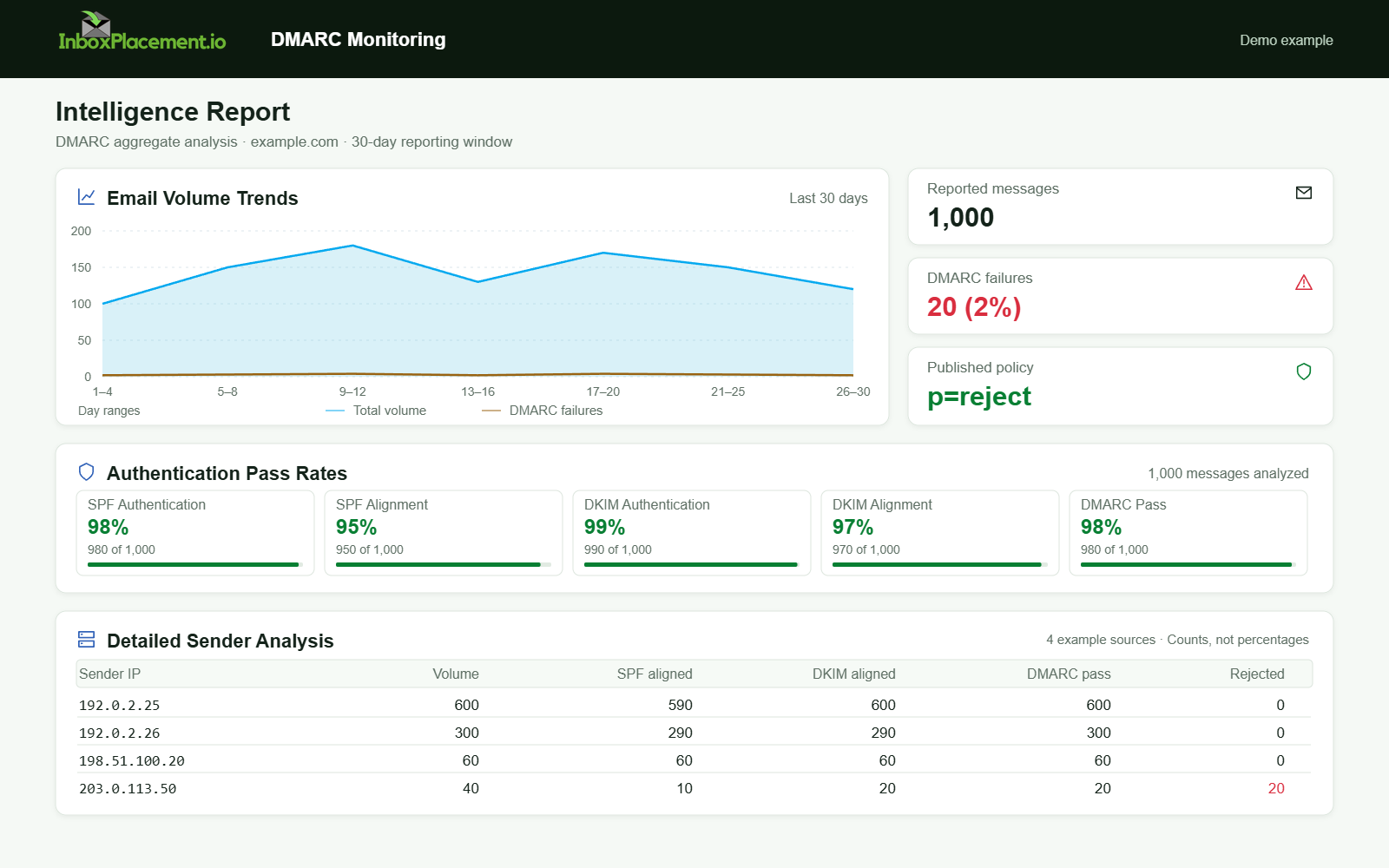
Demo example. DMARC policy and reported outcomes. Synthetic results for feature explanation; not a live test or customer outcome.
FAQ
How does alignment differ between SPF and DKIM?
SPF alignment compares the envelope-from (Return-Path) domain to the From: domain; DKIM alignment compares the d= signing domain to the From: domain. If either method passes and aligns, many receivers treat DMARC as satisfied. See Google’s sender guidance for direct email alignment expectations (Sources).
If SPF fails because of forwarding, should I remove SPF checks?
No. Forwarding can cause SPF to fail because the forwarder’s IP is not in the original SPF. Use DKIM and ARC where available to preserve authentication, and interpret SPF failures in context. Microsoft’s troubleshooting guidance explains forwarding impacts (Sources).
What does an SPF permerror mean?
A permerror often indicates DNS issues such as multiple SPF records for the domain or exceeding SPF lookup limits. Inspect the domain’s DNS and consolidate or simplify the SPF record. Microsoft documents these common causes (Sources).
Can I move DMARC policy to reject immediately?
Published DMARC policy types are factual: p=none (reporting), p=quarantine, p=reject. Changes to enforcement should follow a documented rollout plan based on evidence (DNS checks, DMARC aggregate reports, representative message samples). If you need a temporary operational exception, require a scoped, time-limited emergency authorization with a rollback and retest plan. Coordinate with affected sending services and receiving providers.
Where can I check DNS records and DKIM selectors?
Use your DNS hosting tools or standard DNS query tools to fetch TXT records for the domain (SPF), selector._domainkey (DKIM), and _dmarc (DMARC). Confirm there is at most one SPF TXT record for the domain and that DKIM selectors published match the signer in Authentication-Results.
Run controlled inbox-placement tests from representative sending paths to verify both authentication signals and where test messages land after any changes.
Sources
- Microsoft: How email authentication works in Microsoft 365 — overview of SPF, DKIM, DMARC, ARC and their roles.
- Microsoft: Troubleshoot email authentication in Microsoft 365 — specific SPF failure symptoms and causes.
- Google: Gmail email sender guidelines — sender requirements including that the From: domain must align with SPF or DKIM for direct email and notes on enforcement.
- Google: Gmail email sender guidelines FAQ — notes on enforcement timeline and sender compliance for bulk senders.