
DMARC · Reporting · Email Deliverability
DMARC External Reporting Authorization Explained
· InboxPlacement.io Team
A DMARC external reporting authorization signal tells you which party a receiver used to send DMARC results (or where the receiver recorded a disposition). Read as a field-level signal, it helps you check whether reports are being routed to the address or service you published and whether authentication failures match published records. Treated cautiously, that single signal informs targeted checks (DNS record presence, Authentication-Results header, SPF/DKIM alignment) but cannot by itself prove delivery success, mailbox placement, or that every receiving service enforces the same policy.
What this report or signal directly tells you
- Which reporting destination a receiver used (the rua/rua-like endpoint the receiver recorded).
- Whether the receiver observed a DMARC pass or fail for the message(s) it reported.
- Receiver-observed authentication results (for example, SPF or DKIM outcome), typically summarized in the report and reflected in the
Authentication-Resultsheader at the receiver.
These items are receiver observations about specific messages or aggregates; they are not proof of inbox placement or of universal receiver behavior. Microsoft, Google, and Yahoo guidance treat DMARC, SPF, and DKIM as authentication standards and describe DMARC as the mechanism that both sets policy and specifies where to send DMARC results (reporting) (see Sources).
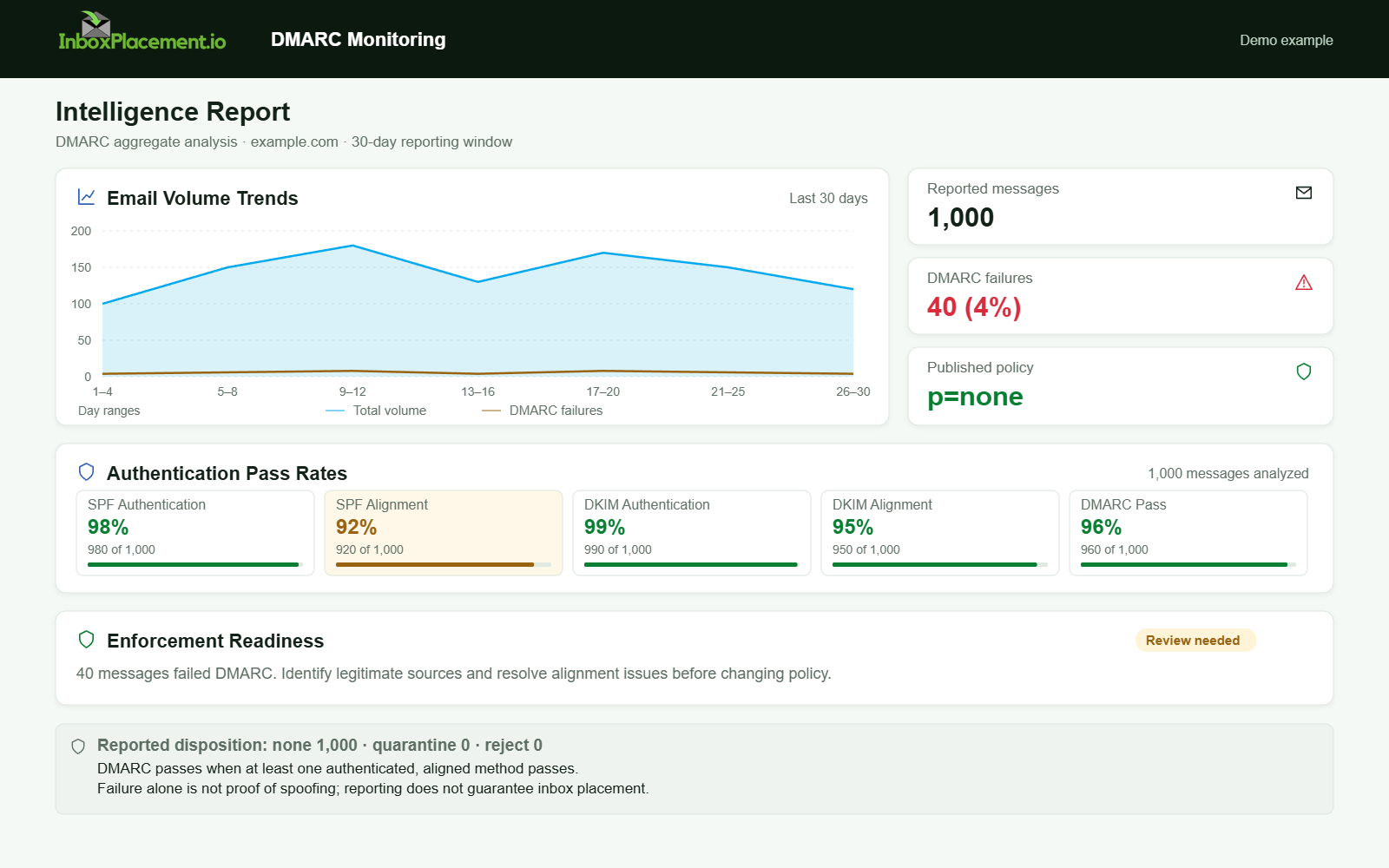
Demo example. Authentication and alignment report. Synthetic results for feature explanation; not a live test or customer outcome.
Fields and signals that matter most
Collect these artifacts when interpreting external reporting authorization signals. Each has a distinct evidentiary role.
- DMARC DNS record (policy and reporting tags)
- What to collect: the domain’s TXT record for
_dmarc.example.com. - Why it matters: shows published policy (
p=none,p=quarantine, orp=reject) and rua tag destinations that receivers should use for aggregate reports. Yahoo’s guidance recommends publishing DMARC with an rua tag for monitoring during setup.
- What to collect: the domain’s TXT record for
- DMARC aggregate RUA reports (XML)
- What to collect: the aggregate XML delivered to the rua address for the time window in question.
- Why it matters: lists sending IPs, policy results, counts, and the reporting organization that generated the report.
Authentication-Resultsheader(s)- What to collect: the
Authentication-Resultsheader added by the receiving server for the message under investigation. - Why it matters: the receiver’s per-message assertion of SPF/DKIM/DMARC outcomes.
- What to collect: the
- SPF and DKIM DNS records
- What to collect: the domain’s SPF TXT and the DKIM selector TXT records.
- Why it matters: confirm whether the sending infrastructure was authorized and whether DKIM signing was present.
- Receiver disposition metadata in the report
- What to collect: any disposition field (some receivers include whether the message was discarded, quarantined, or delivered).
- Why it matters: shows the receiver’s enforcement decision for that message; treat it as the receiver’s observation, not as an absolute outcome across all recipients.
Label any unclear or missing field as illustrative when you do not have corroborating records from the sending domain.
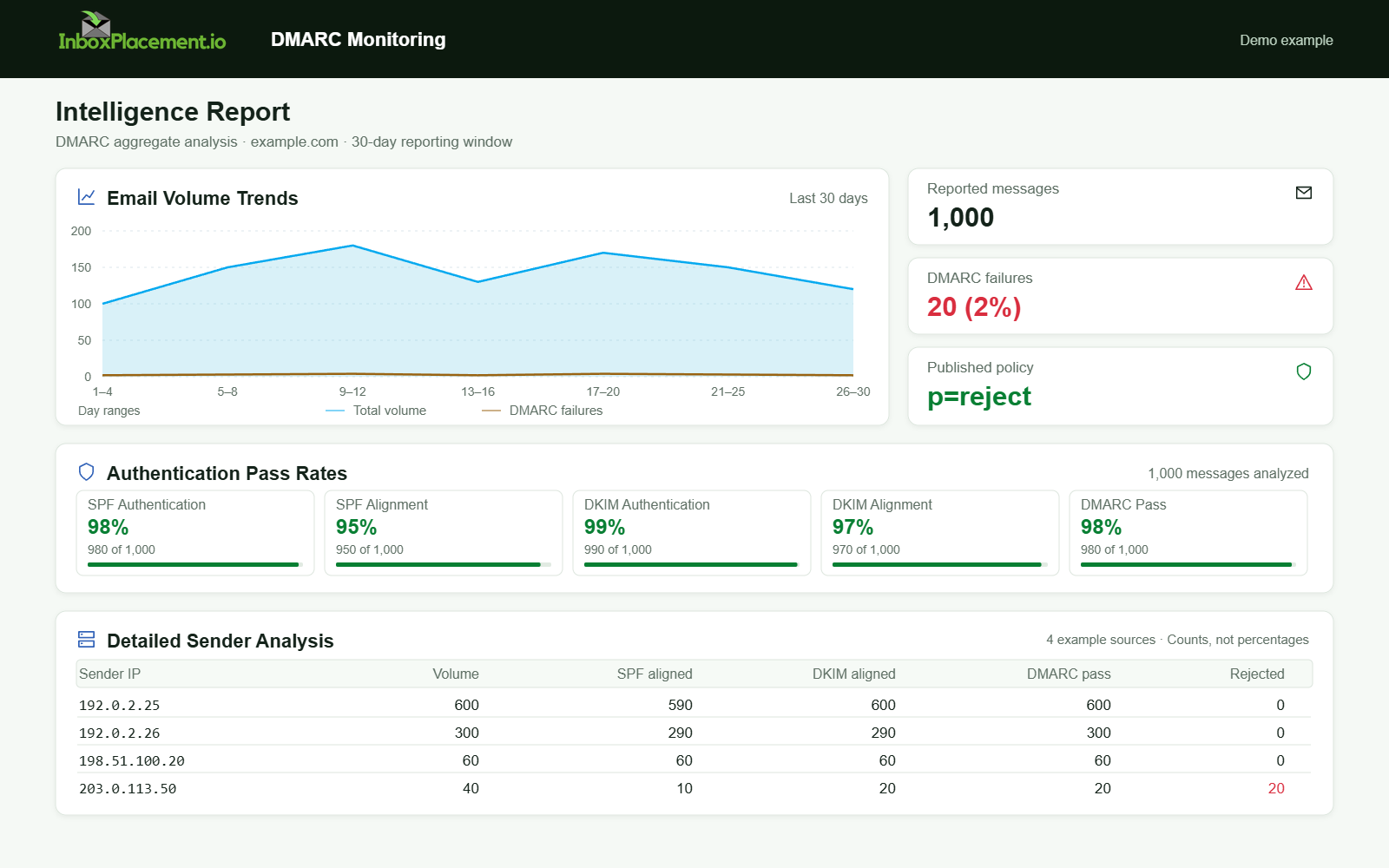
Demo example. DMARC policy and reported outcomes. Synthetic results for feature explanation; not a live test or customer outcome.
Step-by-step interpretation workflow
-
Gather the canonical sources:
- DMARC TXT record for the domain.
- The aggregate RUA XML reports received at the rua destination.
Authentication-Resultsheader from the receiving server for representative messages.- SPF and DKIM DNS records for the sending domain and any relay domains.
- If available, the receiver’s reported disposition metadata.
-
Confirm reporting destination authorization (field check):
- Compare the rua destination recorded in the report to the rua entry in the domain’s DMARC DNS record.
- If the report’s destination matches the published rua, the receiver used the published endpoint; if it differs, mark the scenario as illustrative and investigate whether a third-party service has prior authorization.
-
Read
Authentication-Resultsand map to report fields:- Extract SPF/DKIM/DMARC results from
Authentication-Resultsand verify they align with the aggregate report’s summary for the same time window and IP range.
- Extract SPF/DKIM/DMARC results from
-
Validate SPF/DKIM configuration if failures appear:
- For SPF: check for no record, multiple records, DNS lookup limits, or missing sending IPs (Microsoft troubleshooting lists these as common SPF issues).
- For DKIM: verify signature presence, selector correctness, and that public key records exist.
-
Map observed facts to plausible causes and safe next steps (see Action Matrix below).
-
Retest after corrective steps and compare new reports and
Authentication-Resultsto confirm changes.
Common result patterns and what each may indicate
Each pattern below is illustrative unless you have matched report XML, DNS records, and message headers.
-
Pattern: rua present in DNS, report delivered to same rua, DMARC pass recorded.
- Observed evidence: DMARC DNS includes rua, RUA XML received at same address,
Authentication-Resultsshows DMARC pass. - Likely cause: reporting and authentication alignment as expected.
- Safe next step: maintain monitoring; no immediate policy change.
- Observed evidence: DMARC DNS includes rua, RUA XML received at same address,
-
Pattern: report shows DMARC fail;
Authentication-Resultsshows SPF fail but DKIM pass.- Observed evidence:
Authentication-Resultsindicates SPF fail, DKIM pass (or missing). - Likely cause: sending IP not included in SPF record or alignment issues; DKIM may sign with a different domain or selector.
- Safe next step: validate SPF includes all sending sources and verify DKIM signing domain/selectors.
- Observed evidence:
-
Pattern: no RUA reports received despite rua in DNS.
- Observed evidence: DMARC TXT includes rua, but no aggregate reports arrive at that address.
- Likely cause (illustrative): misformatted rua, blocked mailbox, or receiver omitted reporting for privacy/volume reasons.
- Safe next step: verify rua syntax and mailbox acceptance; add monitoring address if recommended by provider.
-
Pattern:
Authentication-Resultsreports pass, but report disposition indicates quarantine.- Observed evidence: Per-message header shows pass; aggregate report or disposition indicates quarantine.
- Likely cause (illustrative): composite signals (sender reputation, content filters, or message metadata) caused quarantine despite authentication success.
- Safe next step: review message content and sender reputation signals in parallel; do not assume authentication alone governs disposition.
Action matrix: signal, likely cause, safe next step, retest
| Signal observed | Likely cause (illustrative) | Safe next step | Retest criteria |
|---|---|---|---|
DNS has no _dmarc TXT | No DMARC published | Publish a DMARC record with rua for monitoring (do not raise enforcement without owner authorization) | Query DNS until record propagates; check RUA arrival |
| RUA points to a different address than DNS | Rua mismatch or third-party reporting | Verify who manages the rua destination and whether you authorized it | Receive a follow-up aggregate report from the expected rua |
Authentication-Results: SPF softfail | Sending IP not in SPF or SPF lookup limits | Verify the SPF record and sending authorization before changing policy | Send a controlled message and confirm the receiver reports the expected SPF result |
Sources
- How email authentication works in Microsoft 365
- Gmail email sender guidelines
- Troubleshoot email authentication in Microsoft 365
- Yahoo Sender Best Practices