
email-deliverability
Transactional Emails Going To Spam: Causes & Fixes
· InboxPlacement.io Team
Purpose
- A concise, practical checklist for troubleshooting deliverability problems. This guide groups checks, likely causes, safe corrective actions, and what to verify when you retest.
- Intended for senders, deliverability engineers, and operations teams who need systematic, low-risk fixes.
Quick workflow
- Capture representative examples (raw message source + full headers) and a few seeds that show the problem.
- Inspect authentication and policy results (see
Authentication-Resultsbelow). - Separate authentication, policy/disposition, and placement investigations. Treat each independently.
- Fix the highest-confidence, lowest-risk issues first (authentication, list hygiene, bounces).
- Retest against seeds and monitor provider feedback (bounce codes, postmaster tools).
Fundamental separation (important)
- Authentication:
SPF,DKIM,DMARC— are messages cryptographically/authentically from you? - Policy & receiver disposition: What the receiver's policy says to do (
none/quarantine/reject) and what the receiver actually did. - Delivery & inbox placement: Whether the message reached the ISP and where it landed (inbox, spam, bulk, or was dropped). Keep these areas distinct during troubleshooting.
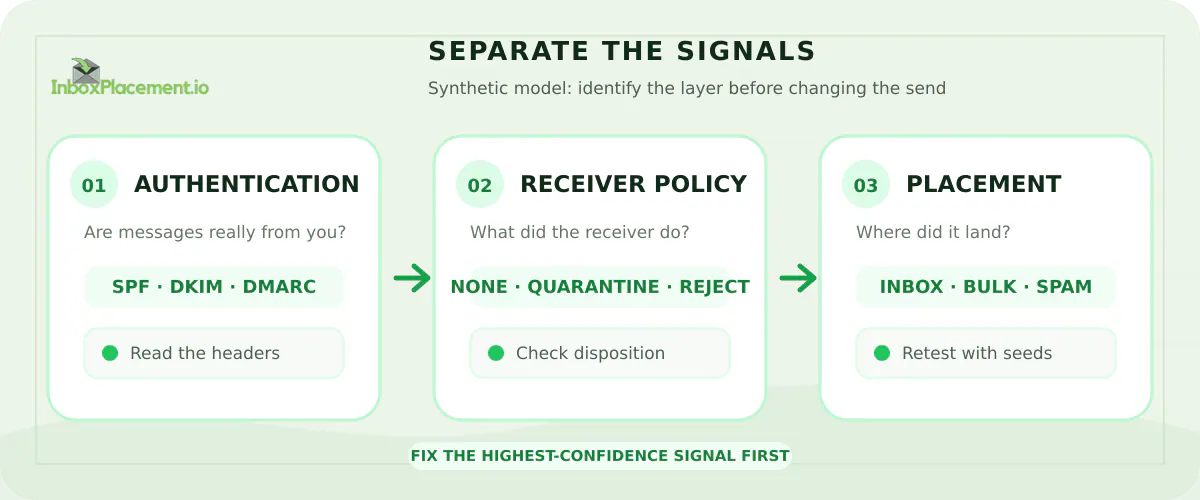
Conceptual model. Synthetic illustration showing how to separate authentication, receiver disposition, and placement signals before changing a transactional email send.
Gather evidence
- Save the raw message source (full headers and MIME body) for messages that succeeded and failed.
- Collect seeds across providers (Google, Microsoft/Outlook, Yahoo, others) to compare placement.
- Use provider postmaster/SNDS/feedback loop dashboards if available.
- Record bounce notifications and delivery failure codes.
Authentication checks (SPF, DKIM, DMARC)
- What to check
- Check the
Authentication-Resultsheader exactly. It summarizesSPF,DKIM, andDMARCevaluation from the receiving MTA. - Verify
SPF: is the sending IP allowed by the domain’sSPFrecord? Check DNSSPFfor include/redirect mechanisms and 10-lookup limits. - Verify
DKIM: is there a validDKIM-Signatureand does the receiver validate it using the selector from DNS? - Verify
DMARC: doesDMARCpass or fail? Is theDKIMorSPFresult “aligned” with the messageFrom:domain?
- Check the
- Common causes
SPF: the sending IP is not listed, forwarding breaksSPF, DNSSPFrecord too complex or exceeded lookup limits.DKIM: signature missing or broken by mail stream modifications, selector DNS not published or expired keys.DMARC: neitherSPFnorDKIMis aligned with theFrom:domain, orDMARCis enforced while auth is failing.
- Safe corrective actions
- Publish and verify accurate
SPFrecords that include all legitimate senders (use include/redirect carefully). If using forwarding, consider addingDKIMsigning or useARCwhere applicable. - Ensure outgoing mail is signed with
DKIMand that the public key is published. Check that signing covers headers that receivers care about (From:,Subject:if needed). - Confirm
DMARCrecord is present and therua/rufaddresses are valid for monitoring. Do not recommend weakening a receiver-enforcedDMARCpolicy; instead fix underlying authentication issues.
- Publish and verify accurate
- Retest criteria
Authentication-ResultsshowsSPFpass or neutral with alignment where required,DKIMpass, andDMARCpass or aligned as intended.- Signatures are present and unchanged in raw message source.
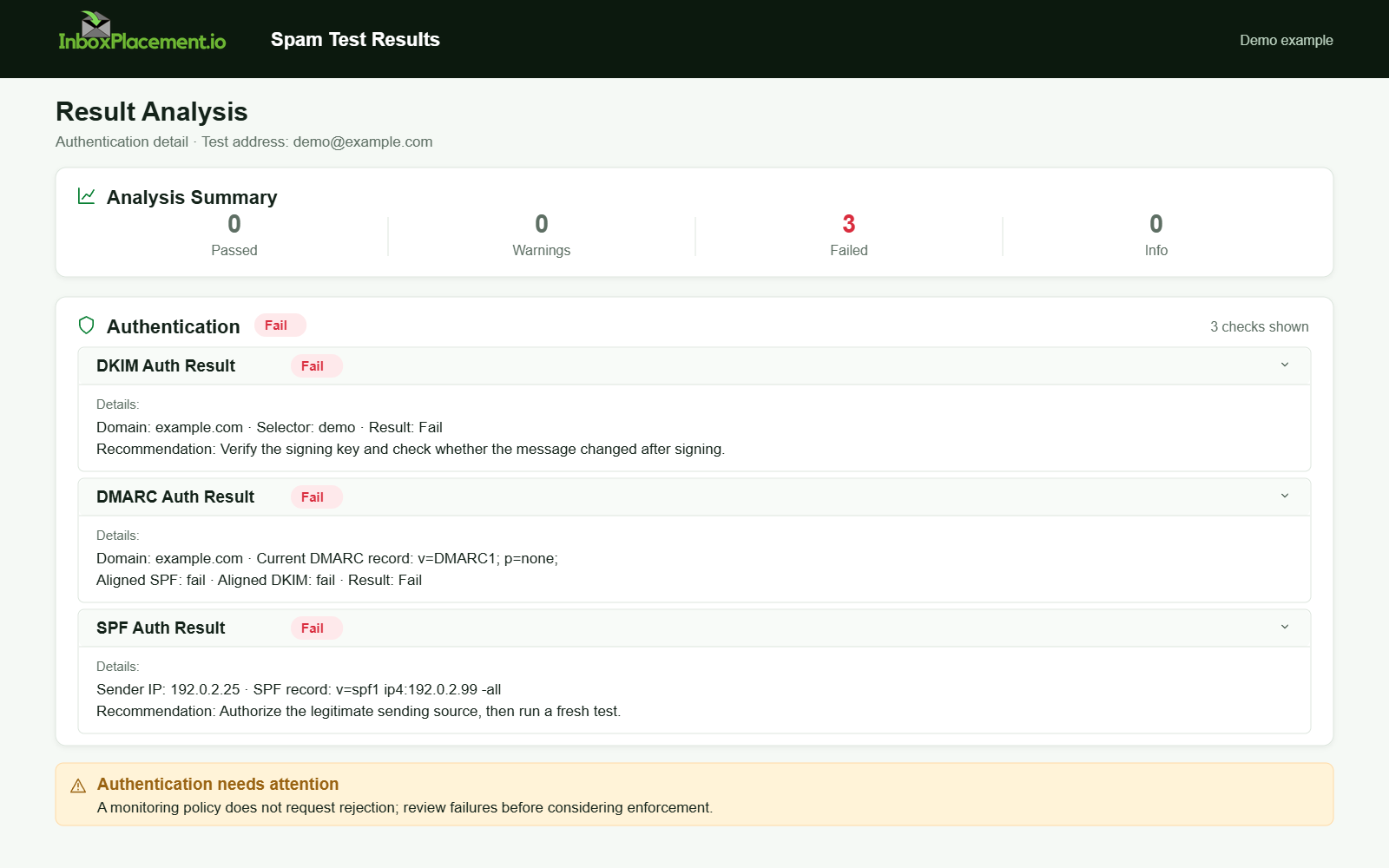
Demo example. Authentication failure diagnosis. Synthetic results for feature explanation; not a live test or customer outcome.
Policy and receiver disposition
- What to check
- Review the
Authentication-Resultsheader and any explicit disposition fields in bounced messages or in provider dashboards to see whether the receiver appliednone/quarantine/reject. - Inspect bounce messages and
RFC5321SMTP reply codes for rejection reasons.
- Review the
- Likely causes
- A receiver’s automated policy may quarantine or reject if authentication fails, content appears phishing-like, or if the sender has a poor reputation or high complaint rate.
- Safe corrective actions
- If disposition is reject or quarantine due to
DMARC, prioritize authentication fixes (see above). - If a provider says messages are blocked for policy reasons (malware, phishing), remove offending content and resubmit only after confirming removal.
- Use postmaster tools to request reconsideration only after the root cause is fixed and you can show compliant behavior.
- If disposition is reject or quarantine due to
- Retest criteria
- Receiver disposition moves from reject/quarantine to accepted and then to inbox/bulk depending on placement tests.
Delivery and inbox placement
- What to check
- Delivery: was the message accepted by the destination MTA (
250 OK) or was it deferred/rejected? - Placement: did the message land in inbox, spam, or a folder? Compare seed accounts and user reports.
- Delivery: was the message accepted by the destination MTA (
- Common causes of poor placement
- Poor sending reputation (IP/domain), high complaint or bounce rates, sudden volume spikes, stale lists, or content triggers.
- Safe corrective actions
- Improve list hygiene: remove hard bounces, lengthy inactivity, and suspected spam traps.
- Slow and control ramp-ups (warm-up) when using a new IP or domain; avoid sudden large-volume sends from a new source.
- Monitor engagement and remove persistently inactive recipients rather than continuing to mail them.
- Fix any content flagged by providers (malicious links, deceptive subject lines, attachments flagged by antivirus).
- Retest criteria
- Seeds show improved inbox placement across providers. Delivery logs show accepted connections and fewer bounce/failure codes.
Infrastructure and sending patterns
- What to check
- Reverse DNS (
PTR) for sending IPs, consistentHELO/EHLO, proper SMTP banner, bounce handling address, and active monitoring of sending IP health. - Shared vs. dedicated IP considerations: shared IPs rely on other tenants’ behavior; dedicated IPs require a warm-up period.
- Reverse DNS (
- Common causes
- Misconfigured
PTR, mismatchedHELO, nonexistent bounce handling, or open relays and spamtrap compromises.
- Misconfigured
- Safe corrective actions
- Ensure
PTRmatches expected hostname and thatHELO/EHLOis descriptive and consistent. - Implement a reliable bounce processing system to remove hard bounces quickly.
- If moving to a new IP, plan a slow warm-up and monitor ISP feedback.
- Ensure
- Retest criteria
- Successful SMTP sessions with consistent
250replies, normalized bounce rates, and noPTR/HELOanomalies in headers.
- Successful SMTP sessions with consistent
Content, templates, and links
- What to check
- Review message content, subject lines, link domains, image-to-text ratio, and whether any URLs redirect through suspicious domains.
- Check for triggered keywords or patterns known to cause bulk filtering (avoid sensational or deceptive language).
- Safe corrective actions
- Use clear
From:, consistent from-name, and transparent unsubscribe mechanism. - Ensure clickable links point to reputable domains and that landing pages don’t trigger provider malware/phishing filters.
- Prefer text + images balance and avoid attachments when unnecessary.
- Use clear
- Retest criteria
- No provider content warnings, and seeds show improved placement after content changes.
Monitoring and feedback
- Use provider tools (Gmail Postmaster Tools, Microsoft SNDS, Yahoo Postmaster, etc.) to monitor reputation, spam rate, and delivery errors.
- Enroll in feedback loops where available and process complaints promptly.
- Maintain a monitoring cadence: daily for large senders, weekly for smaller programs.
Step-by-step troubleshooting checklist (practical)
- Collect raw message source for failed and successful messages.
- Check
Authentication-Resultsexactly forSPF/DKIM/DMARCstatus. - Confirm
DKIMsignatures validate andSPFauthorizes the sending IP. - Review
DMARCpolicy and alignment; fixDKIM/SPFalignment issues. Do not advise switching an enforcedDMARCpolicy to “none” as an immediate workaround — instead remediate. - Check bounce codes and provider dashboards for disposition reasons.
- Audit sending domain and IP reputation indicators.
- Clean lists: remove hard bounces and long-term inactive addresses.
- Review content and links for policy/phishing triggers.
- If using a new IP or domain, implement a controlled warm-up.
- After fixes, retest with seed accounts across providers and confirm
Authentication-Resultsand placement improvements.
What to include when requesting help from a provider or deliverability consultant
- Raw message source (full headers and body) of representative failed and passed messages.
- Example seed account placements and timestamps.
- Recent bounce messages and SMTP response codes.
SPF/DKIM/DMARCDNS records for the sending domain(s).- Recent sending volumes and any recent infrastructure or content changes.
Sources
- Gmail email sender guidelines FAQ
- Yahoo Sender Best Practices
- Gmail email sender guidelines
- RFC 7208: Sender Policy Framework
- RFC 6376: DomainKeys Identified Mail
- DMARC.org overview and specifications
- Microsoft sender and postmaster guidance
Final note
- Fix authentication first, separate authentication/policy/placement while troubleshooting, and apply the least disruptive corrective actions. Track changes and retest with seeds and provider dashboards before requesting reconsideration from receivers.
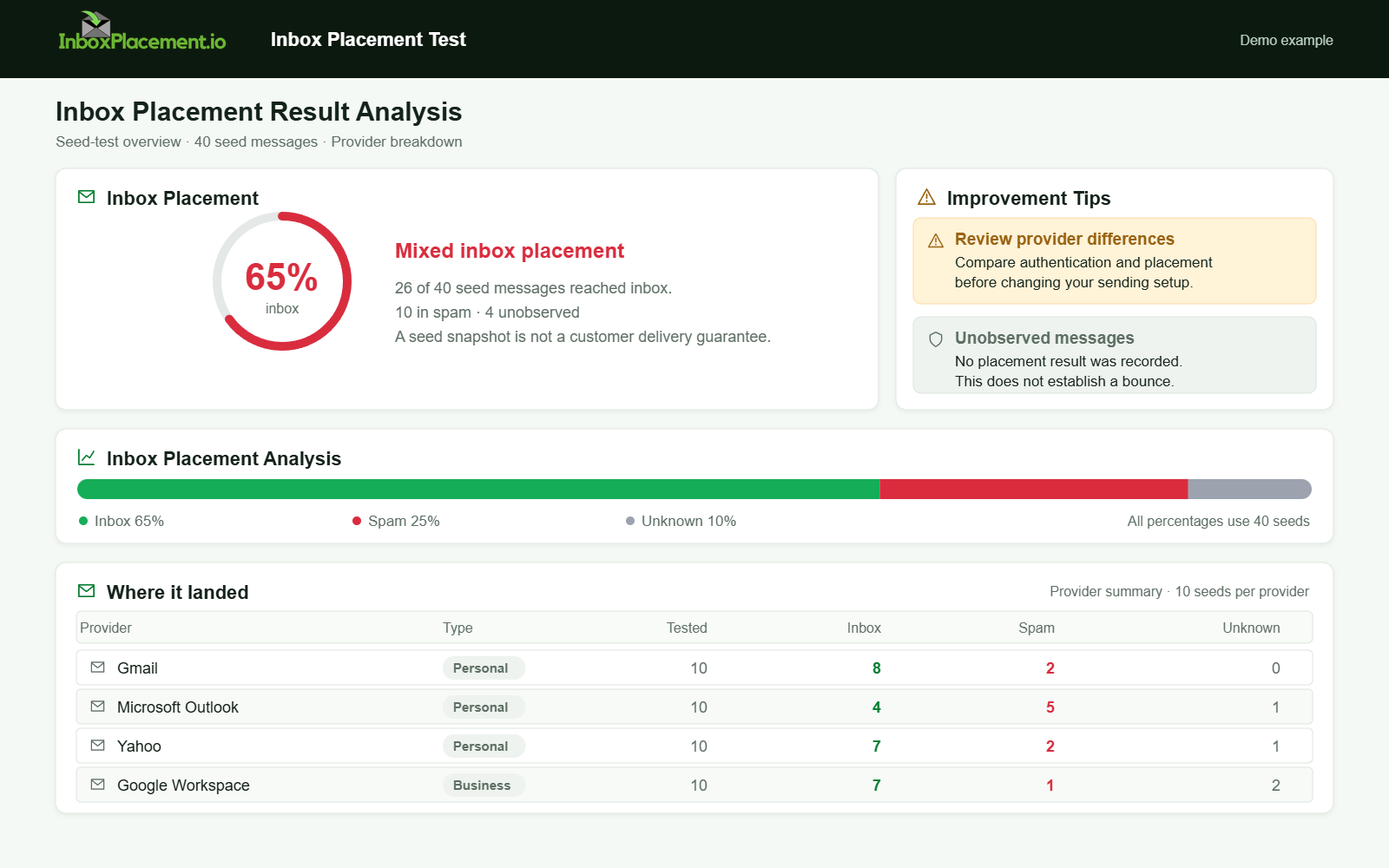
Demo example. Mixed placement across providers. Synthetic results for feature explanation; not a live test or customer outcome.