
TLS-RPT · Email Deliverability · SMTP · Email Authentication · Troubleshooting
TLS-RPT Deliverability Report Interpretation: Field Guide
· InboxPlacement.io Team
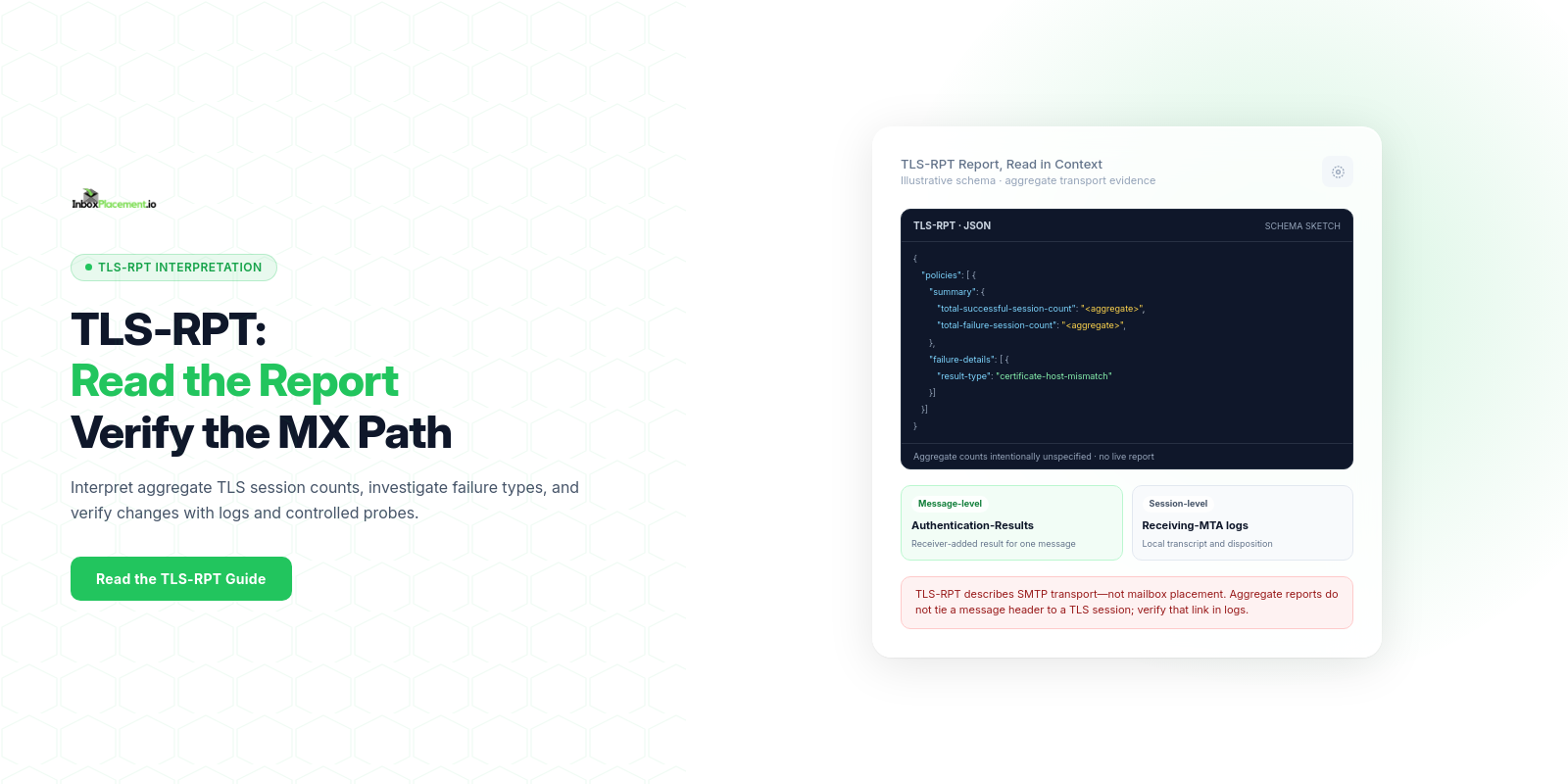
A TLS-RPT (SMTP TLS Reporting) report summarizes whether sending mail transfer agents established policy-compliant TLS sessions with your receiving MX hosts during a reporting window. It is a transport-layer signal—not a message-authentication result or an inbox-placement report. Read each field as a narrow observation, then check plausible causes, safe next steps, and retest criteria.
What the report or signal tells you (direct answer)
RFC 8460 defines a JSON report with aggregate counts of successful and failed TLS sessions, plus details about reported failures. Reports commonly cover a full UTC day and may arrive after a delay; timing and coverage depend on the reporting sender. A missing report is not proof that no TLS problem occurred. Separately, a received message's Authentication-Results header records authentication checks for that message. Correlate report windows with server logs and provider guidance, but do not match a header to a TLS-RPT session unless your own logs support that link.
Fields and signals that matter most
RFC 8460 defines these JSON fields. A dashboard may rename or regroup them, so inspect the raw report when an exact field matters.
- Report identity and period:
organization-name,report-id,date-range.start-datetime,date-range.end-datetime, andcontact-info. - Policy scope: each
policies[]entry includes apolicyobject with fields such aspolicy-type,policy-domain, andmx-host. - Aggregate session counts:
summary.total-successful-session-countandsummary.total-failure-session-count. These summarize sessions for a policy and reporting period; they are not per-message outcomes. - Failure details, when present:
failure-details[].result-type,sending-mta-ip,receiving-mx-hostname,receiving-mx-helo,receiving-ip,failed-session-count, and optionalfailure-reason-codeoradditional-information. - Common
result-typevalues includestarttls-not-supported,certificate-host-mismatch,certificate-expired,certificate-not-trusted, andvalidation-failure. DANE-specific values includetlsa-invalid,dnssec-invalid, anddane-required. Authentication-Resultsis a separate message header, not a TLS-RPT JSON field. Collect it from received messages and keep it separate from transport reports.- Receiver disposition—such as accepted, queued, bounced, or rejected—comes from receiving-server logs or provider reporting, not from TLS-RPT alone.
Always keep TLS signals and authentication signals separate when you record them.
Step-by-step interpretation workflow
- Collect and index reports
- Preserve the original JSON and record its
date-range, reporting organization, policy domain, MX host, and aggregate counts. - Collect receiving-server SMTP logs and
Authentication-Resultsheaders from sample messages for the same time window, but store them as separate evidence.
- Preserve the original JSON and record its
- Confirm the observed fact (evidence)
- Record the exact JSON path,
result-type,failed-session-count, reporting window, and relevant sending/receiving IPs and hostnames. - Quote any
Authentication-Resultsheader separately. Do not call it evidence from the same connection unless logs correlate it by time, host, and IP.
- Record the exact JSON path,
- Classify the observation
- Classify the TLS report's aggregate success/failure counts and each reported
result-type. - Classify message authentication separately from
Authentication-Results; distinguish SPF, DKIM, and DMARC results from published DMARC policy and receiver disposition.
- Classify the TLS report's aggregate success/failure counts and each reported
- Map to likely causes (hypothesis)
- For each failure type, list plausible causes such as a hostname mismatch, expired or untrusted certificate, a policy lookup problem, or an MX configuration issue.
- Use receiving-server logs and controlled TLS probes to investigate protocol or network behavior; the RFC 8460 report schema does not define a universal negotiated-TLS-version or cipher-suite field.
- Choose safe next steps
- Prefer non-destructive verification: check the certificate chain for each reported MX, review server configuration, run a controlled TLS probe, and confirm relevant policy records from authoritative DNS.
- Review SPF/DKIM/DMARC only when message-level evidence points to an authentication issue; do not treat those checks as a fix for a TLS failure.
- Retest and measure change
- After an authorized fix, compare the next complete TLS-RPT window with a comparable prior window and allow for report delivery delay.
- Re-run the same TLS probe and compare relevant server logs. Review new message headers separately when authentication also needed correction.
- Escalate if unresolved
- If a provider reports a specific TLS-related rejection or rate limit, use its current guidance and the exact SMTP response. Do not infer a provider enforcement action from TLS-RPT alone.
Common result patterns and what each may indicate
Each pattern below separates the observed fact, possible causes, safe actions, and retest criteria. All scenarios are illustrative.
Pattern A — Observed: TLS-RPT reports an elevated aggregate failure count and a TLS failure result-type
- Possible causes:
- Receiving-server misconfiguration, such as an expired or incorrectly installed certificate.
- Network or policy conditions that prevent a compliant TLS session.
- Safe actions:
- Check the exact failure type and affected MX host in the report.
- Verify the certificate chain and MX DNS targets.
- Use controlled external TLS probes and server logs to investigate the receiving path.
- Retest criteria:
- A later comparable report shows the relevant failure count or type has changed, and a probe confirms the expected TLS behavior. Review authentication headers separately if needed.
Pattern B — Observed: result-type is certificate-host-mismatch or certificate-not-trusted
- Possible causes:
- Hostname in the certificate does not match the MX name, or a test certificate was left in production.
- Safe actions:
- Verify the certificate chain and hostname on each MX target.
- Replace or reissue a certificate only when authorized; change MX DNS only if you control the domain and certificate plan.
- Do not advise sending parties to disable certificate validation.
- Retest criteria:
- Controlled probes confirm a trusted certificate that matches the MX hostname, and a later report no longer shows the same failure.
Pattern C — Observed: TLS report shows successful sessions while a sample message has authentication failures
- Possible causes:
- Sender authentication settings or alignment issues are independent of TLS.
- Message rewriting or forwarding that breaks DKIM signatures.
- Safe actions:
- Treat authentication failures separately: inspect the sample message's
Authentication-Results, published SPF/DKIM records, and DMARC alignment. - Avoid changing TLS or DMARC policy without owner authorization.
- Treat authentication failures separately: inspect the sample message's
- Retest criteria:
- A new sample message shows the expected authentication results. Do not infer that it is the same session represented in an aggregate TLS-RPT count.
Pattern D — Observed: sparse TLS-RPT entries but delivery complaints or rejections reported by a mailbox provider
- Possible causes:
- Not every sending system supports or submits reports for your domain.
- Transient errors such as timeouts are not required to appear in TLS-RPT, and reports may arrive after the event window.
- Safe actions:
- Confirm your domain's TLS-RPT reporting policy and check whether the provider is expected to send reports.
- Cross-check provider feedback and receiving-server logs; do not treat missing TLS-RPT data as proof that delivery succeeded.
- Retest criteria:
- Reports, probes, logs, and provider feedback agree for a comparable reporting window.
Action matrix: signal, likely cause, safe next step, retest
| Signal (illustrative) | Likely cause(s) | Safe next step | Retest criterion |
|---|---|---|---|
TLS-RPT shows a failure result-type | Certificate, MX, network, or policy issue matching that result | Inspect the JSON detail, certificate, DNS, server logs, and a controlled TLS probe | A comparable later report and probe show the expected change |
certificate-host-mismatch or certificate-not-trusted | Wrong hostname or an untrusted/incomplete certificate chain | Verify each MX target and replace the certificate only with owner authorization | Probe validates a trusted certificate matching the MX hostname |
| A probe or server log shows an older TLS version | Server or client configuration; this is not a standard RFC 8460 report field | Confirm support requirements, server settings, and compatibility before hardening | The same probe confirms the intended negotiated version |
Authentication-Results shows SPF fail and DKIM pass | SPF authorization or message identity alignment issue | Review the sending IP and SPF alignment; keep this message-level evidence separate from TLS-RPT | A new sample message shows the expected SPF result |
DMARC policy is p=quarantine or p=reject, but a message has DMARC fail | SPF/DKIM alignment or source authorization issue | Map legitimate senders to aligned SPF/DKIM; do not weaken DMARC without owner authorization | A new authorized message shows DMARC pass |
Note: every table row is an interpretation template; field names and signals are illustrative and should be mapped to your actual report keys.
Limitations and conclusions the data cannot support
- TLS-RPT reports are aggregated; a report entry cannot prove a particular message reached a recipient or landed in the Inbox.
- A missing report does not prove TLS succeeded: reporting coverage depends on sending systems, report delivery can be delayed, and transient failures are not required to be reported.
- RFC 8460 defines aggregate session counts and failure details, not a universal TLS version or cipher-suite field. Confirm the data source before interpreting such fields in a third-party dashboard.
- A successful TLS handshake does not prove message authentication (SPF/DKIM/DMARC) nor does it guarantee the message will avoid spam filtering.
- A DMARC policy published as
p=rejectorp=quarantinedoes not tell you how every mailbox provider will apply it to every message. Authentication-Resultsvalues describe a message-level authentication evaluation; TLS-RPT summarizes transport sessions. Correlate them only through your own logs and a shared time window.- Never change or weaken a published DMARC enforcement policy (
p=quarantineorp=reject) without explicit owner authorization and a documented plan.
Illustrative example (no first-party data)
The following scenario is illustrative and not drawn from any real report.
Observed facts:
- A TLS-RPT JSON failure detail contains
result-type: "certificate-host-mismatch"for a receiving MX hostname. - A separate sample message from the same reporting window has an
Authentication-Resultsheader showing SPF and DKIM pass.
Possible causes (illustrative):
- The MX certificate does not include the hostname used for the connection.
- A load balancer or a subset of MX hosts serves a different certificate.
Safe actions (illustrative):
- Probe each MX target and verify its certificate chain and hostname.
- Use receiving-server logs to see whether the report detail can be associated with a specific connection. The sample message's authentication header does not by itself identify that TLS session.
Retest criteria (illustrative):
- A controlled probe confirms a trusted certificate that matches the MX hostname, and a later comparable TLS-RPT window no longer shows the same failure type.
FAQ
Can TLS-RPT tell me whether messages reached users' inboxes?
No. TLS-RPT-type reports record transport-layer TLS outcomes for connections that generated reports. Inbox placement is determined by a mailbox provider's spam and ranking systems and cannot be inferred solely from TLS-RPT.
If TLS fails, should I change DMARC to p=none to prevent rejections?
No. Do not weaken DMARC policies without explicit owner authorization and a documented emergency plan. TLS and DMARC serve different purposes: TLS protects transport; DMARC controls authentication and alignment. Address TLS issues directly and coordinate any policy changes with domain owners.
Should I treat an Authentication-Results fail the same as a delivery failure?
No. Authentication-Results records an authentication evaluation; a fail means a check failed or did not align. Delivery decisions come from the receiver and require separate disposition evidence from server logs or provider reporting.
Run an InboxPlacement inbox placement test to verify where sample messages land after applying an authorized change. For authentication reporting and policy context, see DMARC monitoring.
Sources
- The SMTP TLS Reporting standard (RFC 8460) defines the JSON report fields and aggregation model.
- Google's Email sender guidelines require senders to use TLS for email to Gmail accounts.
- Google's Email sender guidelines FAQ says enforcement began ramping up in November 2025 and describes current compliance checks in Postmaster Tools; verify the latest guidance before making provider-specific decisions.