
Deliverability · Inbox Placement · Email Authentication
How to Interpret Inbox Placement Test Results — Guide
· InboxPlacement.io Team
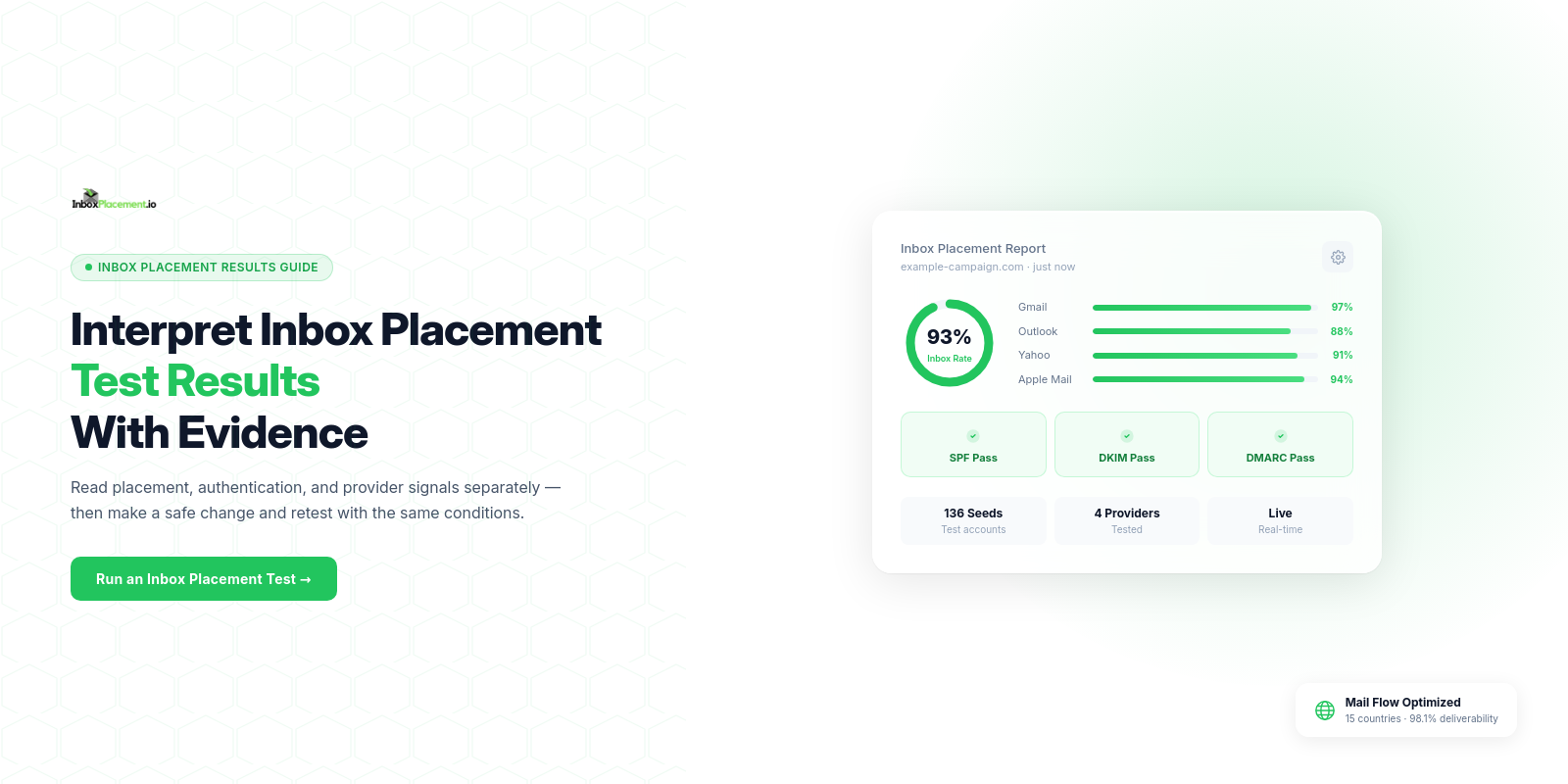
Start with the direct answer: An inbox placement report is a bundle of signals — where test messages landed (inbox, spam, or blocked), message-level authentication evidence (as reported in the
Authentication-Resultsheader), provider disposition notes, and technical checks (SPF/DKIM/DMARCpass/fail and related metadata). Treat each field as an independent signal: none of them alone proves permanent reputation or inbox delivery. Use a field-by-field read to form cautious, testable hypotheses, then apply minimal safe fixes and retest.
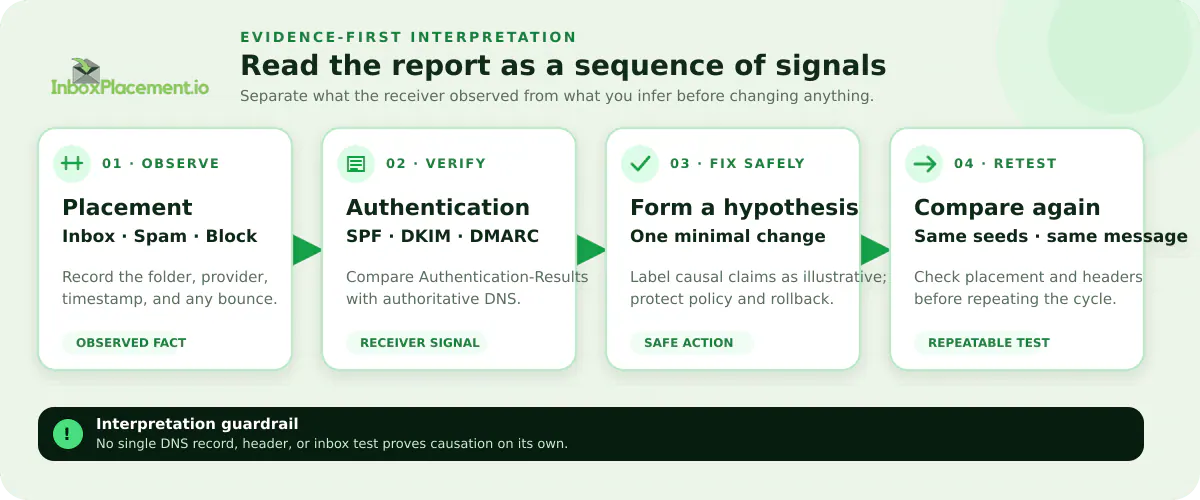
Illustrative workflow. Synthetic teaching graphic for feature explanation; not a live test or customer outcome.
What a placement report or signal actually tells you
- Observed delivery location (Inbox / Spam / Block / Deferred) = a receiver’s disposition for that message at the time the test ran.
Authentication-Resultsheader entries (spf=,dkim=,dmarc=) = the receiver’s computed authentication outcome for that message.- Provider-specific notes or SMTP bounce codes = server-side decisions or errors that explain rejection or temporary failure.
- Ancillary technical signals in a report (IP, domain, header anomalies) = inputs the receiver used when forming its decision.
Interpretation guardrail: Treat
Authentication-Resultsas the receiver’s statement of authentication for that message, not as proof that authentication always caused the disposition. Label any inferred causal link as illustrative unless you have additional telemetry.
Fields and signals that matter most
Each field below should be read separately and then combined cautiously.
Delivery location (Inbox / Spam / Block / Deferred)
- Observed evidence: the mailbox where the test message appeared or whether the test session received a rejection code.
- Possible meaning (illustrative): inbox = message accepted and routed to the primary view; spam = accepted but placed in spam/junk; block/reject = message refused by the server.
- Safe next step: capture the full SMTP session or bounce code if present; record timestamp and seed address provider.
- Retest criteria: repeat the same test after applied changes (see workflow).
Authentication-Results header
- Observed evidence:
Authentication-Resultsheader lines containspf=,dkim=,dmarc=results and sometimes receiver notes. - Possible meaning (illustrative):
spf=passmeans the sending IP matched the published SPF policy for the domain at check time;dkim=passmeans the signed elements verified;dmarc=passindicates alignment checks passed per receiver evaluation. - Safe next step: verify DNS records for SPF/DKIM/DMARC from authoritative DNS and reconcile any mismatch with what
Authentication-Resultsshows. - Retest criteria: after DNS fixes or signing changes, send a new test and confirm
Authentication-Resultsshows the expected pass values.
DMARC policy published vs. DMARC result
- Observed evidence: your DNS DMARC record (
p=none/p=quarantine/p=reject) is separate from what the receiver reports asdmarc=inAuthentication-Results. - Possible meaning (illustrative): a published
p=rejectdoes not guarantee delivery; it instructs receivers how to treat failing mail. Conversely,p=noneprovides reporting only. - Safe next step: do not change DMARC enforcement without owner authorization and a rollback plan. Use reporting to iterate toward enforcement.
- Retest criteria: after any authorized policy change, monitor reports and run seed tests.
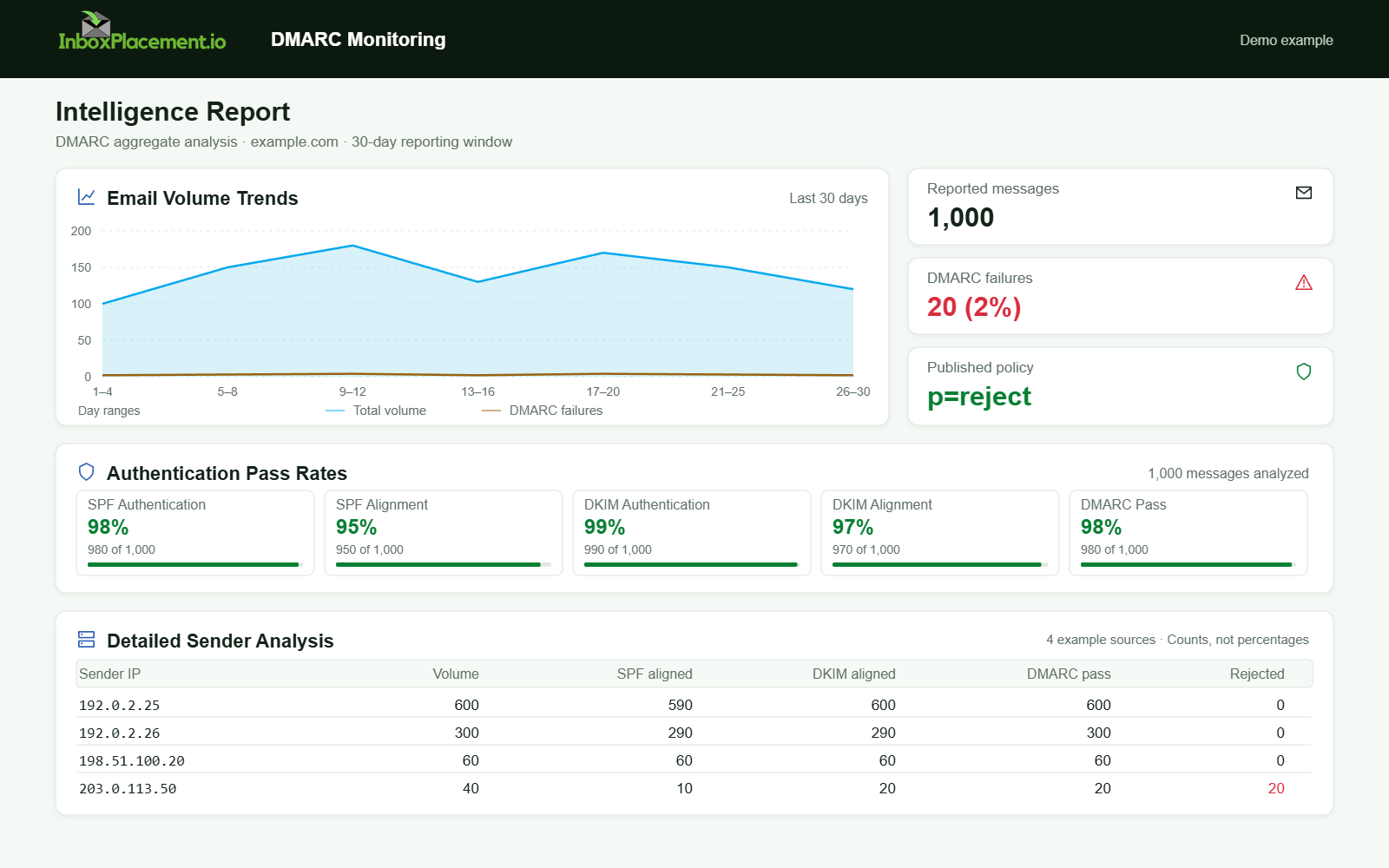
Demo example. DMARC policy and reported outcomes. Synthetic results for feature explanation; not a live test or customer outcome.
Provider-specific disposition notes & SMTP codes
- Observed evidence: bounce text or diagnostic codes from the receiving server; provider annotations in the report.
- Possible meaning (illustrative): codes or annotations can indicate authentication failure, content filtering, or rate limits.
- Safe next step: collect the exact SMTP code and full diagnostic text; map codes to provider documentation.
- Retest criteria: once the specific cause is addressed (auth fix, reduced volume), confirm behavior with a new seed test.
Reputation and content signals included in reports
- Observed evidence: lists, blocklist status, or content-scan verdicts included by the testing tool.
- Possible meaning (illustrative): presence on a blocklist or a high-risk content score may explain spam placement.
- Safe next step: prioritize authentication fixes first (they are low-risk to change); follow with content and list hygiene reviews.
- Retest criteria: after delisting requests or content edits, rerun the test.
Step‑by‑step interpretation workflow
- Record the raw evidence
- Save the seed message headers,
Authentication-Resultsheader, SMTP session or bounce, and the exact delivery folder.
- Save the seed message headers,
- Separate facts from inferences
- Fact example: "Seed A landed in Spam and
Authentication-Resultsshowsdkim=fail." - Inference (illustrative): "DKIM failure may have contributed to spam placement."
- Fact example: "Seed A landed in Spam and
- Prioritize fixes by safety and impact
- Authentication (SPF/DKIM/DMARC) fixes are generally safe and foundational; follow provider guidance.
- Apply minimal safe changes
- Make targeted DNS/authentication updates or correct signing selectors; avoid broad policy loosening.
- Retest with identical test conditions
- Use the same message and seed set, then compare
Authentication-Resultsand placement.
- Use the same message and seed set, then compare
- Iterate and keep records
- Log before/after evidence and timestamps for each change.
Common result patterns and what each may indicate
All scenarios below are illustrative.
Illustrative pattern: Inbox + spf=pass, dkim=pass, dmarc=pass
- Observed evidence: message in inbox and
Authentication-Resultsshows pass for SPF, DKIM, DMARC. - Possible causes (illustrative): alignment and authentication are correct; content and engagement likely acceptable for that mailbox at that time.
- Safe actions: no immediate authentication change; monitor reproducibility across seeds and providers.
- Retest: periodic seeds; include additional messages with varied content.
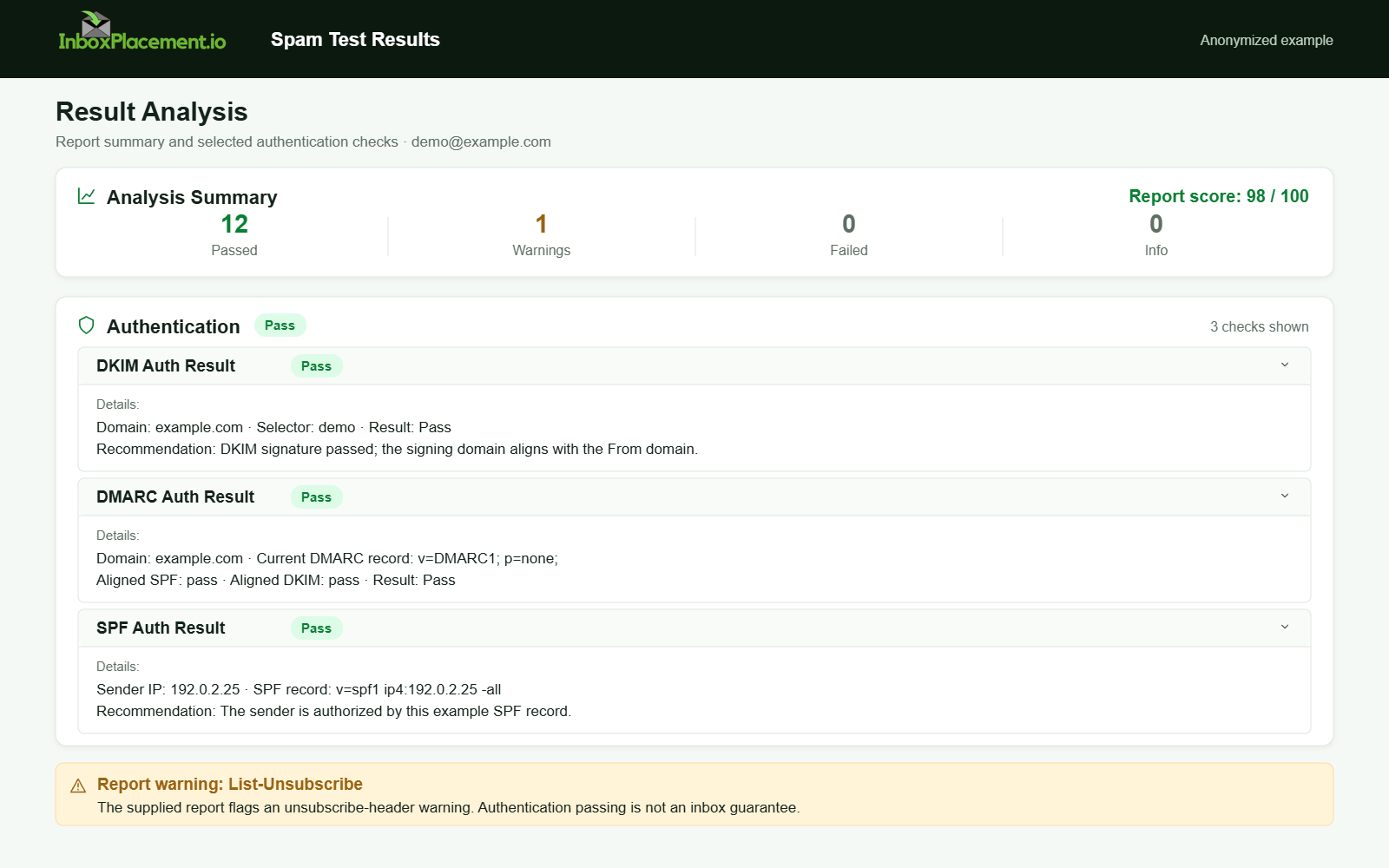
Anonymized example adapted from a supplied product report. Selected figures retained; identifiers and layout reconstructed. Not a new live test.
Illustrative pattern: Spam + dkim=fail, spf=pass, dmarc=fail
- Observed evidence: spam placement; DKIM failed, DMARC failed due to alignment or DKIM fail.
- Possible causes (illustrative): signing key mismatch, wrong selector, or message altered in transit.
- Safe actions: check DKIM selector and private key rotation; verify outbound signing path; consult provider docs for DKIM troubleshooting.
- Retest: after repair, expect
dkim=passanddmarc=passinAuthentication-Resultson a new test.
Illustrative pattern: Rejected with SMTP 5xx + no Authentication-Results
- Observed evidence: immediate bounce with 5xx code and no
Authentication-Resultsheader. - Possible causes (illustrative): server refused connection before authentication evaluation (e.g., IP block, rate limits).
- Safe actions: collect full SMTP transcript, check IP reputation, and contact postmaster for the receiving provider if needed.
- Retest: coordinate with receiving provider or rotate sending path if authorized; run a low-volume test.
Illustrative pattern: Inbox for some providers, Spam for others
- Observed evidence: cross-provider variance in placement.
- Possible causes (illustrative): provider-specific reputation models, differing content filters, or sender status (e.g., bulk sender classification).
- Safe actions: map which providers place mail and check provider requirements (see Sources). Address provider-specific issues in priority order.
- Retest: targeted seeds against providers where mail landed in spam.
Action matrix: signal, likely cause, safe next step, retest
| Signal (observed fact) | Likely cause (illustrative) | Safe next step | Retest criteria |
|---|---|---|---|
spf=none or no SPF TXT | No SPF published | Publish a correct SPF TXT for sending domain; keep under DNS lookup limits | New test shows spf=pass for same seed |
dkim=neutral/permfail | Wrong selector, expired key, or signing not applied | Verify DKIM selector, private key, and signing chain; coordinate with ESP | dkim=pass observed in Authentication-Results |
dmarc=fail while p=quarantine/p=reject | Alignment failure between From and auth domains | Do not weaken DMARC. Fix SPF/DKIM alignment; use aggregate reports to locate sources | dmarc=pass or intended disposition in new test |
| Message rejected with specific bounce code | Provider-side enforcement (rate, list, or policy) | Capture code and check provider docs; open postmaster support if needed | Successful acceptance on repeat after issue addressed |
| Delivered to spam with no auth failures | Reputation or content filter | Review content, links, unsubscribe, engagement and list hygiene | Improved placement across seeds after changes |
Checklist for a single test review
- Save the exact delivered folder and timestamp.
- Export full headers including
Authentication-Results. - Record SMTP bounce codes or diagnostic text if any.
- Confirm DNS SPF, DKIM, DMARC records from authoritative DNS.
- Compare
Authentication-Resultsvalues to DNS-published policies. - Label all causal statements as illustrative unless you have provider confirmation.
- If changing DMARC, obtain owner authorization, set narrow scope/time limits, and define rollback criteria.
What the test and its fields cannot prove
- A single test cannot prove long-term reputation or that a single authentication failure alone caused placement.
- Authentication successes (
spf=pass,dkim=pass,dmarc=pass) do not guarantee inbox placement. Authentication is necessary but not sufficient. - A DMARC policy (
p=reject/p=quarantine) being published does not ensure receivers will uniformly enforce it; enforcement behavior varies by provider. - Presence or absence in one mailbox provider’s inbox does not prove universal delivery performance.
Remember: Authentication-Results reports what the receiver computed for that message, not an absolute proof of causation.
Practical evidence to collect (what to gather from each test)
- Seed address and mailbox provider.
- Full message headers (including
Authentication-Results). - SMTP session transcript or bounce code.
- Exact DNS TXT records for SPF, DKIM selector records, and DMARC record retrieved from authoritative DNS.
- Timestamped notes of any changes made before retesting.
Sources
- Use Yahoo Sender FAQ guidance when mapping provider-specific requirements and enforcement timelines; the FAQ notes enforcement windows and that spoofed mail counts toward bulk-sender thresholds and that List-Unsubscribe enforcement was scheduled to begin in June 2024.
- Use Google’s Postmaster and email sender guidelines FAQ to understand Gmail’s bulk sender classification and enforcement approach; Google documents when stricter enforcement begins and explains bulk sender status criteria.
- Use Microsoft’s email authentication troubleshooting guidance and authentication overview to interpret SPF, DKIM, and DMARC outcomes and typical troubleshooting steps; Microsoft explains how failures can lead to quarantine, rejection, or junk-folder routing.
FAQ
How should I use Authentication-Results when diagnosing placement?
Authentication-Results is the receiver’s report of authentication checks for that message. Use it as factual evidence of what the receiver saw, then cross-check against authoritative DNS records and the SMTP transcript. Treat any causal statement as illustrative unless the receiver confirms it.
Can I change DMARC to p=none temporarily to fix placement?
Do not advise weakening an existing DMARC enforcement policy without the domain owner’s explicit authorization. Any emergency change must be narrowly scoped, time-limited, and accompanied by rollback criteria and monitoring.
How many seed tests should I run before acting?
Collect at least one reproducible test after a controlled change (for example, one before and one after an authentication fix). Use multiple seeds across providers to confirm cross-provider behavior. Label scenario interpretations as illustrative.
Run an InboxPlacement test to verify authentication signals and mailbox placement after applying the recommended changes.