
deliverability · authentication · outlook
SPF Passes But Email Goes To Outlook Junk: Causes & Fixes
· InboxPlacement.io Team
A concise answer: an SPF pass means the receiver reported that the sending IP was authorized for the evaluated SPF identity. That identity may not be the visible From domain, and an SPF pass does not guarantee Inbox placement. Microsoft 365 may also report a separate composite-authentication verdict (compauth) in Authentication-Results; that verdict is not a mailbox-folder result. This guide shows what evidence to collect, how to assess possible causes, and how to verify changes without confusing authentication, receiver action, and placement.
Direct diagnosis: what the symptom usually means and what it does not prove
Observed example
- A recipient reports that a message landed in Outlook Junk while its
Authentication-Resultsheader reportsspf=pass. The folder report and authentication result are separate observations; neither identifies the root cause on its own.
What an SPF pass proves
- The receiver reports that the sending IP was authorized for the SPF identity named in the result. Record that identity too; do not assume it is the visible
Fromdomain.
What SPF pass does not prove (separate signals)
- It does not prove the message will be placed in the Inbox.
- It does not guarantee DKIM alignment or a DMARC result of
passfor the visibleFromdomain. - It does not reveal the receiver’s content filtering, reputation assessment, or mailbox rules.
Key definitions you should keep distinct
- DMARC result: the receiver-reported outcome for a message, such as
dmarc=passordmarc=fail. A pass requires at least one passing SPF or DKIM identity to align with the visibleFromdomain. - Published DMARC policy: the DNS policy (
p=none,p=quarantine, orp=reject) requested by the domain owner. It is separate from the result for a particular message. - Receiver disposition: what the receiving system actually did with the message, such as accepting, quarantining, or rejecting it. A published policy or authentication result alone does not prove the final action.
- Delivery / Inbox placement: the folder reported by the recipient, such as Inbox, Junk, or Quarantine. This is distinct from both the DMARC result and receiver disposition.
Why that matters
- Microsoft describes SPF, DKIM, DMARC, and ARC as complementary protections against spoofing and phishing, and documents a separate composite-authentication result for Microsoft 365. These signals help explain authentication; they do not by themselves establish where a message will land. (See Sources.)
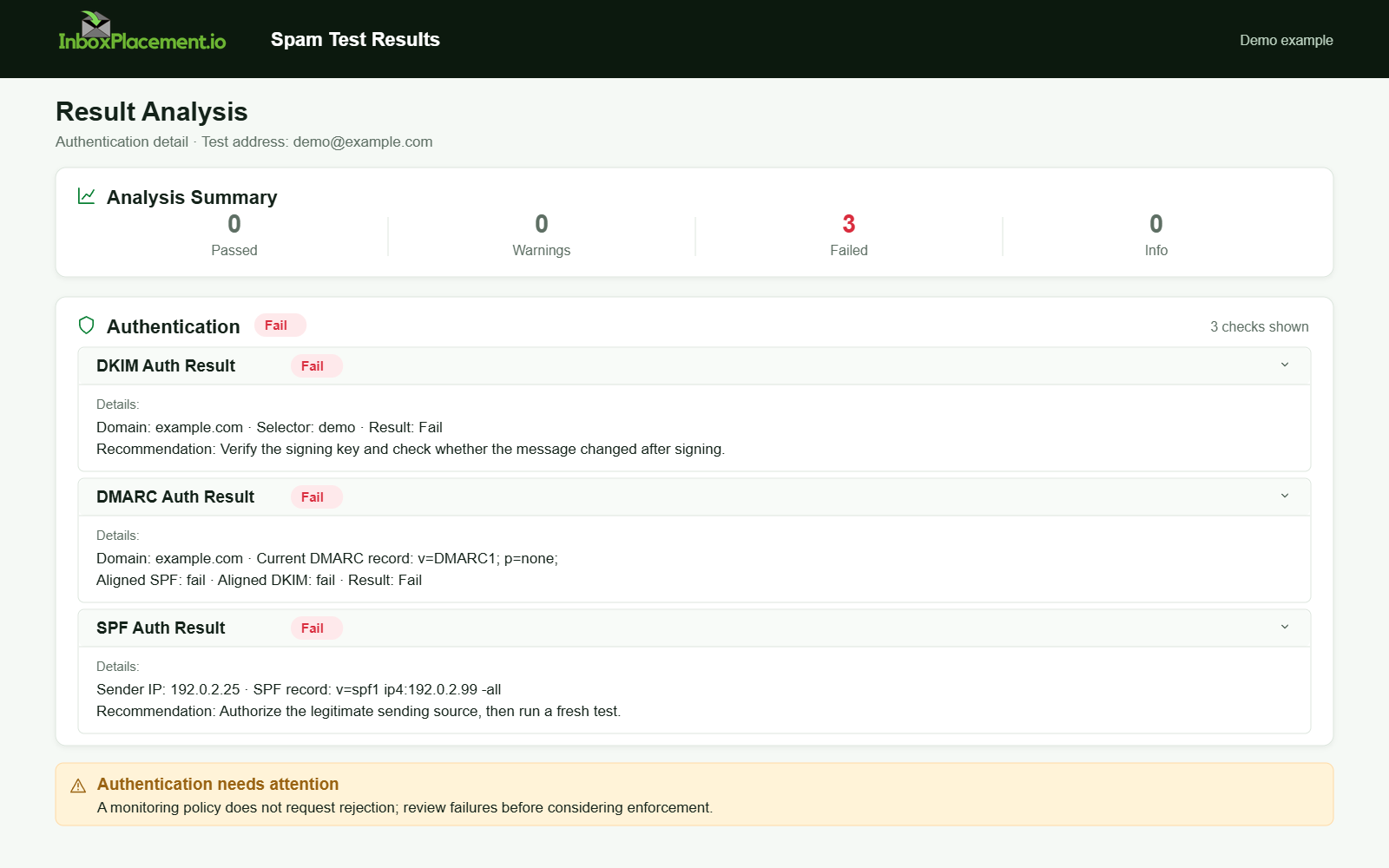
Demo example. Authentication failure diagnosis. Synthetic results for feature explanation; not a live test or customer outcome.
Evidence to collect before changing anything
Collect this evidence for a representative message (do not change DNS or policies before collecting it). Label collected items clearly as “observed evidence.” Do not infer root cause until you map observed signals to likely causes. If you lack full telemetry for a scenario, mark that scenario illustrative.
- Full message headers and a delivered copy. In Outlook, collect the
Authentication-ResultsandReceivedheaders. - The receiver-reported DMARC result and alignment details from
Authentication-Results, separately from the published DMARC TXT record for the visibleFromdomain (including itsp=value). - The SPF result (
spf=pass,softfail,fail,permerror, ortemperror) and the identity evaluated by the receiver. - Whether a DKIM signature is present and valid (
dkim=passordkim=fail), including its signing domain (d=). - The sending IP and its reverse-DNS/
PTRinformation; capture the SMTPHELO/EHLOname when available. - The envelope sender (
MAIL FROM) and visibleFromdomain so you can assess alignment. - Any forwarding or mailing-list hops in
Receivedheaders, along with available ARC headers. ARC can preserve prior authentication information, but it does not guarantee that a receiver will trust it. - The message subject, links, URL shorteners, attachments, and HTML as context to review—not as proof of a filtering cause.
- Recent sending volume, bounce changes, complaint data, or provider feedback, if available. Metrics and access vary by provider.
- The recipient service (such as Outlook.com or Microsoft 365/Exchange Online), user-level junk filters, Outlook rules, and organization transport policies. Ask the mailbox owner or administrator for help where needed.
A symptom-to-cause decision tree
Use this table to move from observed evidence to possible explanations and a first safe action. Treat the explanations as hypotheses unless you have matching message and recipient evidence.
| Observed evidence | Possible explanation (not a diagnosis) | First safe action |
|---|---|---|
Authentication-Results reports spf=pass, dkim=none or dkim=fail, and dmarc=fail | No aligned authentication pass is reported; inspect the evaluated domains before attributing the failure | Compare the SPF identity and DKIM d= with the visible From domain. Confirm the selector and DNS record; do not change DMARC policy based on one message. |
spf=pass and dkim=pass, but dmarc=fail is reported | One or both passing identities may not align with the visible From domain | Compare the SPF identity, DKIM d=, and From; record the published p= policy separately and confirm the receiver’s actual action from its trace or bounce. |
Received headers show forwarding or mailing-list hops, and the final receiver reports different authentication results | Forwarding or message modification may affect SPF or DKIM; ARC may preserve earlier results for receiver evaluation | Compare the original and final headers, collect the ARC set, and ask the intermediary how it handles authentication. Do not assume ARC guarantees acceptance or Inbox placement. |
| Provider feedback flags message content, or a provider-specific verdict accompanies repeated Junk placement | Content filtering or other provider-specific signals may be involved | Save the message, headers, and provider feedback; compare controlled tests without changing allowlists or other recipient filters. |
A sending IP lacks reverse DNS or does not meet the provider’s published DNS/HELO requirements | A technical sending configuration needs review; this alone does not prove why the message went to Junk | Check reverse and forward DNS and the HELO/EHLO name with the mail administrator, then compare with the recipient provider’s current guidance. |
DNS has no DMARC record or publishes p=none | The domain has no DMARC policy or a monitoring-only policy; this does not by itself explain Junk placement | If no record exists, discuss a monitoring record and reporting address with the domain owner. If p=none already exists, review alignment results and reports; do not treat it as a placement fix. |
Common causes to investigate
These are possible causes to investigate, not a ranking. Use matching headers, provider feedback, and recipient-side evidence before deciding which one applies.
-
Missing or misconfigured DKIM
- Evidence:
Authentication-Resultsreports no DKIM signature ordkim=fail. - Why to investigate: DKIM signs parts of a message and identifies a signing domain. Confirm the signature and alignment rather than assuming SPF pass is enough.
- Evidence:
-
DMARC alignment or policy gap
- Evidence: the receiver reports
dmarc=fail, or DNS has no DMARC record. - Why to investigate: DMARC checks alignment between the visible
Fromdomain and an authenticated SPF or DKIM identifier. The DNS policy and message result are separate, and neither one alone explains the final folder.
- Evidence: the receiver reports
-
Forwarding or mailing-list processing
- Evidence:
Receivedheaders show intermediaries and the final authentication results differ from the original sender’s results. - Why to investigate: Forwarding can change the connecting IP used for SPF evaluation; message changes can also affect DKIM. ARC can carry prior authentication information for receiver evaluation, but does not make final-hop SPF pass or guarantee that the chain will be trusted.
- Evidence:
-
Sender reputation or complaint trends
- Evidence: no single header reveals a complete reputation score. Provider feedback, complaint metrics, bounce changes, or consistent failures across controlled recipients can offer clues when available.
- Limitation: these signals do not prove a particular provider’s internal reason for Junk placement.
-
Content or security signals
- Evidence: the message contains links, attachments, or formatting that the recipient or provider flags as suspicious.
- Why to investigate: authentication does not establish that message content is safe or wanted. Review the exact message and any provider feedback before changing content.
-
IP, reverse DNS, or SMTP identity
- Evidence: a
PTRrecord is missing or does not meet the recipient provider’s requirements, or the SMTPHELO/EHLOidentity is inconsistent. - Limitation: requirements vary by provider and sending setup; verify the applicable guidance before changing DNS.
- Evidence: a
-
Provider, mailbox, or organization filtering
- Evidence: placement differs between providers, recipients, or organization tenants, or a user rule or transport policy is present.
- Why to investigate: compare the same controlled message across permitted recipient environments and ask the mailbox administrator to check applicable rules.
Safe remediation steps with clear limitations
Separate observed evidence (what you saw), a possible cause (why), and safe remediation (what to change). Never weaken an existing DMARC enforcement policy without explicit owner authorization and rollback criteria.
-
If DKIM is missing or failing
- Observed:
Authentication-Resultsreports no DKIM signature ordkim=fail. - Possible cause: The DKIM selector or DNS record is incorrect, or outbound signing is not enabled.
- Safe action: Confirm the selector and signing domain with your mail provider, then have an authorized mail administrator publish the correct DKIM record and enable signing.
- Limitation: DNS propagation and signing activation timing vary; validate with headers.
- Observed:
-
If DMARC is absent or misaligned
- Observed:
Authentication-Resultsreportsdmarc=fail, or DNS has no DMARC record. - Possible cause: Neither the SPF nor DKIM identifier passed in alignment with the visible
Fromdomain; a missing record is a separate policy and reporting gap. - Safe action: Verify alignment first. If no DMARC record exists and the domain owner wants reporting, discuss a monitoring record with
p=noneand an appropriateruaaddress. Do not change an existing enforced policy (p=quarantineorp=reject) without authorization and rollback criteria. - Limitation:
p=nonedoes not request DMARC quarantine or rejection and is not an Inbox-placement fix. Other receiver filtering still applies.
- Observed:
-
If forwarding may affect authentication
- Observed:
Receivedheaders show a forwarder and the final receiver reports changed SPF results or DMARC failure. - Possible cause: SPF evaluates the connecting server, which may be the forwarder; a mailing list or intermediary may also modify a message.
- Safe action: Compare the original and final headers, check available ARC results, and ask the forwarder about its authentication handling. Prefer a controlled test without changing recipient allowlists.
- Limitation: ARC can preserve prior authentication information for the receiver to evaluate; it does not make final-hop SPF pass or guarantee Inbox placement. You cannot change a third-party forwarder’s behavior directly.
- Observed:
-
If content or links flag spam filters
- Observed: The exact message contains links, attachments, or formatting that the recipient or provider flags as suspicious.
- Possible cause: A provider’s content or security filtering may be involved.
- Safe action: Review the flagged content and provider feedback. For marketing or bulk mail, follow the recipient provider’s applicable unsubscribe requirements.
- Limitation: Content changes require controlled retesting; do not repeatedly resend the same message or assume that changing one element will fix placement.
-
If IP reputation or rDNS issues exist
- Observed:
PTRis missing or the sending setup does not meet the recipient provider’s published reverse-DNS or SMTP identity requirements. - Possible cause: A technical sending configuration needs review; this observation alone does not prove why a message landed in Junk.
- Safe action: Ask the mail administrator to verify reverse and forward DNS and the
HELO/EHLOidentity against current provider guidance. Review sending history before changing IPs or volume. - Limitation: Requirements vary by provider and sending arrangement, and reputation recovery can take time.
- Observed:
-
If provider-level enforcement affects delivery
- Observed: The same controlled message repeatedly lands differently across providers, recipients, or organization tenants.
- Possible cause: Provider-specific filtering, recipient rules, or organization transport policies.
- Safe action: Compare message headers and placement, collect available provider feedback, and ask the mailbox administrator to review recipient and tenant rules.
- Limitation: A result from one provider or mailbox does not establish the cause for all recipients.
How to verify the change with a real message or controlled test
Follow these verification steps; separate what you test from what you infer.
-
Use a controlled seed test
- Send test messages from the corrected configuration to Outlook mailboxes you control. Note whether each is Outlook.com or a Microsoft 365/Exchange Online tenant, and collect full headers and copies from the mailbox UI.
- Test content-identical and content-modified versions if content is suspected.
-
What to check after sending
Authentication-Results: verify the reported SPF, DKIM, and DMARC outcomes and alignment.- Receiver disposition: record any quarantine or rejection reported in the receiving system’s trace or a bounce message.
- Delivery folder / Inbox placement: record whether the message landed in Inbox, Junk, or Quarantine. Keep this separate from authentication results and receiver disposition.
Receivedheaders: confirm forwarding hops and inspect any ARC headers.- Message body rendering: confirm no link rewrites or warning banners.
-
Retest criteria (illustrative)
- Illustrative pass:
Authentication-Resultsreportsspf=pass,dkim=pass, anddmarc=passwith alignment, and the message lands in Inbox in the controlled Outlook accounts tested. - Illustrative fail:
dmarc=failremains or the message still lands in Junk. Collect new evidence and review it with the provider or mail administrator before changing more settings.
- Illustrative pass:
-
What these tests cannot prove
- A successful test in one mailbox does not guarantee universal Inbox placement. Record results separately for each controlled recipient and provider environment.
Prevention and monitoring checklist
- Publish and verify SPF, DKIM, and DMARC records; collect aggregate DMARC reports (
rua) to monitor alignment where available. - Use DKIM with a long-lived selector and ensure outbound signing on all sending systems.
- Keep SPF records under DNS lookup limits and avoid duplicate SPF TXT records (see Microsoft troubleshooting guidance).
- If mail passes through intermediaries, review available ARC results; receiver trust and handling vary.
- Maintain reverse DNS/
PTRand SMTPHELO/EHLOsettings that meet the recipient provider’s current requirements. - Warm up new IPs and monitor complaint/bounce rates.
- For bulk mail, follow the applicable provider requirements, including unsubscribe elements where required by Yahoo or Gmail.
- Schedule periodic inbox placement tests (seed tests) and review provider postmaster tools or feedback loops where available.
Checklist table (practical)
| Item | Aim | How often |
|---|---|---|
| DKIM signing + DNS check | Ensure signatures validate | After changes / quarterly |
DMARC with rua | Monitor alignment and abuse | Continuous |
| SPF record validation | Keep under lookup limits | After infra change |
| Seed inbox placement test | Observe real placement | Before major sends and regularly for high volume |
rDNS and HELO check | Meet applicable provider requirements | Before sending from any IP |
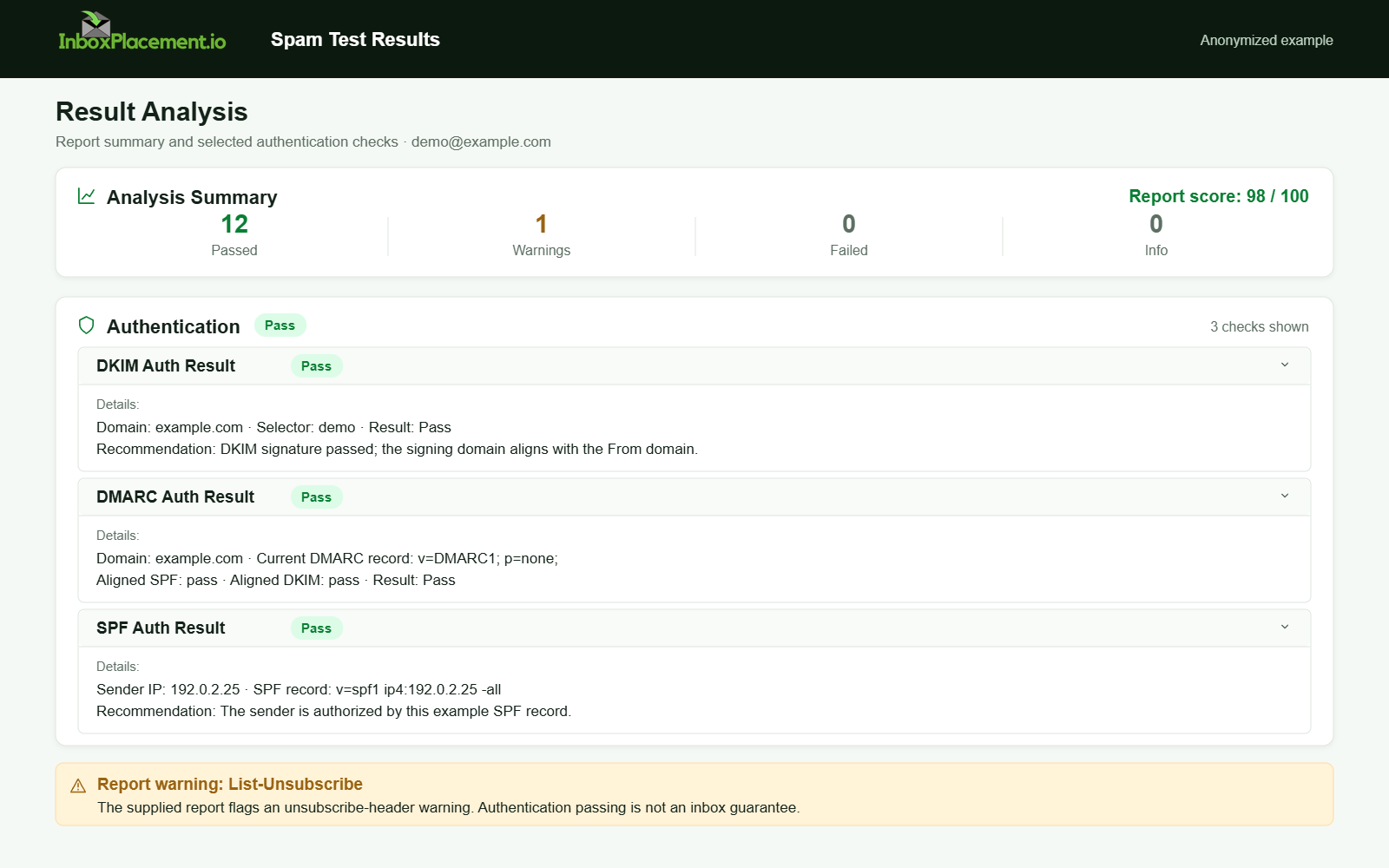
Anonymized example adapted from a supplied product report. Selected figures retained; identifiers and layout reconstructed. Not a new live test.
FAQ
Why does Authentication-Results show spf=pass but Outlook still put the mail in Junk?
spf=pass is one authentication result for the evaluated identity; it does not prove alignment with the visible From domain or guarantee Inbox placement. Check the reported DMARC result, DKIM signing domain, any Microsoft 365 compauth result, the receiver’s action, and the actual folder separately.
Can I temporarily set DMARC p=none to improve delivery?
No. p=none is a monitoring policy that can be used with a rua address to request aggregate reports; it is not a placement fix and does not stop other receiver filtering. Do not weaken an enforced policy (p=quarantine or p=reject) without owner authorization and a rollback plan.
If my SPF passes, should I remove DKIM or DMARC?
No. Microsoft describes SPF, DKIM, DMARC, and ARC as complementary protections against spoofing and phishing. Keep the methods configured correctly, but do not treat authentication alone as proof of Inbox placement.
After an authorized change, run a controlled inbox placement test and record authentication results, receiver disposition, and folder placement separately. A successful test in one mailbox does not guarantee placement for other recipients. Label scenarios without full telemetry as illustrative.
Sources
- How email authentication works in Microsoft 365
- Troubleshoot email authentication in Microsoft 365
- Yahoo Sender Requirements FAQ
- Gmail email sender guidelines FAQ