
SPF · Email Authentication · Email Deliverability · DNS Records · Troubleshooting
SPF Include Mechanism Failure Troubleshooting Guide
· InboxPlacement.io Team
A concise answer: An SPF include: mechanism asks the receiver to evaluate the referenced domain's SPF policy for the same connecting IP and sender identity. With the usual +include: qualifier, the term matches when the referenced policy returns pass; a fail, softfail, or neutral result is a non-match and normally lets the parent record continue. A temperror or permerror is returned to the parent evaluation, while none for an included domain produces permerror. An explicit qualifier on the parent include: term can change the result when it matches. Check the exact MAIL FROM domain, each include target, and the receiver's Authentication-Results before changing DNS. An SPF result describes authentication for that evaluated identity; it does not by itself prove delivery, mailbox placement, DMARC disposition, or sender reputation.
Direct diagnosis: what the symptom usually means and what it does not prove
Observed symptom: a receiving server reports spf=fail, spf=softfail, spf=permerror, spf=temperror, or spf=none in the Authentication-Results header for a message whose SPF policy contains an include: mechanism.
-
What the result usually means
spf=fail: the domain's policy explicitly says the connecting IP is not authorized for the evaluated identity.spf=softfail: the domain indicates that the IP is probably unauthorized, but with a weaker result thanfail.spf=permerror: the published policy could not be interpreted correctly. Causes include syntax problems, multiple SPF policy records, or exceeding the DNS-lookup limit.spf=temperror: a transient error, generally involving DNS, interrupted the evaluation; a later retry may succeed.spf=none: no applicable SPF policy was found for the evaluated identity.- These meanings follow RFC 7208 and Microsoft's troubleshooting guidance.
-
How to interpret an
include:result- The receiver recursively checks the referenced domain using the same connecting IP. If the included policy matches, the
include:mechanism matches. If it does not match, evaluation normally continues through the parent record; a non-match alone does not determine the final result. - A target result of
temperrororpermerroris returned by the include; a target result ofnoneproducespermerror. Do not infer the outcome from the word “include” alone—inspect the exact DNS response and receiver result.
- The receiver recursively checks the referenced domain using the same connecting IP. If the included policy matches, the
-
What this does not prove
- It does not prove where the mail landed (inbox vs. spam vs. quarantine). Authentication checks are one signal among many.
- It does not prove that a published SPF change will immediately change delivery outcomes.
- It does not prove that DKIM or DMARC checks will pass or fail; those are separate evaluations, and DMARC alignment is distinct from SPF authorization.
Treat each diagnosis below as a hypothesis until it is checked against the message headers, DNS responses, and receiver logs.
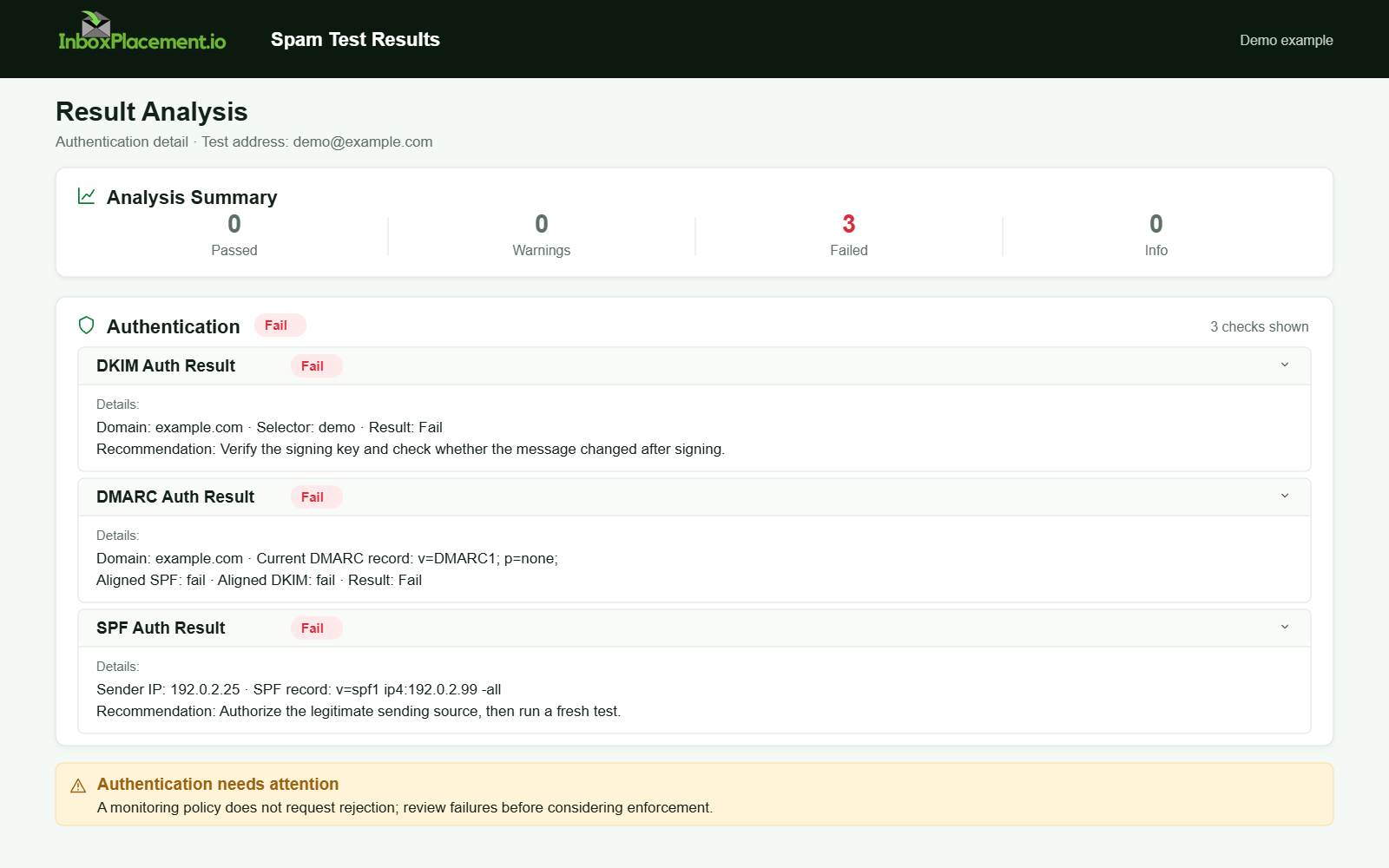
Demo example. Authentication failure diagnosis. Synthetic results for feature explanation; not a live test or customer outcome.
Evidence to collect before changing anything
Collect the following facts for the domain and the affected message(s). Separate observed facts from hypotheses.
Observed evidence to capture (do this for at least one recent failed message and one recent successful or control message):
- The full SMTP envelope (
MAIL FROM) domain and the IP address that connected to the receiver. - The message's
Authentication-Resultsheader exactly as received, includingspf=...,dkim=..., anddmarc=...if present. - The published SPF
TXTrecord for theMAIL FROMdomain at the time of delivery. - For each
include:mechanism, the referenced domain and its SPFTXTresult as resolved during the check; note nested includes as well. - Any receiver bounce/rejection text or error code associated with the message.
- Illustrative note: If you use DMARC reports or an MTA's message logs, collect the same fields there as corroborating evidence.
Do not change DNS or SPF until you have these facts and domain-owner approval. Record observed outputs separately from hypotheses so a proposed change can be matched to the actual failing mechanism.
A symptom-to-cause decision tree
Use this compact decision table to map what you observe to likely causes and the immediate safe action.
Observed Authentication-Results (spf=...) | Likely cause (illustrative) | Immediate safe action (do first) |
|---|---|---|
none / no SPF policy found | No applicable SPF record for the evaluated identity | Confirm the MAIL FROM domain and its DNS response; coordinate with the domain owner before publishing one v=spf1 record if the domain sends mail |
permerror | Policy syntax/record problem, multiple v=spf1 records, or too many DNS-lookup-causing terms | Inspect the complete include chain and record set; fix the smallest confirmed issue and keep one SPF policy record |
temperror | A transient DNS or evaluation error | Check the resolver path and authoritative DNS response; retry before changing the policy |
softfail / fail | The evaluated policy did not authorize the IP; an include: may not have matched, or a later mechanism may have determined the final result | Confirm the connecting IP and MAIL FROM domain; trace each include and continue through the parent record before proposing a change |
pass but mail still classified as spam | SPF passed, but other authentication, receiver, content, or reputation signals may affect delivery | Check DKIM and DMARC separately and verify mailbox placement independently |
These are illustrative mappings, not a substitute for the actual message evidence and receiver logs.
Common root causes to investigate
These are diagnostic possibilities, not a measured frequency ranking. Confirm each against the SPF policy, include-chain DNS responses, and receiver evidence before changing anything.
- Missing or multiple SPF policy records
- A missing policy can produce
none; multiplev=spf1records at the same domain can producepermerror.
- A missing policy can produce
- Exceeded DNS-lookup limit
- More than 10 DNS-lookup-causing terms during one SPF evaluation produces
permerror. Nestedinclude:mechanisms can contribute to the limit; the count is not simply the number of visibleinclude:words.
- More than 10 DNS-lookup-causing terms during one SPF evaluation produces
- An included provider record changed or cannot be resolved
- A changed policy may stop matching the sender IP; a missing or malformed target may instead produce an evaluation error. Compare the current target record and receiver result before attributing the change.
- Sending IP is not authorized by the complete policy
- A new or changed sending IP may not match any mechanism in the evaluated record or its includes, leading to a final
softfailorfaildepending on the policy.
- A new or changed sending IP may not match any mechanism in the evaluated record or its includes, leading to a final
- Temporary DNS failures
- A transient DNS or resolver error can produce
temperror; verify the query path and retry.
- A transient DNS or resolver error can produce
- Forwarding changes the connecting IP
- A forwarding server may not be authorized by the original
MAIL FROMdomain, so the forwarded message can fail SPF. This is separate from DMARC alignment; inspect the evaluated domain and consider DKIM and ARC evidence as well.
- A forwarding server may not be authorized by the original
- SPF syntax or record-selection errors
- Malformed syntax or ambiguous SPF policy records can produce
permerror. Check the exact record at the domain used for SPF, not only the visibleFrom:domain.
- Malformed syntax or ambiguous SPF policy records can produce
Safe remediation steps with clear limitations
Separate the safe actions you can take immediately from higher-risk changes that need owner approval.
Observed evidence decision principle: prioritize minimal, reversible changes.
Immediate safe actions (low risk)
- Do not publish multiple
v=spf1policy records for the same domain. If more than one exists, have the domain owner consolidate them into one authoritative SPF record. - Trace which
include:domains are queried and document which approved provider each represents. - If a temporary DNS issue is suspected, verify authoritative DNS health and retry tests from multiple resolvers before editing SPF.
- Confirm the sending IP reported by the receiver is actually one you control or is an approved provider IP.
- Confirm the exact
MAIL FROMdomain being evaluated; a visibleFrom:domain may be different.
Corrective actions with cautions
- Reduce DNS-lookup-causing terms only after tracing the full evaluation. Flattening an
include:intoip4orip6mechanisms can reduce DNS lookups but increases maintenance when a provider changes its IPs.- Limitation: flattened records require updates when the provider's sending IPs change.
- Combine approved provider authorizations into the domain's single SPF policy; do not publish a separate
v=spf1record for each provider.- Limitation: make sure the combined record remains syntactically valid and within DNS response-size limits.
- If an
include:points to a removed or moved provider, update or remove it only after confirming that no legitimate mail flow depends on it.- Limitation: coordinate with provider before removal to avoid interrupting legitimate mail.
- If you must correct a syntax error in SPF, apply the minimal edit, verify via DNS propagation checks, and monitor.
Emergency changes and DMARC
⚠️ Never advise weakening an existing DMARC enforcement policy (p=quarantine or p=reject) as a routine fix.
🛡️ Emergency DMARC policy changes require explicit owner authorization, limited scope, a strict time limit, and rollback criteria. Document the approval and rollback plan.
Rollback and staging
↩️ Make one change at a time.
📝 Record the previous SPF text, monitor after the DNS change, and keep a rollback plan to restore it if unintended effects occur.
How to verify the change with a real message or controlled test
What to test and what to record (separate observed evidence from conclusions):
-
Controlled send
- After an SPF change, send test messages through each affected sending path or provider.
- Where test accounts are available, check the mailbox providers that matter to your recipients (for example, Gmail, Outlook, and Yahoo). Testing across three providers is a coverage suggestion for this guide, not a universal SPF requirement.
-
Check the Authentication-Results header
- Observe the
Authentication-Resultsheader for the receiving mailbox. Recordspf=pass,spf=fail,spf=permerror, or other returned values, and note the domain referenced. - Also record
dkim=anddmarc=results if present; they are separate signals.
- Observe the
-
What this proves and what it does not
- What it proves: the SPF result the receiving server recorded for that message at that time (for example,
pass,softfail,permerror, ortemperror). - What it does not prove: final mailbox placement or long-term sender reputation. Check receiver disposition and mailbox placement separately;
Authentication-Resultsis not a delivery guarantee.
- What it proves: the SPF result the receiving server recorded for that message at that time (for example,
-
Retest criteria
- After adding an authorized IP or flattening an include, confirm
spf=passfor the same IP andMAIL FROMdomain at more than one relevant receiver when available. Two receivers is a practical cross-check, not a standards-mandated threshold; allow for the published DNS TTL. - After correcting a permanent error, confirm that
permerrorno longer appears in subsequentAuthentication-Resultsheaders. After atemperror, confirm a later evaluation completes, while noting that one successful retry does not prove a persistent DNS issue is resolved.
- After adding an authorized IP or flattening an include, confirm
Illustrative test checklist (use for each sending IP/provider)
- Send a test message through the affected sending path
- Capture the
Authentication-Resultsheader and evaluatedMAIL FROMdomain - Confirm
spf=passor that the priorpermerror/temperrorno longer occurs - Confirm DKIM signature status and DMARC alignment if applicable
- Note mailbox placement for the same message (separate signal)
Prevention and monitoring checklist
Ongoing controls that can reduce recurring SPF include problems:
- Keep an inventory of authorized senders and the domain used in each
MAIL FROMidentity. - Maintain one valid
v=spf1policy record for each sending domain; review it before adding or removing aninclude:. - Recheck the complete include chain and DNS-lookup-causing terms after a provider or sending-path change.
- Monitor authoritative DNS changes and preserve the previous record text so an unintended change can be rolled back.
- Periodically send controlled messages and retain the resulting
Authentication-Resultsheaders, DNS observations, and separate placement observations.
Sources
- RFC 7208: Sender Policy Framework — Defines SPF result meanings, the
include:mechanism, and the DNS-lookup limit. - Microsoft: Troubleshoot email authentication in Microsoft 365 — Maps common SPF results to DNS and policy troubleshooting steps.
- Microsoft: How email authentication works in Microsoft 365 — Explains SPF's
MAIL FROMscope and forwarding-related limitations. - Google: Gmail email sender guidelines FAQ — Provider guidance relevant when validating real messages at Gmail.
- Yahoo Sender Requirements FAQ — Provider guidance relevant when validating real messages at Yahoo.