
Email Deliverability · Email Authentication · SMTP Troubleshooting
SMTP 451 Email Error Troubleshooting and Diagnostic Guide
· InboxPlacement.io Team
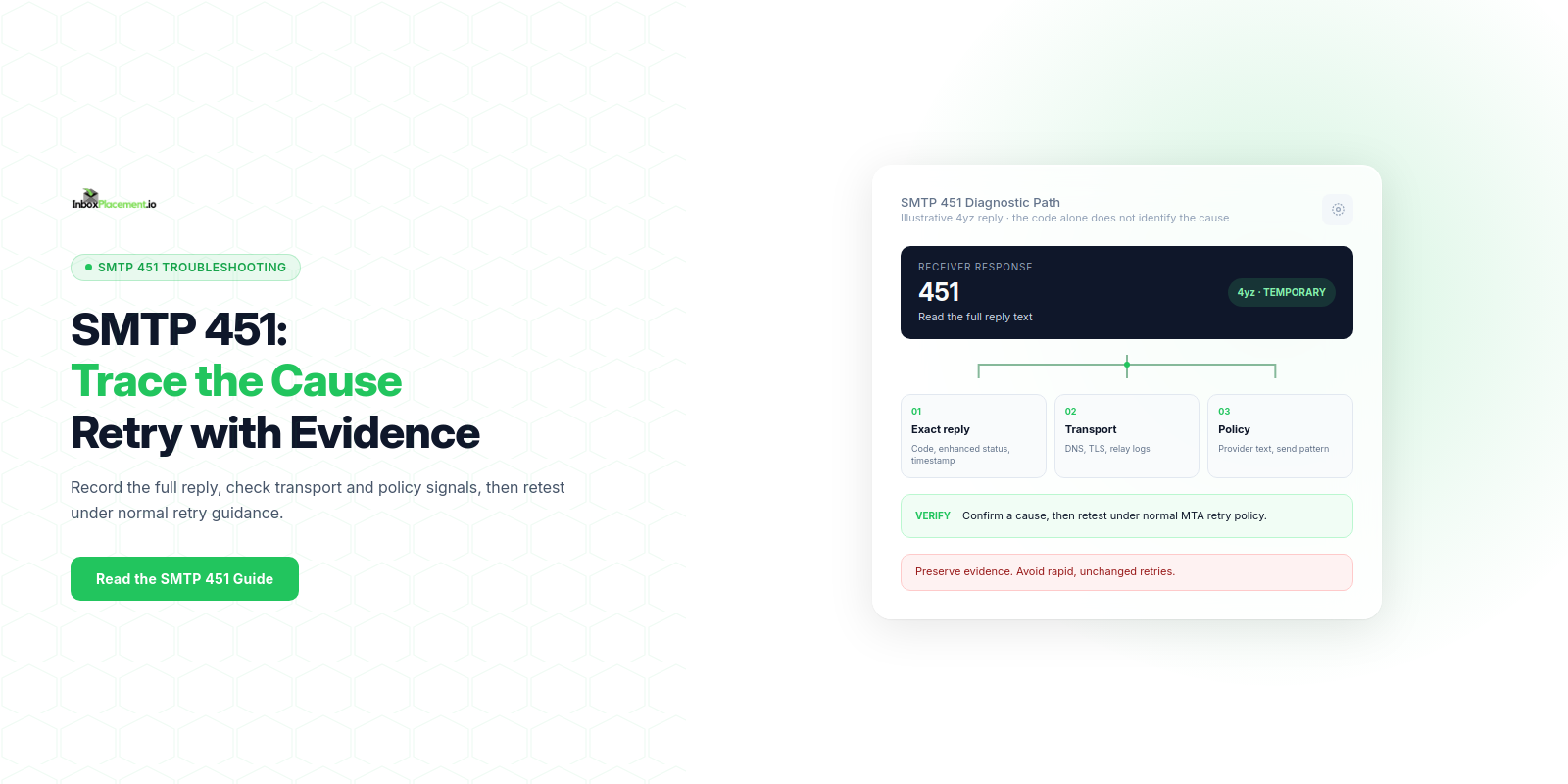
An SMTP 451 is a 4yz transient-negative reply: the receiving server did not accept the command and the requested action did not occur, but the error condition is temporary. The code alone does not identify the cause or mean an unchanged retry will succeed. Capture the exact response and enhanced status code, correlate it with mail-server logs and transport or authentication evidence, then make a targeted change and verify it through the sender's documented retry policy.
Direct diagnosis: what the symptom usually means and what it does not prove
Observed evidence
SMTP 451is in the4yzclass of transient-negative SMTP replies. The command was not accepted and the requested action did not occur; the error condition is temporary.- The exact server response, enhanced status code, transaction stage, and accompanying text are primary evidence (for example
451 4.7.1 Temporary policy rejection— illustrative).
Possible investigative paths (not conclusions)
- A temporary receiver-side resource or policy condition, such as a sending-rate limit, greylisting, or a temporary filtering issue.
- A transient DNS or SMTP handshake problem at the receiver or an intermediate relay.
- A receiver-side policy trigger that the provider treats as recoverable; check its diagnostic text and documentation before changing sender behavior.
What a 451 does not prove
- It does not prove your message failed authentication (
SPF/DKIM/DMARC) unless the server's response or anAuthentication-Resultsheader specifically reports that. - It does not prove a permanent block, inbox placement, or end-user disposition.
- It does not prove which sending IP or part of your infrastructure caused the condition without correlating logs.
Evidence to collect before changing anything
Separate observed facts, likely causes, and recommended actions. Collect these items from your systems and any cooperating teams:
Observed facts to gather
- Full
SMTPtransaction transcript (HELO/EHLO,STARTTLSnegotiation,AUTHif used,MAIL FROM,RCPT TO,DATA, and the exact numeric response and accompanying text). RedactAUTHpayloads, passwords, and private recipient information before sharing logs. Message-IDand envelopeMAIL FROM/RCPT TOaddresses for the failed message(s), stored and shared according to your privacy policy.- Timestamped sending server logs (MTA logs) covering retries and any subsequent success/failure.
Authentication-Resultsheader value from any delivered message or receiver-provided diagnostic; record the exact header string and label examples as illustrative.- Sending IP address, sending domain, and any upstream relay or ESP used.
- Recent changes to sending volume, templates, or authentication
DNSrecords (SPF,DKIMselectors,DMARCpolicy). DNSquery logs and resolution results for the relevantMXandTXTrecords at the time of failure (illustrative).
Contextual signals (illustrative)
- Which provider returned the reply. Enhanced status codes and response text are provider- and situation-specific; Google's published SMTP error reference, for example, lists distinct
451diagnostics. - Whether the error affected many recipients at the same destination or only a few.
Do not change DNS or enforcement policies until you have this evidence.
A symptom-to-cause decision tree
Use this compact decision table to map the immediate symptom to likely investigative paths. Treat each row as illustrative and confirm with your collected evidence.
| Symptom (451 text or pattern) | Observed evidence to collect | Likely investigative path |
|---|---|---|
| "Temporary policy rejection" or "4.7.1" | MTA transcript, number of simultaneous failures, recent volume spike | Check sending rate, per-recipient rate limits, and provider throttle policies (illustrative) |
| "Greylisted" or explicit greylist text | Retry timing, how many retries were attempted | Confirm proper retry schedule and that retries occur from same IP and envelope (illustrative) |
| "DNS temporary failure" or lookup timeouts | DNS query logs, dig results for MX and TXT | Check DNS resolution consistency and authoritative server reachability (illustrative) |
| TLS handshake failure then 451 | SMTP transcript showing STARTTLS/TLS errors | Verify TLS configuration and certificate chain on sending side (illustrative) |
| Authentication-related message in Authentication-Results | Authentication-Results header, SPF/DKIM/DMARC DNS records | Validate SPF/DKIM/DMARC settings and alignment (see Sources) (illustrative) |
Label every unverified scenario as illustrative; use the concrete logs you collected to choose the correct path.
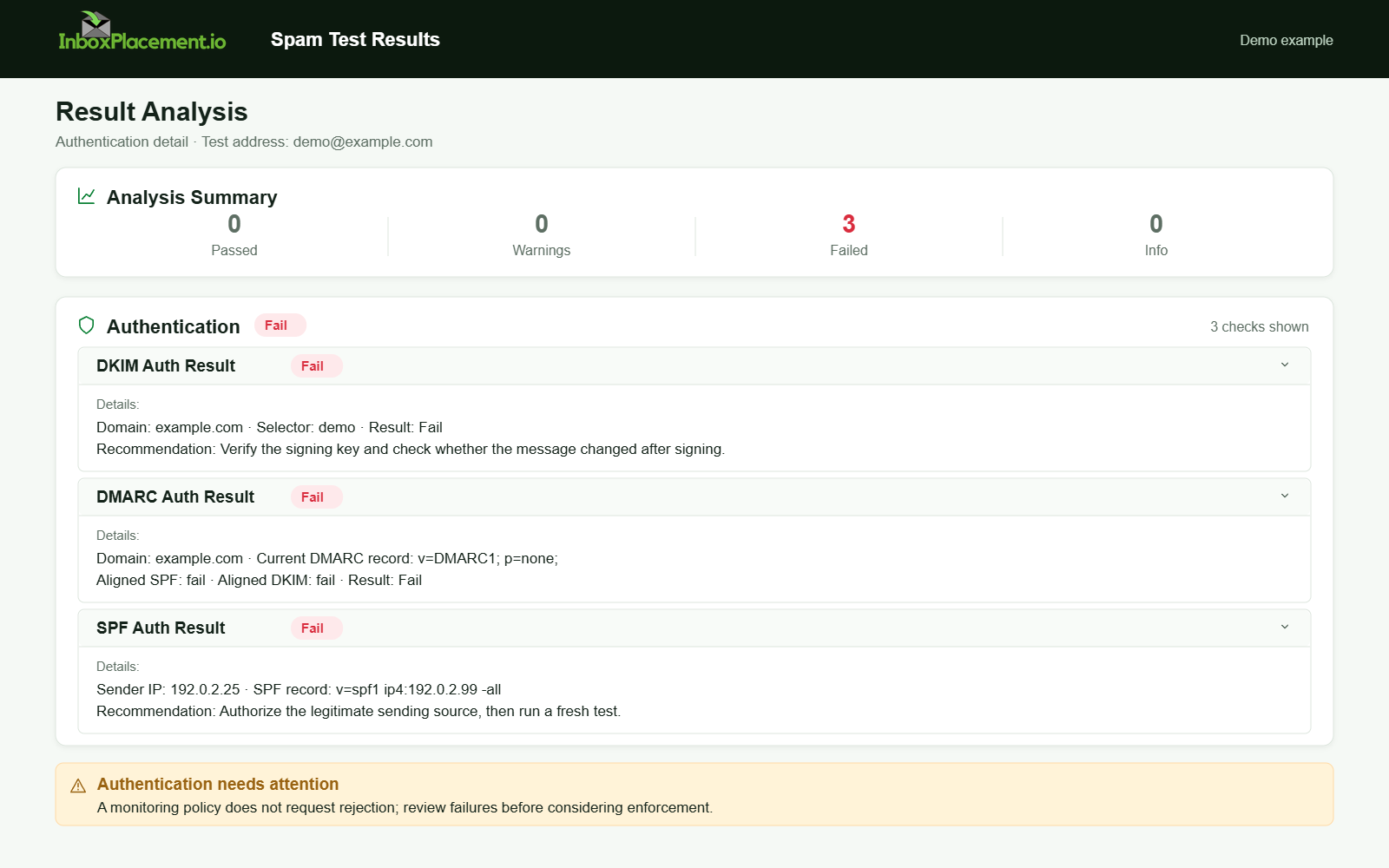
Demo example. Authentication failure diagnosis. Synthetic results for feature explanation; not a live test or customer outcome.
Possible causes to investigate
These are diagnostic paths, not a ranking by measured frequency. Confirm a cause with the named evidence before changing configuration:
-
Transient receiver-side throttling or greylisting
- Observed evidence: similar
451responses across multiple recipients at oneMX, with later attempts changing outcome (illustrative). - Confirm: compare exact reply text and timestamps across recipients and attempts; check receiver guidance.
- Observed evidence: similar
-
Rate limits or a sending-volume spike
- Observed evidence: a sudden increase in connections or messages from the sending IP; repeated
451replies with policy text (illustrative). - Confirm: MTA metrics and provider guidance on rate limits.
- Observed evidence: a sudden increase in connections or messages from the sending IP; repeated
-
Temporary DNS resolution failures or lookup timeouts
- Observed evidence:
DNSquery timeouts when resolving the recipientMXor authenticationTXTrecords during failures (illustrative). - Confirm: compare resolver results and authoritative-server responsiveness at the relevant times.
- Observed evidence:
-
TLSnegotiation or handshake problems- Observed evidence: a
STARTTLSattempt followed by a connection closure and451reply (illustrative). - Confirm: inspect the
SMTPtranscript and validate the sending server's certificate chain.
- Observed evidence: a
-
Authentication-related policy signals
- Observed evidence: an
Authentication-Resultsheader showing failures or a provider diagnostic that specifically cites authentication (illustrative). - Confirm: inspect
SPFTXTsyntax and lookup count,DKIMselectorDNS, and theDMARCrecord and alignment. Use the linked provider guidance to check current requirements.
- Observed evidence: an
-
Upstream relay or ESP outages
- Observed evidence:
451replies that cite upstream relay issues or differ across relays (illustrative). - Confirm: coordinate with ESP/relay provider; compare logs across relays.
- Observed evidence:
Safe remediation steps with clear limitations
Always separate what you observe, what you will change, and rollback criteria.
General rules before any change
- Do not weaken a DMARC enforcement policy without explicit domain-owner authorization and a documented, approved plan; prefer diagnosing and fixing alignment/authentication causes first.
- When in doubt, apply changes first in a controlled test subdomain or limited sender set.
Safe, low-risk actions (recommended order)
-
Retry behavior and pacing
- Action: Follow the receiver's stated guidance and your
MTA's documented retry/backoff policy for the4yzreply. Do not manually accelerate retries or flood the receiver with unchanged attempts. - Limitation: A retry can help only when the condition is transient; recurring deferrals still need investigation.
- Action: Follow the receiver's stated guidance and your
-
Verify DNS health (no authoritative DNS outages)
- Action: Check
MX,SPF,DKIM, andDMARClookups from multiple resolvers; investigate any authoritative-server failures. - Limitation: DNS propagation may take time; do not create multiple conflicting SPF records.
- Action: Check
-
Check SPF syntax and lookup budget
- Action: Confirm a single
SPFTXTrecord exists for the envelope domain; investigate duplicates and avoid exceeding the 10-DNS-lookup limit cited in Microsoft'sSPFtroubleshooting guidance (see Sources). - Limitation: Changing SPF affects all envelopes for the domain—coordinate with owners.
- Action: Confirm a single
-
Verify DKIM signing and selector DNS
- Action: Confirm
DKIMselectorDNSexists and keys are valid; rotate keys only under the applicable policy and change controls. - Limitation: DKIM changes require DNS propagation and careful selector naming to avoid breaking signatures.
- Action: Confirm
-
Confirm DMARC policy and alignment
- Action: Review the
DMARCrecord. If it usesp=quarantineorp=reject, do not relax it without domain-owner consent; investigate and correct supported alignment issues instead. - Limitation: DMARC policy changes are policy-level and can have broad impacts.
- Action: Review the
-
Check TLS configuration
- Action: Ensure your server negotiates supported
TLSversions and presents a valid certificate when required by the receiver. Google requires aTLSconnection for transmitting mail to Gmail (see Sources). - Limitation: Certificate changes require planning and cannot be rushed.
- Action: Ensure your server negotiates supported
-
Coordinate with receiver postmaster/abuse channels when the problem affects many recipients
- Action: Contact the receiving provider through its appropriate postmaster or support channel with collected evidence.
- Limitation: Provider response times vary; keep rate-limiting and retry prudent.
Policy change authorization requirements (non-exhaustive)
- Any proposed policy change must have explicit domain-owner approval.
- Limit scope: prefer fixing alignment/authentication issues rather than broad policy relaxations.
- If a temporary, narrowly scoped change is approved for mitigation, require defined rollback criteria and active monitoring before and after the change.
- Document start/end timestamps, monitoring metrics to collect, and contact points for rapid rollback.
How to verify the change with a real message or controlled test
Separate test plan, what to observe, and what the test cannot prove.
Controlled test plan
- Pick a small set of representative recipients at the affected provider (use test accounts you control).
- Send a single test message with a unique Message-ID and envelope identifiers after the change.
- Collect MTA logs, the receiving server’s SMTP transcript, and any delivered message’s Authentication-Results header.
What to observe (evidence)
SMTPresponse codes: did the451stop or persist?Authentication-Resultsheader values, if a message is accepted:SPF/DKIM/DMARCresults and alignment details.- Delivery disposition at the receiving
MTA: accepted, deferred, or bounced. Remember acceptance is distinct from inbox placement.
What the test cannot prove
- Authentication success does not guarantee inbox placement.
Authentication-Resultsand delivery are distinct signals. - A successful test from a few accounts cannot guarantee behavior at scale or across all recipient mailboxes.
Controlled retry checklist (practical)
- Send one controlled test message after the change.
- If a
451occurs, let theMTAfollow its documented retry policy and observe the later responses; do not force rapid retries. - Keep the test set small and repeatable.
Prevention and monitoring checklist
Use this checklist to reduce future 451 incidents. Separate monitoring items and preventive configurations.
Checklist
- Monitor sending rate and set alerts on sudden spikes.
- Monitor authoritative
DNSresponsiveness forMXandTXTrecords (SPF,DKIM,DMARC). - Periodically validate
SPFlookup count and the single-record rule (see Microsoft's guidance). - Rotate
DKIMkeys on a scheduled cadence and verify selectors. - Monitor
Authentication-Resultsfrom accepted messages. - Ensure
TLSconfiguration is current and certificates do not expire. - Keep an incident playbook that includes contact channels for major mailbox providers.
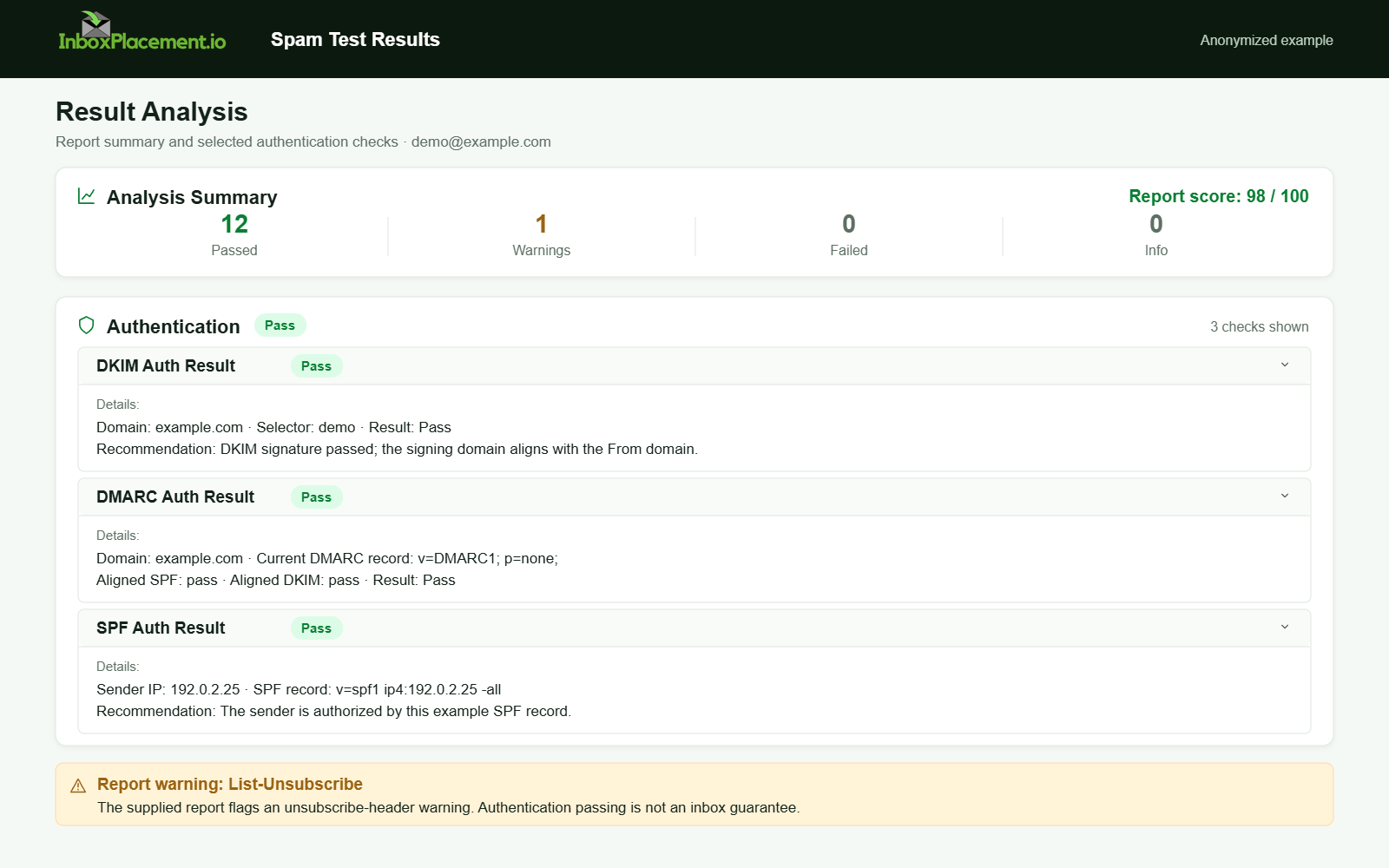
Anonymized example adapted from a supplied product report. Selected figures retained; identifiers and layout reconstructed. Not a new live test.
FAQ
What does the Authentication-Results header tell me after a 451?
Authentication-Results reports a receiver's evaluation of SPF, DKIM, and DMARC for a message it processed. If available on an accepted message, use it as one diagnostic signal; it does not prove inbox placement.
Can I change DMARC from reject to none to stop 451 replies?
Do not weaken DMARC enforcement as a first response. Any change needs domain-owner authorization, narrow scope, and a rollback plan. First verify SPF/DKIM alignment and investigate other causes.
If retries succeed, should I still investigate?
Yes. A later retry succeeding may indicate a temporary condition, but it does not identify the cause. Investigate the response pattern, sending volume, DNS, and upstream issues before resuming a large send.
Consider running an InboxPlacement test to observe authentication signals and mailbox behavior after applying the recommended changes.
Sources
- RFC 5321: Simple Mail Transfer Protocol — Check the definition of transient-negative
4yzreplies and SMTP retry guidance. - RFC 3463: Enhanced Mail System Status Codes — Check the standardized format and meaning of enhanced status codes.
- Gmail SMTP errors and codes — Compare provider-specific reply text and enhanced status codes, including
451examples. - Microsoft: Troubleshoot email authentication in Microsoft 365 — Verify
SPF,DKIM,DMARC, andSPFlookup-error guidance. - Gmail email sender guidelines — Verify Gmail sender requirements for
TLSand email authentication.